AI Adoption in Business: Use Cases, Benefits, and Implementation Challenges

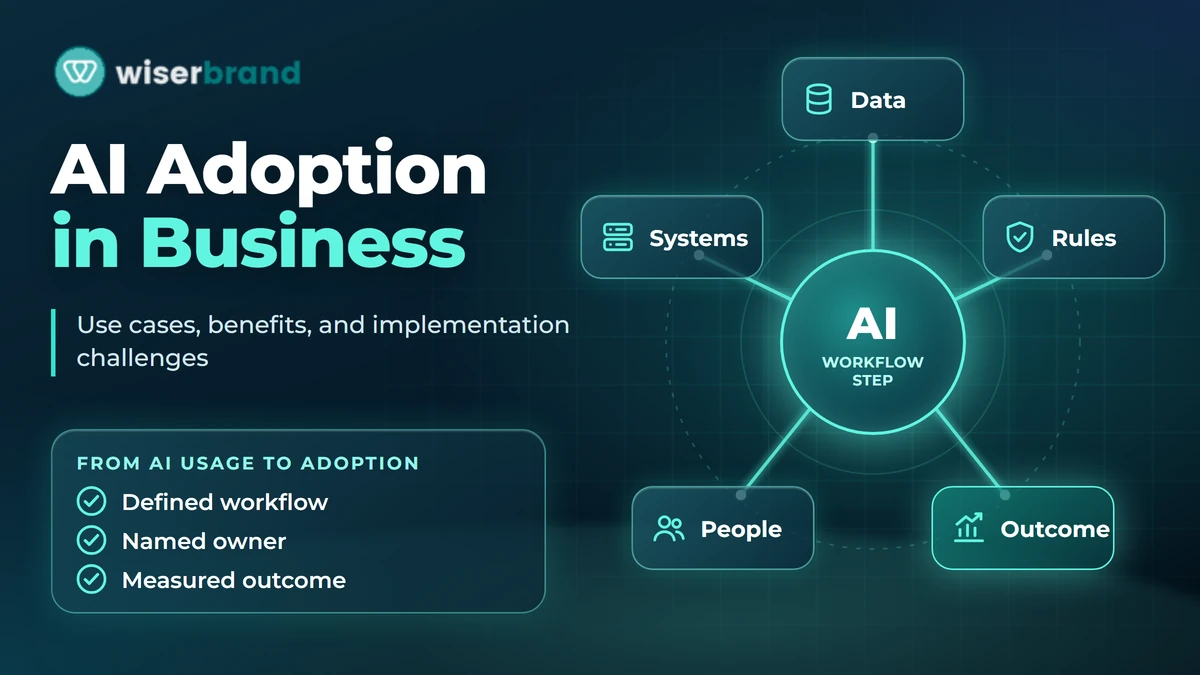
AI adoption in business means putting AI into a defined operating workflow, assigning ownership for its outputs and actions, and measuring what changes after deployment. A company may use AI to classify support requests, summarize sales activity, extract invoice data, forecast demand, or prepare recommendations. Adoption becomes operational only when the AI step connects to business data, systems, rules, people, and a measurable outcome.
Current adoption statistics need careful interpretation. A Federal Reserve analysis reported that about 18% of U.S. firms had adopted AI by the end of 2025 in Census business survey data, while a November 2025 survey of senior business leaders estimated that 78% of the labor force works at firms that have adopted AI. The gap reflects different populations and units of measurement rather than a contradiction. The practical question for a business is therefore not only who has tried AI, but which workflows are mature enough to justify integration, control, and ongoing ownership.
What Current Data Says About AI Adoption in Business
Business AI use is growing, but adoption is uneven across company size and sector. The U.S. Census Bureau Business Trends and Outlook Survey analysis found that reported AI use across U.S. businesses stayed between 17% and 20% from December 2025 through early May 2026. In the period ending May 3, 2026, 37% of firms with at least 250 employees reported AI use, compared with less than 20% among firms with four or fewer employees.
The same Census analysis showed sector differences. Information and finance and insurance reported higher use than the national rate, while retail trade reported lower use. These gaps matter because adoption depends on the work available to automate or augment, the quality of accessible data, existing software, risk requirements, and the organization’s ability to change a process after an AI feature is introduced.
The adoption of AI in business should therefore be evaluated at workflow level. A company with one production workflow that reliably reduces manual review may be further along operationally than a company with dozens of unmeasured AI subscriptions. That workflow-level view is what AI adoption services are organized around: an inventory of what is actually in use, a prioritized shortlist, and a named owner for each item.
Where AI Fits in Business Workflows
AI is most useful when part of a workflow contains interpretation that fixed rules handle poorly. Classification, extraction from variable documents, summarization, drafting, anomaly explanation, and context-based recommendations are common examples. Stable policy checks, calculations, record permissions, required approvals, and irreversible action gates usually belong in deterministic logic.

Where AI Fits by Business Function
Select a function to filter the table
Showing 7 of 7 functions
| Business Function | Workflow Example | AI Responsibility | System or Human Control | Useful Metric |
|---|---|---|---|---|
| Customer service | Triage an incoming support request | Classify intent and summarize account context | Help desk routing rules and escalation thresholds | Routing accuracy, resolution time, reopen rate |
| Sales | Prepare an account briefing before a call | Summarize CRM history and research signals | CRM ownership rules and rep review | Research time, rep edit rate, meeting-to-opportunity conversion |
| Marketing | Classify campaign responses and prepare variants | Interpret response intent and draft copy | Consent rules, brand review, campaign platform | Manual handling rate, qualified response rate |
| Finance | Extract invoice fields and explain exceptions | Read variable documents and classify mismatches | ERP validation, approval limits, finance reviewer | First-pass acceptance, exception rate, processing time |
| Operations | Interpret order or fulfillment exceptions | Combine case context and propose a resolution path | ERP or OMS rules, inventory checks, approval gates | Exception resolution time, cancellation rate |
| HR | Summarize candidate or employee documents | Extract and organize job-relevant information | Human decision-maker and employment policy | Processing time, correction rate, escalation rate |
| Software delivery | Assist with issue analysis and test preparation | Summarize logs, suggest code or test cases | Repository permissions, CI tests, engineer review | Cycle time, accepted suggestions, defect escape rate |
Benefits Come From Workflow Changes, Not AI Usage Alone
A useful business case connects an AI capability to a specific change in work. If an AI system summarizes a customer record before a service agent reads it, the measurable mechanism is reduced preparation time. If a model extracts fields from invoices and valid records pass deterministic checks, the mechanism is fewer manual data-entry steps. If AI classifies requests before routing, the mechanism is less sorting work and potentially faster assignment.
Cycle Time and Manual Handling
AI can reduce processing time when interpretation is the bottleneck and the model output is accurate enough to avoid equivalent rework later. Measure the full workflow from trigger to completed outcome. A faster first response is not useful if cases are frequently reopened or reassigned.
Capacity and Consistency
Automation may release employee capacity when routine interpretation, drafting, or data preparation consumes substantial time. Treat that as capacity released unless headcount or outsourcing spend actually changes. Consistency should also be measured directly through reviewer edits, policy violations, and exception rates rather than assumed from automation.
Decision Preparation
AI is often more defensible as a preparation layer than as the final decision-maker. A model can retrieve context, summarize alternatives, or flag anomalies while an employee remains responsible for pricing, hiring, credit, legal, security, or other high-impact decisions. This design captures useful model behavior without giving the model authority that the workflow does not require.
Which Business Use Cases Are Good Candidates?
The strongest candidates combine meaningful manual effort with repeatable inputs and a clear completion condition. They also have an accessible source of truth and a way to measure quality after launch.
Is Your Workflow a Good AI Candidate?
Check each condition your workflow meets
Teams that are still comparing candidate workflows can use an AI readiness assessment to examine process clarity, data availability, integration constraints, risk, and measurement before committing to a build.
Where AI Adoption Often Stalls
The Process Is Not Defined Before the Model Is Added
AI cannot compensate for unclear ownership or conflicting process rules. If teams disagree about when a lead becomes qualified or which system owns customer status, adding a model introduces another decision layer without resolving the underlying ambiguity. Map the current process first, including triggers, inputs, decisions, handoffs, exceptions, and the final business outcome.
Business Data Is Fragmented or Poorly Owned
A model can only work with the context provided to it. Duplicate CRM records, stale product data, missing document permissions, and inconsistent identifiers produce weak inputs. Before expanding AI, define the source of truth for each material field and decide how stale or conflicting data should be handled.
Integration Is Treated as an Afterthought
A useful model response still needs a workflow around it. Production adoption may require APIs, identity controls, event triggers, state tracking, retries, logging, and write permissions in systems such as a CRM, ERP, help desk, or ecommerce platform. AI integration services are relevant when the business case depends on connecting model behavior to several existing systems rather than adding a standalone AI interface.
The Pilot Has No Baseline or Scale Gate
A pilot cannot prove value if the team did not record how the workflow performed before AI. Define baseline processing time, manual handling, error or rework rate, and business outcome where available. Set a scale gate before deployment so a positive demo does not become the only reason for broader rollout.
Risk and Governance Need to Match the Workflow
Governance should be proportional to what the AI can read, recommend, and change. The NIST AI Risk Management Framework provides a voluntary framework for managing AI risks across design, development, deployment, and use. For business implementation, that principle translates into practical controls such as limited data access, approval gates, output validation, monitoring, and documented ownership.
A low-risk internal summarization workflow may need source access controls, quality checks, and user feedback. A workflow that can change a customer record or trigger a financial action needs stronger permissions, deterministic validation, audit logs, and explicit human approval for material actions. Where the model reads content the business does not control, such as inbound email or supplier documents, filter sensitive fields out of the model context and treat retrieved text as data rather than instruction. The risk comes from the workflow and its authority, not from the AI label alone.
A Practical Implementation Pattern
Business adoption works better when teams move from workflow economics to architecture, not from a preferred model to a use case. A practical sequence is:
8-Step AI Implementation Sequence
Open a step for details and mark it complete
01Choose one workflow and define the business outcome.
Record the trigger, current owner, systems involved, and completion condition.
02Measure the baseline.
Capture cycle time, manual handling, error or rework rate, volume, and any relevant downstream metric.
03Map data and system ownership.
Identify the source of truth, required integrations, sensitive fields, and stale-data rules.
04Separate AI judgment from fixed rules.
Assign interpretation to the model and keep stable validation, policy, calculation, and approval logic deterministic.
05Define authority and exceptions.
Specify what the system may read or change, which actions require approval, and how failures move to a manual queue.
06Test realistic cases.
Include missing data, conflicting records, malformed inputs, permission failures, tool outages, and outputs that fail the expected schema.
07Run a controlled pilot.
Compare the new workflow with the baseline and review corrected or escalated cases rather than measuring only successful examples.
08Scale, revise, or stop.
Expand only if workflow quality, business metrics, risk controls, and operating ownership meet the predefined gate.
For initiatives that span multiple functions or require prioritization across a portfolio, AI strategy consulting can help connect use-case selection, data readiness, architecture, ownership, and investment criteria.
Build, Buy, or Configure Existing Software?
Many workflows do not need custom AI software. Native features are often enough when the required data already lives in the platform and the feature supports the needed controls. A third-party SaaS product can fit a common workflow that mainly needs configuration.
Custom development is more relevant when the workflow crosses systems, uses proprietary logic or private knowledge, requires model choice, or needs controls that an existing product does not provide. AI software development services fit when the business problem calls for a purpose-built workflow layer rather than another isolated tool.
How to Measure Business AI Adoption
Adoption metrics should show both usage and operating performance. User counts or prompt volume describe activity, but they do not show that a workflow improved.
Business AI Metrics by Layer
Select a layer to filter the metrics
Showing 7 of 7 metrics
| Metric Layer | Metric | What It Answers |
|---|---|---|
| Adoption | Active users or workflows | Is the AI capability being used in the intended process? |
| Workflow | Cycle time | Does the process reach completion faster? |
| Workflow | Manual handling rate | How often does a person still need to perform part of the workflow? |
| Quality | Human override or edit rate | How often do employees correct the AI recommendation or draft? |
| Reliability | Workflow failure rate | How often do tool, data, permission, or model issues stop completion? |
| Control | Escalation and policy violation rate | Are risky or unsupported cases being routed appropriately? |
| Business | Conversion, resolution, cost, or throughput metric | Did the operating change affect the business outcome the workflow was selected to improve? |
Use a balanced set. A lower manual handling rate is not automatically better if rework or policy violations increase. Faster routing is not a success if assignment accuracy falls. The evaluation should preserve the quality and risk measures that could deteriorate when teams optimize only for speed.
What Company Size Changes About the Approach
Larger organizations usually have more integration capacity and also more complicated permissions, ownership, and system dependencies. Smaller companies often have fewer legacy constraints but less capacity to own evaluation and maintenance after launch.
That difference should change the sequence rather than the standard. A smaller company is usually better served by a native platform feature or one bounded workflow with a named owner, because operating cost and maintenance land on a small team. A larger organization typically needs permission mapping, source-of-truth agreement, and a defined incident path before the first cross-system workflow goes live, because the same workflow touches more records and more teams.
Firm size is not a maturity test. A clean source of truth, a measurable baseline, an accountable owner, and a controlled execution path are better implementation criteria than headcount.
When AI Is the Wrong Tool
Some workflows are better served by ordinary software or deterministic automation. Do not add AI when the task is a stable calculation, a fixed validation rule, a simple database lookup, or a policy gate with no need for interpretation. A model adds cost, nondeterminism, monitoring work, and another failure path.
AI is also a poor starting point when the organization cannot identify the source of truth, lacks permission to use required data, has no owner for the process, or cannot define a tolerable error boundary. Fixing those conditions often creates more value than adding a model immediately.
FAQ
What Does AI Adoption in Business Mean?
AI adoption in business means integrating AI into a real business process with defined data, systems, ownership, controls, and measures of success. Buying an AI tool or allowing employees to experiment with a chatbot is usage, but it does not by itself show operational adoption.
What Are the Most Common Business Uses of AI?
Common uses include classification, document extraction, summarization, drafting, forecasting, anomaly analysis, research, and recommendation preparation. The exact fit depends on the workflow, available data, acceptable error rate, and the actions the system is allowed to take.
How Should a Business Choose Its First AI Use Case?
Start with a frequent workflow that contains meaningful manual interpretation, has accessible data, and has a measurable completion condition. Prefer a bounded use case with a clear exception path over a broad goal such as automating an entire department.
What Is the Biggest Challenge in Business AI Adoption?
There is no single challenge across every company. Common blockers include unclear processes, fragmented data, integration constraints, weak ownership, insufficient evaluation, and permissions that do not match the proposed automation. The dominant constraint should be identified for the specific workflow before selecting technology.
How Long Does Business AI Adoption Take?
The timeline depends on scope. Configuring a native AI feature may take far less work than building a cross-system workflow with custom integrations, approvals, evaluations, and operating controls. A useful plan estimates each dependency rather than assigning one generic timeline to AI adoption.
Final Thoughts
Judge business AI adoption by the operating workflow, not the number of AI tools in use. Start with one process that has an owner and baseline. Use AI for interpretation, keep fixed rules deterministic, define approval boundaries, and evaluate the completed workflow against business and risk metrics.
Teams that have a candidate workflow but no agreed scope can use generative AI consulting to turn it into a pilot definition with named data sources, architecture, controls, and success criteria.