HubSpot Automation Workflows: CRM Automation, Triggers, and Business Processes

HubSpot automation workflows connect CRM events to repeatable actions such as record updates, internal notifications, task creation, lead routing, nurture steps, and pipeline handoffs. The strongest workflows keep the CRM as the source of truth, use explicit enrollment logic, and separate fixed business rules from any AI-assisted interpretation.
The practical question is not how many workflow actions HubSpot can run. It is how to turn a business process into a controlled sequence with clear triggers, data requirements, ownership, exception handling, and measurable outcomes. This guide explains how HubSpot workflow automation works, where pipeline automation fits, when custom integrations are needed, and how to avoid duplicate or conflicting actions.
What HubSpot Automation Workflows Are
HubSpot describes its workflow tool as a way to automate processes using a workflow created with AI, a template, or from scratch. The editor combines enrollment triggers with actions, re-enrollment or unenrollment settings, and workflow configuration before publication.
A workflow is best understood as controlled process logic around CRM records. A record enters because a defined condition or event occurs. HubSpot then executes configured actions in sequence or branches. The workflow may update properties, create tasks, notify users, delay until a condition is met, call another system, or route a record to a different path.
This is different from a one-off user action. A workflow is reusable operating logic. Because it can change business records without someone clicking each step, the design should define which data is authoritative and which actions are safe to execute automatically.
How Enrollment Triggers Control the Start of a Workflow
Current HubSpot documentation defines workflow enrollment triggers as the conditions that automatically enroll records. HubSpot supports several trigger types, and the exact options depend on workflow type and subscription. Trigger design should therefore be treated as part of the process definition, not as a technical afterthought.
A useful enrollment rule answers three questions: which record type is eligible, what event or property state starts the process, and if the record may enter again. Re-enrollment needs special attention because a workflow that should run once can create duplicate tasks, emails, or updates if the same record repeatedly meets the condition.
Before activation, test enrollment against records that should enter and records that should stay out. A filter that appears correct in a small sample can still include stale, incomplete, or historically unusual records when applied to the full CRM.
Triggers, Actions, and Business Rules Should Have Different Jobs
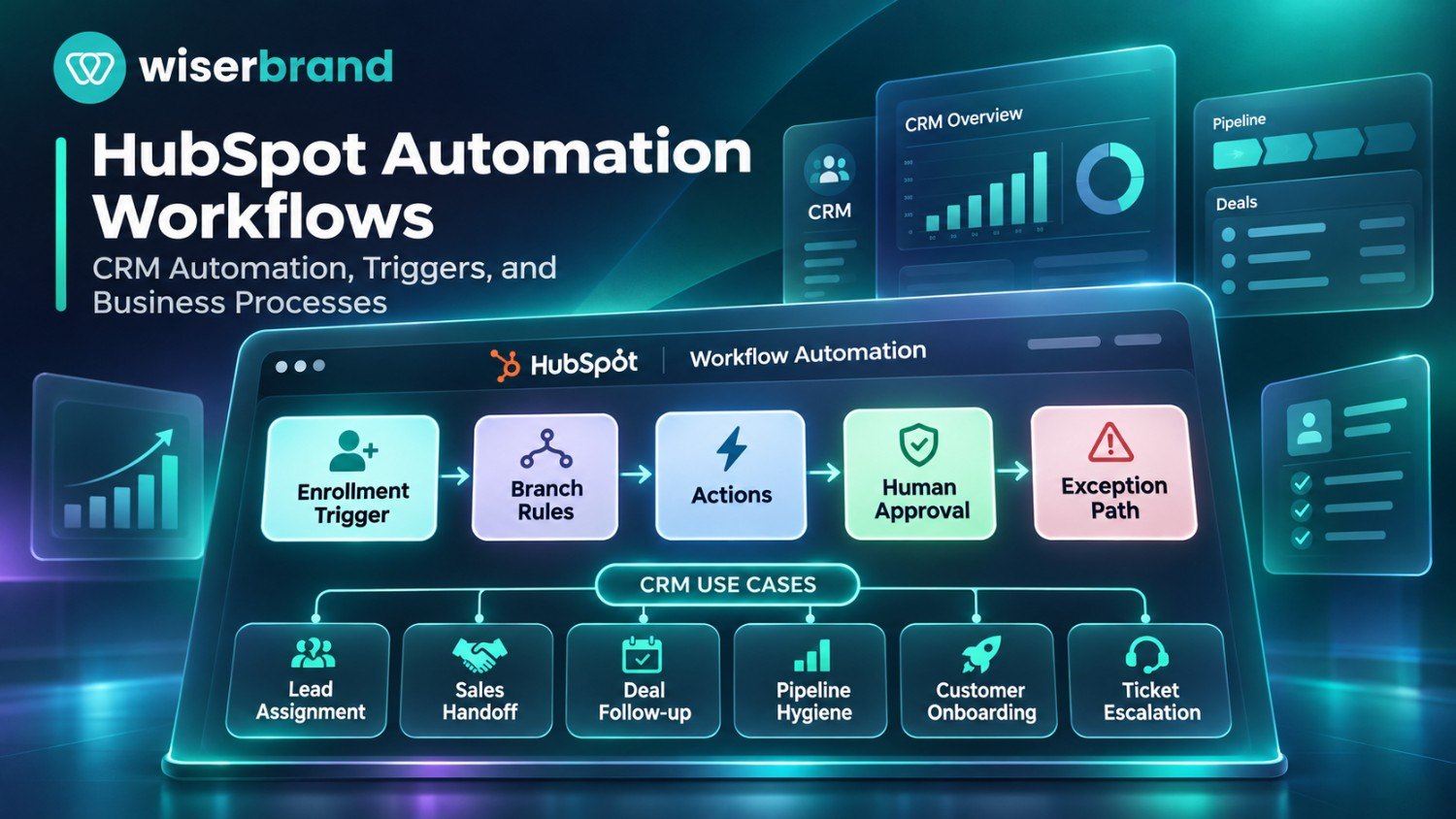
A trigger answers when the workflow starts. An action answers what the workflow does. A business rule defines the condition that must remain true before a material action is allowed. Mixing those concepts produces workflows that are difficult to audit and change.

Triggers, Actions, and Business Rules
Open each layer to see its role, example, and control.
Enrollment trigger
Workflow action
Branch condition
Business rule
Human approval
Exception path
The phrase hubspot custom automation triggers and actions is useful only when the underlying process is explicit. Custom logic should still have a named trigger, allowed action set, validation step, and failure path. A custom action without those boundaries is simply harder to troubleshoot.
Practical HubSpot CRM Automation Workflows
Practical HubSpot CRM Automation Workflows
Open a workflow to see the trigger, action, exceptions, and KPI.
Lead assignment
Sales handoff
Deal stage follow-up
Pipeline hygiene
Customer onboarding
Ticket escalation
Data enrichment handoff
HubSpot Pipeline Automation Should Reflect the Real Process
HubSpot also documents pipeline automation for actions triggered when records move through supported pipeline stages or statuses. The current guidance includes actions such as creating tasks, sending internal notifications, and editing records, with availability depending on subscription and object.
Pipeline automation is useful when the business process is naturally represented by stages. A deal entering Contract Sent can create a review task. A ticket entering an escalation status can notify a service lead. These automations are easier to understand when the stage itself has a clear operational meaning.
Avoid using stages as generic triggers for unrelated work. If users move records between stages only to make automation run, the CRM stops reflecting the actual process. The workflow should follow the business state, not force users to manipulate the state for technical reasons.
Lead Routing: Keep Assignment Logic Deterministic
Lead routing is a common automation target because the trigger and output are easy to define. The workflow starts when a contact or company reaches a qualification state. HubSpot checks the fields that drive ownership, then assigns the record or routes it to a review path when required data is missing.
Stable assignment policy belongs in deterministic logic. Territory, account ownership, product line, customer tier, and named-account rules should not change because a language model interprets the same record differently. AI may research or classify ambiguous context, but the final routing rule should use validated CRM fields or an explicit reviewer when the decision carries sales or customer impact.
Measure routing accuracy together with reassignment and override rates. Faster assignment is not useful when sales operations spends the next hour correcting owners.
Deal and Pipeline Automation Needs Exit Conditions
A workflow should know when to stop. Deal follow-up automations often fail because they create reminders after the deal has already advanced, closed, or moved to another owner. Each delayed step should recheck the current CRM state before executing an action that was scheduled earlier.
For example, a workflow may create a task three days after a deal enters Proposal Sent. Before creating that task, check that the deal is still in the relevant stage and has not been closed, disqualified, or reassigned to a process that uses different follow-up rules. This prevents stale actions from becoming operational noise.
If multiple workflows can touch the same deal, document field ownership. One workflow may own commercial stage changes while another owns internal tasks. Two independent workflows should not continuously rewrite the same field based on competing assumptions.
When to Use Custom Automation and Integrations
Native workflows are strongest when the source data and required actions already live in HubSpot. A custom integration becomes more relevant when the process depends on an ERP, product database, support platform, enrichment source, billing system, or proprietary application.
For example, a closed-won deal might need to create a project in another system. The integration should use a stable record identifier, validate required fields, record the external object ID, and prevent a retry from creating the project twice. If the external system is unavailable, the deal should retain a visible exception state so the team can recover the handoff.
When a HubSpot workflow needs controlled data exchange with another application, API development services can support custom endpoints, middleware, field mapping, and retry-safe integrations.
Where AI Fits Into HubSpot Automation
AI is appropriate for variable interpretation tasks such as summarizing a conversation, classifying an inquiry, extracting a value from unstructured text, researching account context, or drafting a follow-up. Deterministic workflow logic should still enforce required fields, consent state, assignment policy, approval thresholds, and write permissions.
A safe pattern is trigger, validate, interpret, validate again, then execute. The model produces a structured result or recommendation. The workflow checks the output against schema and business rules before changing a CRM record or sending the next action. High-impact customer, pricing, financial, or policy decisions should retain an approval gate that matches the risk.
For workflows that combine HubSpot with external models or AI services, AI integration services can connect the model layer to CRM data and existing applications while keeping tool permissions and action boundaries explicit.
A Practical HubSpot Workflow Implementation Process
HubSpot Workflow Implementation Process
Open each step for details. Mark it complete to track your progress on this page.
1. Map the Existing Process
Identify the trigger, current owner, inputs, manual decisions, exceptions, downstream systems, and completion condition. Record a baseline before adding automation.
2. Define the Source of Truth
Choose the HubSpot object and properties that represent the actual business state. If another system owns a field, do not recreate competing ownership inside the CRM.
3. Write Enrollment and Exit Logic
Specify who enters, when re-enrollment is allowed, what disqualifies a record, and which delayed actions must recheck state before execution.
4. Assign Actions and Permissions
Limit every automated action to the fields, records, and users required by the process. Separate read access from write authority where possible.
5. Build Branches Around Business Rules
Use explicit conditions for consent, territory, lifecycle stage, ownership, amounts, service tier, or other stable policy. Keep ambiguous interpretation outside those fixed controls.
6. Design Exceptions
Define what happens after missing fields, duplicate records, permission denials, invalid integration responses, API timeouts, or partially completed actions.
7. Test With Representative Records
Test normal and edge cases, including records that must not enroll. Verify the final CRM state, downstream side effects, and logs.
8. Release in a Limited Scope
Start with one team, pipeline, record segment, or low-risk action set. Monitor corrections and exceptions before expanding automation authority.
9. Measure and Maintain
Review workflow completion, delays, overrides, duplicate actions, integration failures, business outcomes, and changes to the CRM schema or connected tools.
Teams that need help turning a manual CRM process into a controlled operating workflow can use business process automation services to map ownership, rules, integrations, and measurable outcomes before implementation.
Permissions, Exceptions, and Recovery
Workflow permissions should reflect the business action, not the convenience of setup. If an automation only needs to create tasks, it should not receive broader access to sensitive customer or financial properties. Connected apps should use the smallest useful scope and separate credentials from workflow content.
Define how the workflow recovers after a partial success. A task may be created even though the downstream API call fails. A contact may be updated before another action times out. Recovery logic should inspect the current state before retrying so the system does not repeat completed work.
Manual exception handling is part of a production workflow. Give the reviewer the record, failure reason, previous actions, and the next required decision. An automation that silently stops is operationally incomplete even if the happy path works perfectly.
Metrics That Show If HubSpot Automation Works
| Metric | What It Measures | Interpretation |
|---|---|---|
| Workflow completion rate | Share of enrolled records that reach the intended outcome | Separate normal completion from records that only triggered |
| Enrollment accuracy | Eligible records enrolled without including excluded records | Audit both false inclusion and missed records |
| Duplicate action rate | Repeated tasks, emails, or updates that should occur once | Indicates re-enrollment or retry problems |
| Manual handling rate | Share of cases requiring human work | Segment planned approvals from avoidable exceptions |
| Human override rate | Automated decisions or assignments changed by users | Useful for routing, qualification, and AI-assisted steps |
| Stage dwell time | Time records remain in defined pipeline stages | Shows waiting and follow-up delays |
| Integration failure rate | External actions that fail after retries | Identifies reliability issues outside HubSpot |
| Lead response time | Time from qualified trigger to first sales action | Useful for routing and handoff workflows |
| Rework rate | Completed records that require later correction | Balances speed with process quality |
Choose metrics that reflect the completed business process. Workflow execution count is useful for diagnostics, but it does not tell the team if records were assigned correctly, follow-ups happened on time, or exceptions were resolved.
Common HubSpot Automation Mistakes
The first mistake is broad enrollment. A workflow is activated with filters that appear reasonable, but historical or incomplete records enter unexpectedly. Test exclusion cases before publication.
The second is missing re-enrollment control. A property changes back and forth, and the record receives the same task or notification repeatedly. Document which workflows are one-time and which are designed for repeated events.
The third is letting multiple workflows own the same property. Competing updates create unstable CRM state and make root-cause analysis difficult. Assign one workflow or business owner to each policy-driving field.
The fourth is building automation around unreliable data. If lifecycle stages, owners, consent status, or associated companies are inconsistent, the workflow will reproduce those inconsistencies faster. Fix the fields that drive decisions before broad rollout.
The fifth is adding AI to deterministic rules. A model is unnecessary for required-field checks, numeric thresholds, stage logic, or permission checks. Use AI only where interpretation changes the workflow meaningfully.
When Native HubSpot Automation Is Not Enough
Move beyond native workflows when the process requires specialized state across several systems, unsupported actions, custom user interfaces, high-volume event processing, or recovery behavior that is difficult to represent in the workflow editor. The reason should be architectural, not a preference for custom code.
A custom orchestration layer may coordinate HubSpot with finance, fulfillment, support, product, and proprietary systems while HubSpot remains the CRM source of truth. That layer should still preserve the same controls: permissions, idempotency, logs, failure queues, and clear ownership.
If the process needs software beyond native CRM automation and standard integrations, custom software development services can support workflow-specific interfaces, orchestration, and business logic without turning HubSpot into the owner of every downstream system.
FAQ
What Are HubSpot Automation Workflows?
HubSpot automation workflows are reusable processes that enroll CRM records based on defined triggers and execute configured actions. A production workflow should also define re-enrollment, exit logic, permissions, exceptions, and the business outcome it is intended to produce.
What Is HubSpot Pipeline Automation?
Pipeline automation triggers actions from changes in supported deal, ticket, project, or other object stages, depending on account features and subscription. It works best when the stage has a real operational meaning and the resulting action belongs to that process.
Can HubSpot Workflows Update CRM Records Automatically?
Yes, workflows can include record actions where supported. The workflow design should limit field ownership, check the current record state before delayed updates, and prevent multiple automations from rewriting the same property with conflicting logic.
When Should a HubSpot Workflow Use a Custom Integration?
Use an integration when the workflow needs data or actions from another source-of-truth system. Define matching identifiers, field ownership, authentication, retries, duplicate protection, and an exception state before sending production records across the boundary.
Should AI Be Used in HubSpot Lead Routing?
Use AI only for ambiguous interpretation such as research or classification. Stable routing policy such as territory, named accounts, ownership, or required consent should remain deterministic. Measure sales overrides so the team can see where the logic needs correction.
How Do You Test a HubSpot Automation Workflow?
Test records that should enroll, records that should not enroll, re-enrollment cases, missing data, duplicates, permission failures, delayed actions, and integration timeouts. Verify the final CRM and downstream states rather than checking only that the workflow ran.
Final Thoughts
HubSpot automation works best when the CRM reflects the real business process and every workflow has one clear purpose. Define the trigger, record ownership, exit conditions, exception path, and success metric before adding more branches or actions.
Keep stable policy deterministic, use AI only where interpretation is useful, and treat cross-system retries and duplicate prevention as part of the workflow design. The result is easier to operate because teams can see which system owns each decision and what happens when an automated path cannot finish.