Salesforce Marketing Automation: Tools, Platform, and Practical Workflows


Salesforce marketing automation connects campaign logic, customer data, messaging, and CRM actions so marketing teams can run repeatable workflows without treating every touchpoint as a manual task. The platform choice matters because Salesforce currently supports several marketing automation models, including Marketing Cloud Next flows, Marketing Cloud Engagement journeys and automations, and Account Engagement for B2B lead nurture. The right setup depends on the audience, channels, data model, sales handoff, and level of control the workflow needs.
For teams researching marketing automation for Salesforce, the useful question is not which feature has the longest list of capabilities. Start with the business process. Define the trigger, the customer or prospect record that acts as the source of truth, the decision rules, the messages or CRM actions, the exception path, and the metric used to judge the completed workflow. This guide applies that operating model to practical Salesforce marketing automation tools and implementation choices.
What Salesforce Marketing Automation Means in 2026
Salesforce marketing automation is the use of Salesforce marketing products, CRM data, workflow logic, and connected channels to execute defined marketing processes. A workflow might enroll a prospect after a form submission, wait for a qualification signal, send approved content, update campaign data, notify sales when conditions are met, and stop if the person unsubscribes or no longer meets the audience criteria.
Salesforce does not have one universal marketing automation engine for every customer. Its current product family uses different automation surfaces. Salesforce describes Marketing Cloud Next campaigns as being paired with flows, with each campaign starting from a flow that automates content distribution and data collection. Availability depends on edition and Marketing Cloud licensing. The current Salesforce guidance on campaigns and flows documents that model.
Marketing Cloud Engagement uses a different model. Journey Builder handles customer journeys, while Automation Studio handles scheduled or criteria-based data and messaging work. Account Engagement uses B2B-oriented tools such as Engagement Studio, completion actions, and automation rules. This distinction matters because a marketing automation platform should be selected around the workflow and data model rather than treated as one interchangeable Salesforce feature.
Which Salesforce Marketing Automation Tools Fit Which Job?
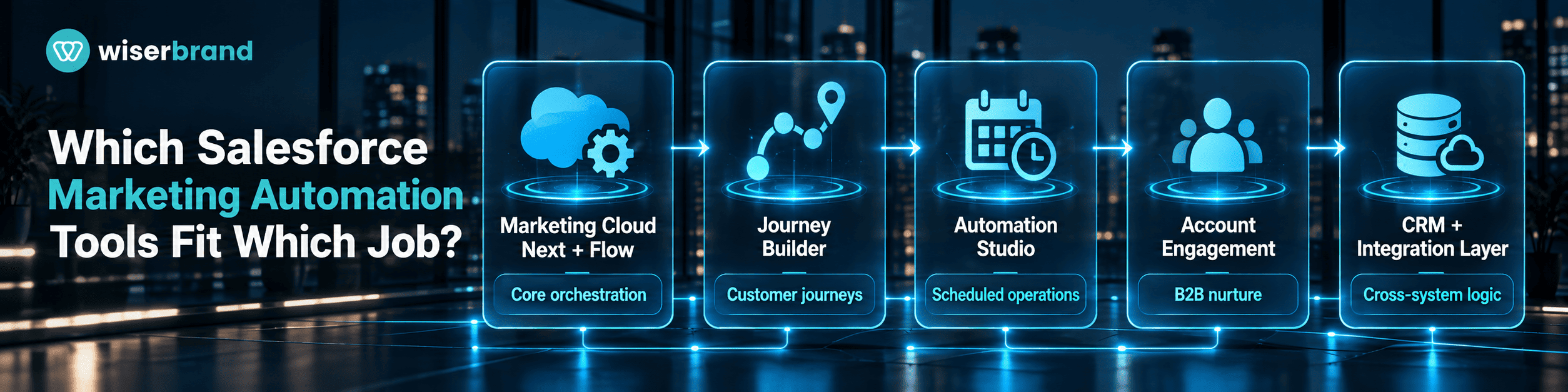
| Tool or Layer | Best Fit | Typical Trigger | Primary Control |
|---|---|---|---|
| Marketing Cloud Next campaigns and Flow | Campaign orchestration on the core Salesforce platform | Audience or CRM event enters a marketing flow | Flow entry criteria, permissions, and campaign logic |
| Marketing Cloud Engagement Journey Builder | Multi-step and cross-channel customer journeys | Contact enters from a configured entry source | Journey entry rules, decision splits, timing, and exit criteria |
| Marketing Cloud Engagement Automation Studio | Scheduled data and messaging operations | Schedule or configured criteria | Queries, imports, sends, dependencies, and failure monitoring |
| Marketing Cloud Account Engagement | B2B prospect nurture and marketing-to-sales handoff | Prospect activity, list membership, or automation criteria | Scoring, grading, lists, completion actions, and sales rules |
| Salesforce Flow and CRM automation | Record updates and deterministic CRM process logic | Record or platform event | Validation, assignment, approvals, and object permissions |
| Custom integration layer | Processes that cross Salesforce and external systems | Webhook, API event, scheduled sync, or CRM change | Field mapping, authentication, retries, idempotency, and audit logs |
The table is a decision aid, not a claim that every Salesforce edition exposes every feature. Licensing, account configuration, data products, and release changes can affect availability. Confirm the exact product and edition before designing a workflow around a named action.
How Marketing Cloud Engagement Journeys Work
Journey Builder is designed around a communication plan. Contacts enter from an entry source, then canvas activities determine how the journey communicates with them and when they move to the next activity. Salesforce describes Journey Builder as a campaign planning tool for Marketing Cloud Engagement and documents continuous evaluation of contacts against the journey path. The Journey Builder documentation is the primary reference for this behavior.
That architecture is useful when timing and customer state change the next marketing action. A welcome journey might send an initial message, wait for a defined period, check engagement or profile criteria, choose an approved branch, and exit contacts who reach the intended state. The journey should not invent policy. Consent status, suppression, contractual communication limits, and required data checks remain explicit controls.
Practical Salesforce Marketing Automation Workflows
B2B Lead Nurture and Sales Handoff
A B2B nurture workflow starts when a prospect enters an approved audience, such as a form completion or a defined list. Marketing automation with Salesforce can then sequence content and update marketing engagement data, but the sales handoff should use explicit qualification conditions.
For example, the marketing workflow may track engagement and profile signals while Salesforce CRM remains the source of truth for account ownership and sales status. When a prospect reaches the handoff criteria, deterministic logic checks required fields, territory, existing ownership, suppression status, and duplicate records before creating the task or notification for sales. Missing data moves the record to an exception queue rather than forcing assignment.
Customer Onboarding Journey
A customer onboarding journey can start after a CRM record reaches a confirmed post-sale state. The automation uses product, customer, and lifecycle data to place the contact into the correct communication path. Messaging may cover setup guidance, training content, or milestone reminders. If the implementation needs account-level coordination, the workflow should also define how multiple contacts from the same customer are treated.
The source-of-truth boundary is important here. Marketing automation can schedule communications, but it should not infer that an implementation milestone is complete merely because an email was opened. Use the operational system or an approved CRM field for completion state. If that data is unavailable, pause or route the workflow instead of advancing the customer on a marketing signal alone.
Re-Engagement and Suppression
A re-engagement workflow can target contacts who meet defined inactivity or engagement criteria. Before any send, the process should evaluate channel permission, suppression, bounce state, and other messaging restrictions relevant to the organization. Exit criteria are as important as enrollment criteria. A contact who converts, opts out, changes segment, or becomes ineligible should leave the path without waiting for the original sequence to finish.
Campaign-to-Pipeline Follow-Up
Campaign follow-up becomes more useful when marketing and sales agree on what the next CRM state means. A webinar attendee, for example, should not automatically become a sales-ready opportunity. The workflow can capture attendance and engagement, then apply explicit fit and intent criteria before routing the record. Sales acceptance and override behavior should be measured so the team can see if the handoff logic matches real pipeline quality.
Where Account Engagement Fits B2B Marketing Automation
Account Engagement is the Salesforce marketing automation product commonly used for B2B prospect management and nurture. It supports several forms of automation, including Engagement Studio programs, automation rules, completion actions, segmentation rules, and external activities or actions. Salesforce groups these capabilities in its Account Engagement automation documentation.
The product is useful when the business process revolves around prospects, engagement, scoring or grading inputs, and coordinated handoff to CRM users. It is not a reason to move every sales rule into marketing automation. Opportunity stage policy, territory assignment, required approval, and other stable CRM logic should remain in the system responsible for those rules.
Where Deterministic Automation Should Stay in Control
A marketing automation workflow often contains interpretation and fixed policy at the same time. Keep the fixed policy deterministic. This makes the path easier to test and prevents a model or marketer-configured content step from changing a rule that should be consistent.
- Use explicit rules for consent, suppression, required fields, territory, ownership, lifecycle gates, and contractual communication restrictions.
- Use deterministic validation before a CRM record is created or updated by an integration.
- Use fixed approval thresholds for high-impact changes such as pricing exceptions or customer commitments.
- Use AI only where the task benefits from interpretation, generation, classification, or summarization, and validate the output before it becomes an executed CRM action.
This separation also reduces debugging time. If an audience condition is wrong, the team can inspect the rule. If generated content is wrong, the team can inspect the model input and review path. Combining both into an opaque step makes root-cause analysis harder.
How AI Fits Into Salesforce Marketing Automation
AI can support campaign planning, content generation, classification, research, audience analysis, or recommendations. The model output should be treated as an input to the workflow, not as proof that a business action succeeded. A generated subject line is content. A successful send requires the messaging platform, permissions, audience status, and execution path to work.
For higher-risk customer-facing use, start with draft-and-review behavior. The marketer receives the proposed output, checks the customer context and brand requirements, and approves the final content. More automation can be added after evaluation shows acceptable quality and the organization has monitoring and rollback paths.
When the use case crosses models, CRM data, marketing channels, and other business systems, AI integration services can support the architecture around authentication, data boundaries, validation, and production monitoring rather than placing the entire process inside a prompt.
Connecting Salesforce Marketing Automation to External Systems
External integrations are common when product usage, ecommerce events, event platforms, data warehouses, or proprietary applications supply marketing signals. Define the direction of data ownership before building the sync. One system should own each important business field, even if several systems can read it.
A production integration should define the event that starts synchronization, the matching key, allowed field updates, validation, retry behavior, duplicate-event handling, logging, and the response to a partial failure. For custom connections, API development services are relevant when standard connectors do not support the required objects, transformations, or error controls.
Avoid bidirectional rules where both platforms continuously rewrite the same field. That design can create loops and make ownership unclear. If two systems need to contribute to the same process, separate source data, derived values, and execution state into distinct properties.
A Practical Implementation Blueprint
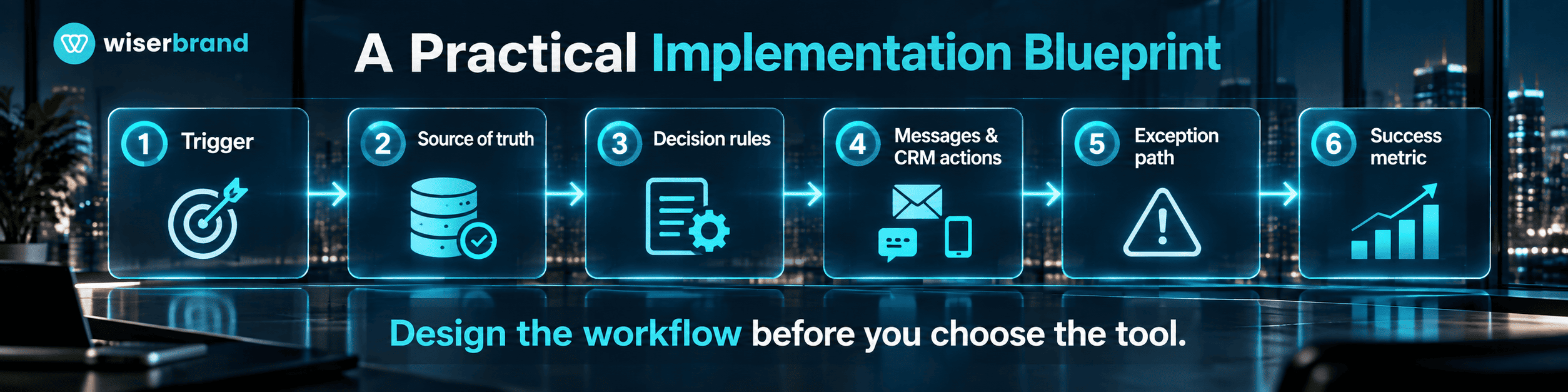
- Choose one measurable marketing workflow. Document the current trigger, handoffs, manual work, errors, and completion condition.
- Define the source of truth. Identify which Salesforce or external object owns identity, consent, lifecycle state, campaign status, and sales ownership.
- Select the automation surface. Use Flow, Journey Builder, Automation Studio, Account Engagement, or a custom integration based on the workflow rather than feature familiarity.
- Design enrollment and exit rules. Include suppression, duplicate handling, missing data, and conditions that should stop the workflow.
- Define permissions and approvals. Limit who can modify audiences, content, CRM records, integration credentials, and high-impact actions.
- Test representative and failure cases. Include stale records, missing fields, duplicate events, invalid data, paused integrations, and conflicting ownership.
- Launch to a controlled audience. Monitor execution, exceptions, sales overrides, content corrections, and customer response.
- Compare results with the baseline. Expand only when workflow quality and business metrics justify broader use.
Teams that need help mapping the process before configuration can use marketing automation consulting to define the workflow, data dependencies, integration boundaries, and measurement plan.
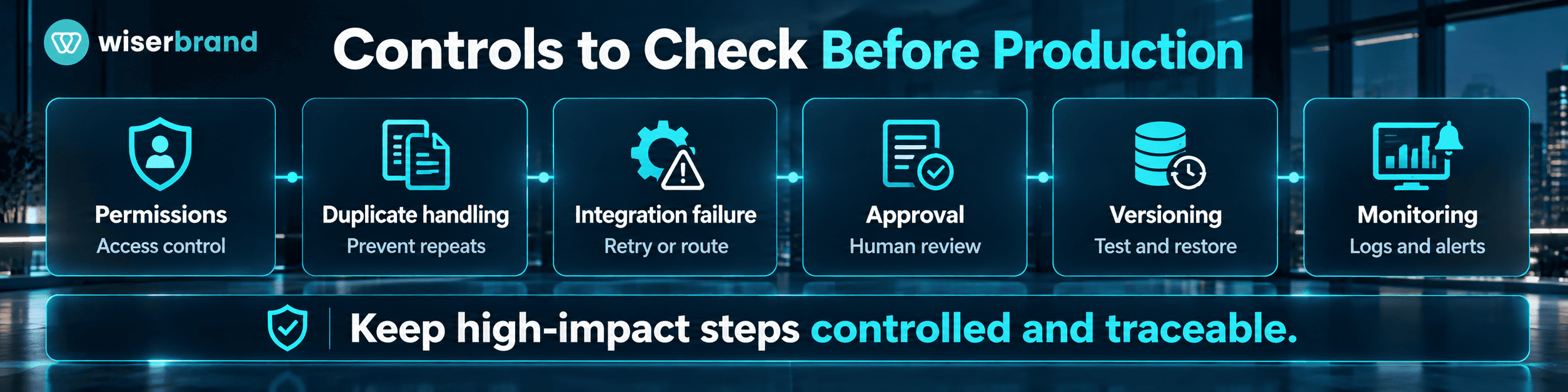
Controls to Check Before Production
| Control Area | Question to Answer | Failure if Ignored |
|---|---|---|
| Enrollment | What exact event and data qualify a person to enter? | Wrong audience enters the automation |
| Exit logic | What conditions stop or remove a person? | Messages continue after conversion or opt-out |
| Data ownership | Which system owns each key field? | Conflicting updates and unclear state |
| Permissions | Who can change flows, journeys, lists, or integrations? | Unauthorized or accidental execution |
| Duplicate handling | How are repeated events or records detected? | Duplicate sends, tasks, or CRM updates |
| Integration failure | Does the workflow retry, pause, or route the case? | Silent loss of customer or campaign state |
| Approval | Which customer-facing or high-impact steps require review? | Unreviewed commitments or policy violations |
| Versioning | How are changes tested and restored? | Production changes cannot be traced or reversed |
| Monitoring | Which logs and metrics show completion and failure? | Problems appear only after users report them |
Metrics That Show If the Workflow Works
Marketing metrics should be paired with workflow metrics. Opens, clicks, and form fills describe engagement, but they do not show if the automation is technically reliable or if marketing-to-sales handoffs are accepted.
| Metric | What It Measures | Interpretation |
|---|---|---|
| Workflow completion rate | Share of enrolled records that reach the intended endpoint | Segment failures by data, configuration, integration, and approval cause |
| Exception rate | Cases routed out of the normal path | A rising rate may indicate poor source data or overly strict logic |
| Duplicate action rate | Repeated sends, tasks, or updates that should occur once | Should be investigated rather than treated as marketing volume |
| Sales acceptance rate | Share of routed leads accepted by sales | Balances automated qualification with pipeline quality |
| Sales override rate | How often sales changes the automated routing or status | Useful signal for revising handoff criteria |
| Conversion rate | Share reaching the defined business conversion | Compare cohorts and maintain the same conversion definition |
| Cycle time | Time from workflow trigger to intended handoff or outcome | Shows waiting, approval, and integration delays |
| Unsubscribe or complaint rate | Negative messaging response | Use alongside engagement and conversion metrics |
Common Implementation Mistakes
The first mistake is automating a process before the data model is clear. If contacts, leads, accounts, prospects, subscribers, and campaign members are treated as interchangeable, the workflow will eventually route or message the wrong record.
The second is building long journeys without explicit exit logic. A customer may convert, change segment, opt out, or become ineligible while the automation continues to follow its original path.
The third is mixing marketing interpretation with fixed CRM policy. Scoring or engagement signals can inform a handoff, but ownership, compliance checks, and required approvals should not depend on a variable model response.
The fourth is measuring campaign activity but not workflow quality. A rising send volume can hide duplicate actions, rejected leads, stale data, or failed integrations. Monitor the completed business process.
The fifth is adding custom code before testing native options. Custom development is justified when the standard platform cannot express the required workflow, data mapping, integration, or control. Otherwise it creates an extra component to maintain.
Frequently Asked Questions
What Is the Best Salesforce Marketing Automation Platform?
There is no single best product for every Salesforce customer. Marketing Cloud Next, Marketing Cloud Engagement, and Account Engagement serve different automation models and audiences. Choose based on channels, data model, B2B or B2C process, CRM dependency, orchestration needs, licensing, and the workflows the team must operate.
What Is the Difference Between Journey Builder and Flow?
Journey Builder is associated with Marketing Cloud Engagement and focuses on customer journey orchestration. Flow is the automation engine used across the core Salesforce platform and is also central to Marketing Cloud Next campaigns. They should not be treated as identical tools even when both represent multi-step automation.
Can Salesforce Marketing Automation Update CRM Records?
Salesforce workflows and connected marketing products can participate in processes that update CRM data, but the exact action depends on the product, edition, permissions, object, and integration design. Validate allowed fields and use explicit ownership rules before enabling writes.
Can AI Write and Send Marketing Content Automatically?
AI can generate content, but generation and sending are separate actions. A production workflow still needs an approved audience, channel permissions, sending configuration, validation, and monitoring. For sensitive, regulated, or high-impact communication, keep human review or an explicit approval gate.
How Should Marketing and Sales Share Automation Ownership?
Marketing should own the campaign or nurture logic it operates, while sales operations should retain control over sales-stage definitions, ownership rules, and other CRM policy. Shared fields need one documented owner. Cross-functional changes should be tested against both marketing execution and downstream sales behavior.
When Is Custom Development Better Than Native Automation?
Use custom development when the workflow requires unsupported external systems, complex transformations, specialized approval logic, custom interfaces, or reliability controls that native tools cannot provide. A standard campaign or CRM rule should remain native when it already meets the requirement.
Final Thoughts
Salesforce marketing automation works best when the team designs the business process before choosing the automation surface. Keep audience and messaging logic close to the marketing platform, stable CRM policy in deterministic rules, and cross-system data ownership explicit. Test exit conditions and failures as carefully as the happy path.
For organizations planning broader automation across Salesforce and connected systems, business process automation services can help map the process, select the appropriate automation layer, connect external applications, and define the controls and metrics required for production use.