Salesforce Agentic AI Tools Adoption in 2026: A Practical Rollout Guide

Salesforce agentic AI tools adoption is mostly a cost, data, and permissions exercise, not a build exercise. Agentforce makes it straightforward to stand up an agent in a sandbox and considerably harder to answer the questions that follow: which actions the agent may take in a production org, how consumption is metered against your workflows, what the knowledge base has to look like before grounded answers are reliable, and how you would notice a behavior change three weeks after launch. This guide covers what you are actually adopting in the Agentforce 360 platform, how the pricing models behave at real volumes, the readiness work that has to happen inside the org, testing and observability, and a rollout sequence with the controls that belong at each stage. Pricing and feature availability change often, so verify every figure against Salesforce documentation before committing budget.
What You Are Actually Adopting
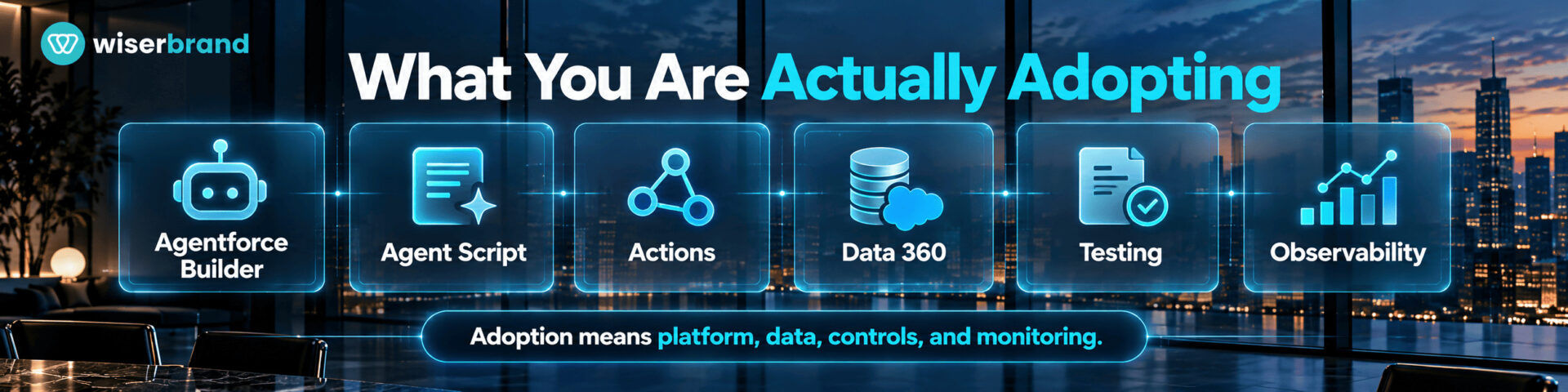
Agent deployment at this scale is now common in large organizations: McKinsey's 2026 global survey found 40 percent of respondents from companies above $1 billion in revenue reported scaling AI agents in at least one function, up from 27 percent a year earlier, while only 37 percent of all respondents reported any enterprise EBIT effect from AI. Agentforce is a set of components rather than one product, and adoption planning gets easier once the pieces are separated.
| Component | What it does | Why it matters in adoption |
|---|---|---|
| Agentforce Builder | Defines topics, instructions, and the actions an agent may call | Where scope and the action allowlist are set |
| Agent Script | Specifies deterministic behavior for parts of the agent's flow | Lets you fix the steps that must not vary |
| Actions | Discrete functions the agent executes, such as retrieving a record or updating a case | The billing unit and the risk surface |
| Data 360 grounding | Supplies records, knowledge, and context to the agent | Answer quality is capped by what lives here |
| Agentforce Studio testing | Runs scenarios against the agent before release | Prevents the demo-to-production gap |
| Observability and session tracing | Logs inputs, responses, reasoning steps, LLM calls, and guardrail checks | The only way to diagnose behavior after launch |
| Digital Wallet | Tracks consumption in near real time with threshold alerts | Cost control belongs in the rollout, not after it |
| MuleSoft Agent Fabric | Registers and governs agents regardless of where they were built | Relevant once agents exist outside Salesforce too |
Salesforce documents that deep observability in Agentforce 360 rests on two foundations: a Session Tracing Data Model that logs every interaction including reasoning steps, LLM calls, and guardrail checks into Data 360, plus MuleSoft Agent Fabric for registering and governing agents. At the same announcement, Agent Analytics and Agent Optimization were listed as available, with Agent Health Monitoring scheduled for general availability in Spring 2026. Confirm current availability in your edition and region before designing a monitoring plan around any single capability.
Decide What Should Not Be an Agent
The most common waste in Salesforce agentic AI tools adoption is agentic treatment of deterministic work. Flow, validation rules, approval processes, and Apex still do fixed logic better, cheaper, and with predictable results.
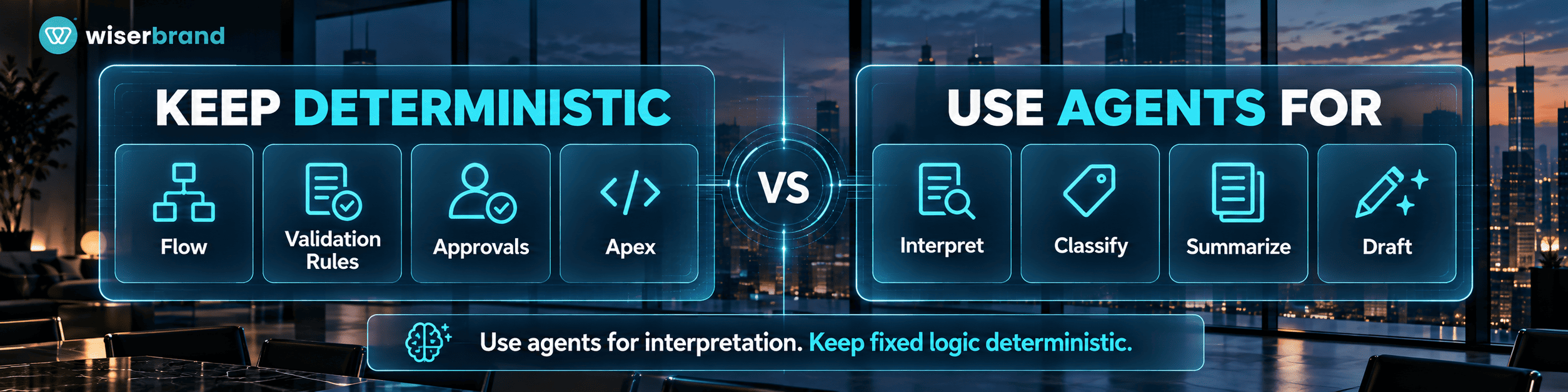
Reserve the agent for steps that need interpretation: understanding an unstructured request, classifying intent, deciding which of several bounded actions applies, summarizing a case history, or drafting a reply. Keep everything with a stable rule in deterministic automation: eligibility thresholds, required approvals, tax and discount calculation, record locking, and anything that must produce the same output every time. A well-designed Agentforce workflow usually contains more deterministic steps than model steps, and Agent Script exists precisely so that you can pin down the parts that must not improvise.
How the Pricing Models Behave
Cost planning is where Salesforce agentic AI tools adoption most often goes wrong, because the meter is the action rather than the conversation. The Salesforce Agentforce pricing page sets out the current options.
| Model | Published price | Notes from the pricing page |
|---|---|---|
| Salesforce Foundations | $0 | Includes Agentforce Builder, Prompt Builder, Agent Script, Agentforce Coworker, and Agentforce Vibes |
| Flex Credits | $500 per 100,000 credits | Standard actions consume 20 credits, Agentforce Voice actions consume 30; covers customer-facing agents, employee agents, Voice, and Digital Wallet |
| Conversations | $2 per conversation | Customer-facing agents; cannot be used in the same org as Flex Credits |
| Agentforce User License | $5 per user per month | Requires Flex Credits on top; metered employee usage |
| Agentforce add-ons | $125 per user per month | Unmetered employee usage for Sales, Service, and Field Service |
| Agentforce Industries add-ons | $150 per user per month | Industry Clouds equivalent |
| Agentforce 1 Editions | From $550 per user per month | Includes the add-on and 2.5 million Flex Credits per org per year |
Three details change budgeting more than the headline numbers. Flex Credits and Conversations cannot coexist in one org, so the choice is an org-level commitment rather than a per-project one. Unused Flex Credits do not roll over into subsequent subscription terms. And exceeding your entitlement carries no overage penalty, with usage billed monthly in arrears at your contracted rate, which makes threshold alerts in Digital Wallet a practical necessity rather than a nicety.
Estimate Cost per Workflow Before You Buy
Because actions are the meter, the estimate is arithmetic you can do before signing anything. Count the actions a single completed workflow requires, multiply by 20 credits for standard actions or 30 for voice, then by expected volume.
Salesforce's own published example makes the shape clear: a self-service order-status agent that authenticates the customer and retrieves order details uses two actions, or 40 credits at $0.20, and at 20 requests a day comes to roughly $120 a month.
Apply that method to your three candidate workflows and two things usually surface. Employee-facing agents with many small actions per session can cost more than expected, which is where the unmetered per-user add-ons start to look rational. And a workflow whose action count grows with retries or clarification turns has variable cost, so estimate a range rather than a point. Compare the result against the fully loaded cost of the manual process, including review time, before deciding anything is cheaper.
Get the Org Ready Before the Agent
Grounding quality determines answer quality, and most orgs need work here before Salesforce AI adoption moves past a sandbox.
- Knowledge: articles written for human skimming often ground poorly. Check coverage of the top intents, remove contradictory versions, and assign owners with a review cadence.
- Records: duplicates and inconsistent picklists produce confident wrong answers. Resolve them for the objects the agent will read.
- Field-level security and sharing: the agent inherits access from its user context, so scope that user deliberately rather than reusing an admin profile.
- Integrations: confirm the external systems the agent needs, such as an order management or ERP endpoint, are reachable through supported connections with sensible rate limits.
- Data 360 setup: grounding and session tracing depend on it, which affects both capability and cost.
This is unglamorous work and it is where most of the timeline goes. Our AI adoption assessments treat org readiness as a separate deliverable for that reason, because an agent deployed over unresolved knowledge and data problems fails in ways that look like model failures and are not.
Permissions and the Action Allowlist
Design the action list as a security boundary, not a capability list.
| Action type | Reasonable control in a Salesforce org |
|---|---|
| Read account, case, or order records | Scoped integration user, field-level security applied, access logged |
| Answer from knowledge | Restricted to approved article set, with a fallback when confidence or coverage is low |
| Create or update a case, add a comment | Automated with validation, change history retained |
| Update opportunity stage or forecast fields | Human confirmation, since downstream reporting depends on it |
| Issue refunds, credits, or price adjustments | Approval above a policy threshold, blocked below the reviewer's authority |
| Contract, entitlement, or account closure changes | Human approval in every case |
| Delete records or modify sharing rules | Outside the agent's action set entirely |
Two habits keep this durable. Give the agent its own user with a purpose-built permission set rather than an existing admin or service login, so an access review can answer what the agent can reach. And treat every new action added later as a change that goes through the same review, since scope creep in the action list is the quiet way a low-risk agent becomes a high-risk one.
Test Against Reality, Not Demos
Agent behavior is non-deterministic, so a passing demo tells you almost nothing about production. Build a scenario set from your own history: the top intents by volume, the cases that were previously mishandled, malformed and ambiguous requests, out-of-scope requests that should be refused, multi-issue conversations, and misuse attempts.
Score more than answer quality. Check that the agent selected the expected action, passed valid parameters, respected the topic boundary, escalated when it should have, and stayed inside policy. Run the same scenario set again after every instruction, knowledge, or model change, because a prompt edit that improves one intent frequently degrades another. Keep the set in version control alongside the agent configuration.
Monitor What Matters After Launch
Observability in Agentforce Studio gives analytics, session-level tracing, and health signals, and the useful question is which of those you will actually review each week.
A workable monitoring routine covers: containment and escalation rates by topic, action success and failure rates, clusters of sessions where the agent could not resolve the request, knowledge gaps surfaced by unresolved intents, latency and error spikes, credit consumption against forecast in Digital Wallet, and human corrections after handoff. Assign the review to a named person. Dashboards nobody opens are the standard failure mode of Salesforce AI adoption programs at the six-month mark.
Design the Human Handoff First
Escalation quality decides how customers experience the agent. Define the triggers explicitly: low confidence, repeated failure to resolve, a request outside the topic set, detected frustration, a regulated or high-value account, or an action that requires approval.
Then define what transfers with the case. The receiving agent should see the conversation, what the AI attempted, which records it touched, and what it could not do. A handoff that dumps a customer into a queue to repeat themselves converts an efficiency gain into a service complaint, and it will show up in reopen rates rather than in the AI dashboard.
A Rollout Sequence That Holds
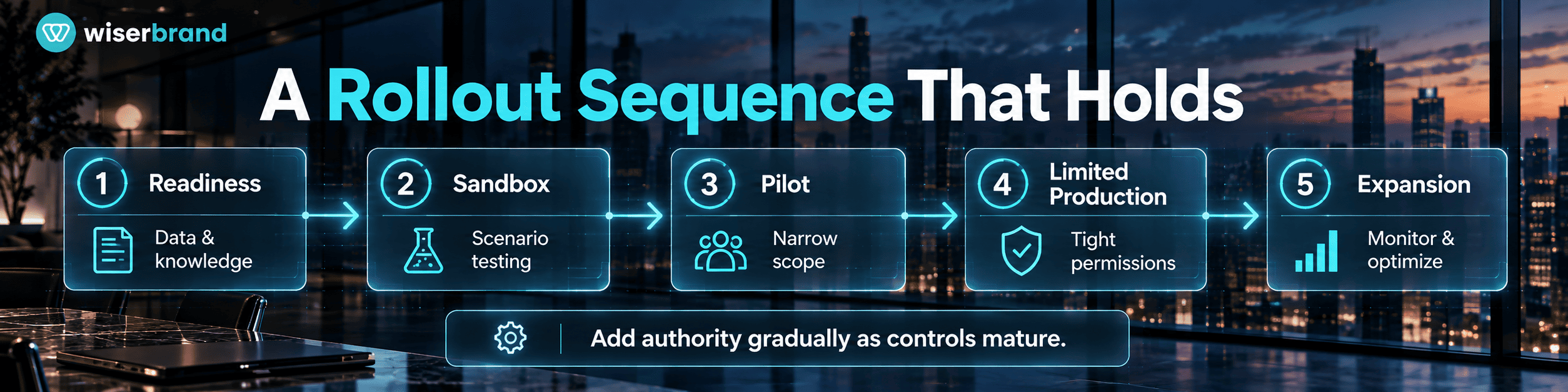
- Pick one workflow with high volume, text input, and reversible actions, and record its baseline: volume, handle time, escalation rate, reopen rate, and cost.
- Choose the pricing model deliberately at org level, using action counts per workflow rather than a headline rate.
- Prepare knowledge, records, permissions, and the integration user before building anything.
- Build the narrow version: a small topic set, an explicit action allowlist, Agent Script for the steps that must be fixed, and a defined escalation path.
- Test against the historical scenario set, including refusals and misuse.
- Pilot on a limited segment with human review on every consequential action, full session tracing, and a documented rollback.
- Review evidence against the baseline, then expand, refine, or stop. Stopping at this gate is a valid outcome.
- Relax controls one case type at a time based on measured override and error rates, then add the next workflow using the same components.
Resist adding topics during the pilot. Every new topic changes the behavior of the existing ones, which invalidates the evaluation you were in the middle of running.
Metrics for a Salesforce Rollout
| Layer | Metric | What it tells you |
|---|---|---|
| Agent | Action success rate, correct action selection, grounded response rate, refusal accuracy | The agent behaves as configured |
| Workflow | Containment rate, escalation rate, first-contact resolution, handle time, reopen rate | The process actually changed |
| Quality | Human override rate, corrections after handoff, policy violations caught | Shows if speed came at the cost of accuracy |
| Cost | Credits per completed workflow, cost per resolved case, review hours | The denominator for any savings claim |
| Business | CSAT, SLA compliance, revenue leakage prevented, capacity reallocated | Shows if the rollout earned its budget |
One caution specific to Agentforce: containment and deflection look impressive in isolation. Pair them with reopen rate and CSAT, because a contained case the customer had to escalate elsewhere is a deferred cost, not a saving.
Common Mistakes
- Choosing the pricing model before counting actions per workflow, then discovering the org-level commitment was wrong.
- Turning on an agent over a knowledge base nobody has reviewed in two years.
- Giving the agent a broad admin context because scoping the permission set took longer.
- Treating Agentforce as a replacement for Flow, and paying credits for logic a rule already handled.
- Launching without threshold alerts in Digital Wallet, then meeting the consumption curve in an invoice.
- Adding topics faster than the scenario set grows, until nobody can say what changed the behavior.
- No named owner for instructions, knowledge, and model configuration after go-live.
When an Agent Is Not the Right Answer
Skip the agent when the process is fully rule-based and Flow already handles it, when volume is too low to repay configuration and maintenance, when the required knowledge lives in people's heads rather than in reviewable content, when every case ends in a human decision anyway, or when the action would be irreversible and the approval step removes the time saving. In those situations a prompt template, a report, or a better-designed Flow delivers more with less operational overhead.
FAQ
What does Salesforce agentic AI tools adoption cost in practice?
Cost depends on actions per workflow and volume rather than on a single list price. Salesforce publishes Flex Credits at $500 per 100,000 credits, with standard actions at 20 credits and voice actions at 30, alongside a $2 per conversation model for customer-facing agents and per-user options including add-ons at $125 per user per month. Count the actions in your top workflows, multiply by volume, and treat implementation, Data 360, and review time as separate lines.
Should we choose Flex Credits or Conversations?
The two cannot run in the same org, so decide at org level. Conversations suit customer-facing deployments with long interactions and few backend actions, since the cost is flat per conversation. Flex Credits suit mixed deployments covering employee agents, voice, and workflows with a small number of actions each, and give more granular usage data in Digital Wallet. Model both against your own action counts before committing.
How long does an Agentforce rollout take?
The agent build is rarely the constraint. Knowledge cleanup, record quality, permission design, and integration access usually set the timeline, and a first customer-facing workflow commonly runs a few months from assessment to a live pilot in an org that is in reasonable shape. Orgs with fragmented data, heavy customization, or an unreviewed knowledge base take longer, and compressing that phase moves the problem into production.
Do we still need Flow and Apex?
Yes, and more than most teams expect. Deterministic automation remains the right tool for validation, approvals, calculations, and any step that must behave identically every time, and it does not consume credits. The strongest Agentforce designs use the model for interpretation and routing while Flow, validation rules, and Agent Script hold the fixed logic.
How do we prevent an agent from taking an action it should not?
Control it at three layers rather than through instructions alone: a narrow action allowlist in the agent configuration, a dedicated user with a purpose-built permission set and field-level security, and approval gates on anything financial, contractual, or hard to reverse. Then verify with a scenario set that includes out-of-scope and misuse attempts, and review the action list every time someone proposes adding to it.
What should we monitor after launch?
Watch escalation and containment by topic, action success and failure rates, unresolved session clusters that point to knowledge gaps, latency and error spikes, human corrections after handoff, and credit consumption against forecast. Assign the weekly review to a named owner and treat a rising override rate in one topic as a policy or knowledge problem before treating it as a model problem.
Final Thoughts
Adoption succeeds or fails on the work around the agent. Count actions before choosing a pricing model, fix knowledge and permissions before building, keep deterministic logic in deterministic tools, test against your own history, and monitor with someone accountable for the review. Done in that order, Salesforce agentic AI tools adoption produces a workflow you can defend in a business review rather than a demonstration that impresses once.
If you want an outside read before committing budget, our AI agent development and custom AI development teams size these rollouts around action counts, org readiness, and the controls the risk tier requires, and the assessment stands on its own if you build the rest internally.