Scaling AI Agents Without Losing Control


Scaling AI agents is not the same as scaling a chatbot. A chatbot answers. An agent can plan, call tools, read systems, update records, trigger workflows, and hand work to people or other agents. That extra capability is the reason agents can create value. It is also the reason they can create risk.
The first pilot is usually controlled. One workflow, one team, one data source, one approval path. Problems are visible because the scope is small. Scaling AI across departments changes the situation. More tools, users, permissions, exceptions, and integrations make the system harder to understand.
The goal is not to slow adoption. The goal is to scale agents with the right operating model: clear ownership, limited permissions, measurable performance, human review for risky actions, and monitoring that shows what the agent actually did.
This guide explains how to scale AI agents in a business environment without losing control of quality, security, cost, or customer trust.
What Scaling AI Agents Really Means
Scaling AI agents means moving from one useful workflow to a managed system of agents, tools, data sources, policies, and owners. The challenge is not only technical. It is operational.
A company may start with one agent that summarizes support tickets. Then it adds an agent that drafts replies, another that checks refund policy, another that updates CRM fields, and another that monitors renewal risk. Each agent may be useful alone. Together, they create a new layer of business operations.
At that point, scaling AI is about control as much as speed. Teams need to know which agents exist, what they can access, what actions they can take, who owns them, how they are evaluated, and when humans must step in.
A scalable agent setup usually includes:
- A clear use case and business owner.
- Approved data sources.
- Tool permissions with least-privilege access.
- Workflow rules and escalation paths.
- Human approval for high-impact actions.
- Logs of actions, tool calls, failures, and handoffs.
- Evaluation before launch and monitoring after launch.
- A review process for changes.
Without those basics, agent adoption can spread faster than the company can govern it.
Why AI Agents Become Harder to Control at Scale
The pilot stage hides many problems. A demo may work well because the data is clean, the user is cooperative, and the task is narrow. Production is different. Customers ask unclear questions. Employees skip fields. APIs fail. Permissions vary. Data conflicts. Edge cases become normal.
The main scaling problems usually fall into six areas:
| Control Area | What Can Go Wrong |
|---|---|
| Scope | Agents start handling tasks they were not designed for. |
| Permissions | Tools give agents more access than they need. |
| Data quality | Agents act on incomplete, outdated, or conflicting data. |
| Reliability | Small model errors become operational issues at higher volume. |
| Security | Prompt injection, data leakage, and unsafe tool use become real risks. |
| Ownership | No one knows who should fix or improve the agent after launch. |
NIST’s AI Risk Management Framework is useful here because it treats AI risk as a lifecycle issue, not a one-time checklist. Its core functions are Govern, Map, Measure, and Manage, which fit the reality of scaling AI systems across business processes.
For agents, the key lesson is simple: governance must scale with capability. The more an agent can do, the more control the business needs around access, approval, monitoring, and rollback.
Start With an Agent Inventory
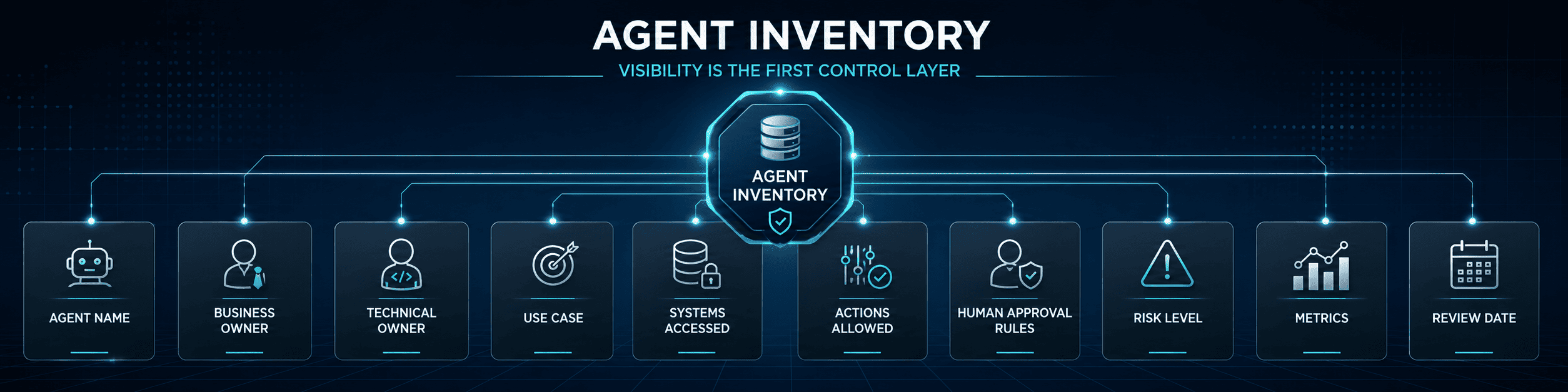
The first control layer is visibility. A company cannot govern agents it cannot list.
Create an agent inventory that records every agent in use or under development. It does not need to be complex at first. It should answer practical questions:
| Inventory Field | Why It Matters |
|---|---|
| Agent name | Makes the system easy to identify. |
| Business owner | Defines who is accountable for outcomes. |
| Technical owner | Defines who maintains the build. |
| Use case | Keeps scope clear. |
| Systems accessed | Shows data and tool exposure. |
| Actions allowed | Shows what the agent can actually do. |
| Human approval rules | Defines where review is required. |
| Risk level | Helps prioritize testing and controls. |
| Metrics | Shows how success is measured. |
| Review date | Prevents outdated agents from running unnoticed. |
This inventory becomes more important as agents spread across support, sales, finance, HR, operations, and engineering. It also helps leaders see duplicate work. Two teams may be building similar agents with different rules and different security assumptions.
An inventory is not bureaucracy. It is basic operational awareness.
Define Autonomy Levels Before Launch
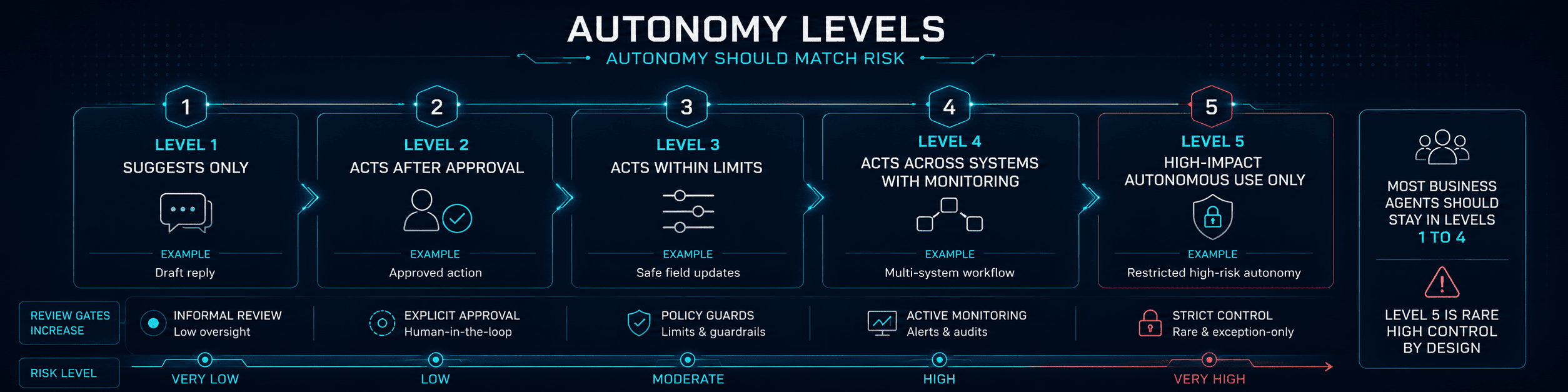
Not every agent should have the same level of freedom. A summarization agent and a refund approval agent should not be governed in the same way.
Use autonomy levels to decide what the agent can do without human review.
| Level | Agent Role | Example |
|---|---|---|
| Level 1 | Suggests only | Drafts a reply or summarizes a case. |
| Level 2 | Acts after approval | Prepares a refund note, but a person approves it. |
| Level 3 | Acts within limits | Updates low-risk fields or creates tasks under clear rules. |
| Level 4 | Acts across systems with monitoring | Routes work, calls tools, and updates records with audit logs. |
| Level 5 | Acts autonomously on high-impact workflows | Rare, high-control use only. |
Most business agents should stay between Levels 1 and 4. High-impact autonomous action should be limited and carefully reviewed.
This prevents a common mistake: treating all agents as harmless because the first one only drafted text. Once an agent can change records, trigger emails, issue refunds, modify access, or affect customers, the risk profile changes.
Use Least-Privilege Tool Access
Agents become powerful when they can use tools. They can query databases, update CRMs, create tickets, send messages, read files, or start workflows. That power needs limits.
The safest approach is least-privilege access. Give the agent only the tools, data, and actions it needs for the defined task.
For example:
- A support summary agent may read tickets but should not issue refunds.
- A sales research agent may read CRM and public company data but should not update forecast categories.
- A finance agent may prepare approval packets but should not release payments.
- An HR onboarding agent may create tasks but should not change compensation data.
- An inventory agent may flag low stock but should not create purchase orders without approval.
OWASP’s Top 10 for LLM Applications covers risks such as prompt injection, insecure output handling, sensitive information disclosure, and excessive agency. Excessive agency is especially relevant for agents because it describes the risk of an LLM-based system having too much functionality, permission, or autonomy.
Good tool design includes allowlists, scoped credentials, action limits, approval gates, rate limits, and audit logs. The agent should not inherit broad user permissions by default. It should have its own controlled access profile.
Build Human Review Into the Workflow
Human review should not be an afterthought. It should be part of the agent design.
The right review model depends on risk:
| Workflow Type | Recommended Control |
|---|---|
| Low-risk drafts | Human can edit before sending. |
| Internal summaries | Periodic quality review may be enough. |
| Record updates | Limit fields and log changes. |
| Customer messages | Review for sensitive cases or low confidence. |
| Refunds and credits | Human approval above threshold. |
| Legal, HR, or finance actions | Human approval by default. |
| Access changes | Strong approval and audit trail. |
The goal is not to approve every small step. That defeats the purpose of automation. The goal is to place human review where judgment, liability, money, access, or customer trust is involved.
A useful approval step should be easy to act on. The reviewer should see the agent’s proposed action, supporting evidence, confidence level, source data, and risk flags. If review requires the human to redo the work, the workflow needs improvement.
Separate Agent Decisions From Business Rules
An agent should not be the only place where business logic lives. If refund policy, lead routing, discount approval, or access control rules are hidden inside prompts, the system becomes hard to audit.
Keep business rules in structured layers where possible:
| Rule Type | Better Location |
|---|---|
| Refund eligibility | Policy engine, ecommerce platform, or service layer. |
| Lead routing | CRM rules or workflow logic. |
| Approval thresholds | Finance or operations workflow. |
| Access permissions | Identity and access management. |
| Pricing rules | Pricing system or approved rules engine. |
| Escalation paths | Helpdesk or workflow orchestration. |
The agent can interpret intent, gather context, and prepare the next step. The system should enforce critical rules.
This split makes scaling AI safer. It also makes the workflow easier to update when policies change. Instead of editing several prompts, the team changes the rule in one controlled place.
Monitor Agent Behavior, Not Only Outputs
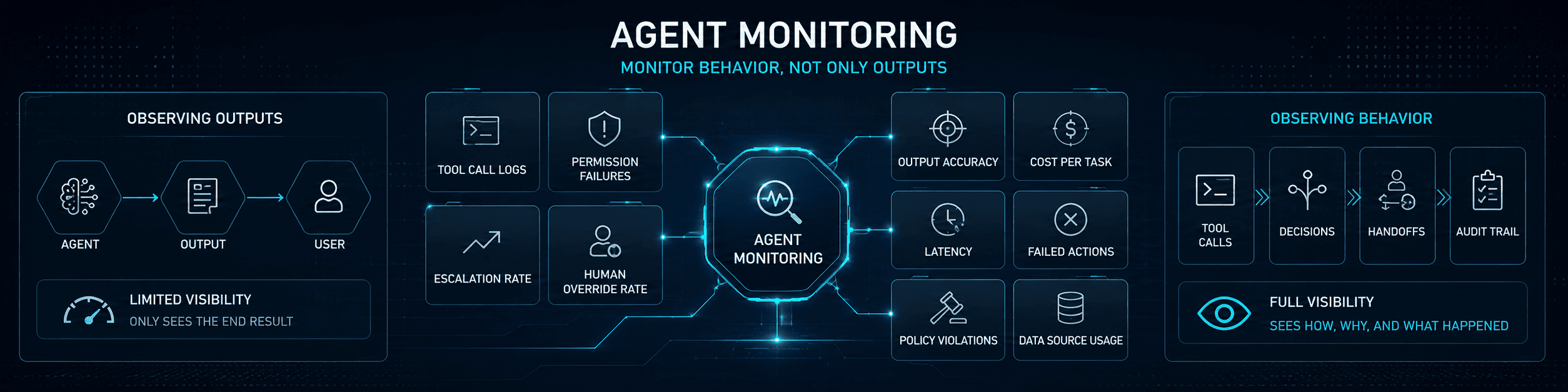
Traditional software monitoring checks uptime, errors, latency, and system health. Agents need those checks, but they also need behavior monitoring. A managed AI approach adds ongoing oversight of tool calls, failures, performance, costs, policy violations, and production incidents.
Track what the agent saw, what it decided, which tools it called, what data it used, what action it took, what failed, and where a human stepped in.
Google Cloud describes agent observability as gaining insight into the internal state and behavior of AI-powered software agents. That idea matters because a final answer is not enough to understand agent quality. The trajectory matters: the steps, tool calls, decisions, and handoffs.
Useful monitoring includes:
- Tool call logs.
- Permission failures.
- Model refusals.
- Escalation rate.
- Human override rate.
- Output accuracy checks.
- Cost per completed task.
- Latency by workflow.
- Failed action rate.
- Repeated user corrections.
- Policy violation flags.
- Data source usage.
Monitoring should connect to business outcomes. A support agent is not successful because it responds quickly. It is successful when it resolves routine work accurately, escalates the right cases, improves handling time, and avoids harmful mistakes.
Evaluate Agents Before and After Launch
Agent evaluation should cover more than answer quality. A good evaluation checks task completion, tool use, policy compliance, safety, latency, cost, and recovery from bad inputs.
Use three evaluation layers:
| Layer | What It Tests |
|---|---|
| Capability evaluation | Can the agent complete the intended task? |
| Safety evaluation | Does it avoid unsafe, unauthorized, or policy-breaking actions? |
| Production evaluation | Does it perform well with real users, messy data, and system limits? |
OpenAI’s updated Preparedness Framework describes evaluations and monitoring as part of a wider safety stack for frontier AI risks, including evaluation of model capabilities and safeguards before deployment. Business teams do not need the same framework for every internal agent, but the principle applies: stronger capability requires stronger evaluation.
Test agents against normal cases, edge cases, missing data, conflicting instructions, adversarial prompts, policy exceptions, and tool failures. Include cases where the agent should refuse, escalate, or ask for confirmation.
After launch, keep evaluating. Real usage will reveal cases that test data missed. Strong MLOps practices help teams version agent components, track production performance, manage deployments, and respond when quality starts to decline.
Control Cost Before Usage Spikes
Scaling AI agents can create cost surprises. More users, longer contexts, more tool calls, and repeated retries can increase spend quickly.
Cost controls should be designed before broad rollout:
- Set usage limits by workflow.
- Track cost per task, not only total model spend.
- Use smaller models for simple steps.
- Cache repeated lookups where safe.
- Limit unnecessary context.
- Stop loops and repeated tool calls.
- Monitor retries and failed actions.
- Use batch processing for non-urgent work.
- Review expensive workflows monthly.
Cost should be tied to value. A high-cost workflow may be acceptable if it protects revenue or saves significant manual effort. A cheap workflow may still be wasteful if nobody uses it or trusts the output.
Design for Rollback and Incident Response
Agent failures need a response plan. The plan should be written before launch.
At minimum, teams should know how to:
- Disable an agent quickly.
- Revoke tool access.
- Pause a workflow.
- Roll back changed records where possible.
- Identify affected users or customers.
- Review logs.
- Notify the right internal owner.
- Fix the rule, prompt, or integration.
- Re-test before reactivation.
This is especially important for agents that touch customer communication, payments, access, legal data, HR data, or production systems.
A safe rollout includes limited launch, version control, change logs, and clear escalation paths. If the team cannot stop or inspect the agent, the agent is not ready to scale.
The Scaling AI Operating Model
Scaling AI agents requires a shared operating model across business and technical teams.
A practical model includes:
| Function | Responsibility |
|---|---|
| Business owner | Defines the use case, success metric, and acceptable risk. |
| Product or operations lead | Maps the workflow and owns adoption. |
| AI engineer | Builds prompts, tool calls, logic, and evaluation tests. |
| Software engineer | Handles integrations, APIs, reliability, and deployment. |
| Security lead | Reviews access, data exposure, prompt injection risk, and logs. |
| Legal or compliance | Reviews regulated workflows and sensitive data use. |
| Support or enablement | Trains users and captures feedback. |
| Analytics | Measures business impact and performance. |
The model can be lightweight for simple agents. It should become more formal as risk and autonomy increase.
The mistake is letting every team build agents independently with no shared standards. That may feel fast at first, but it creates long-term risk: duplicated tools, inconsistent approvals, unknown data access, and agents that nobody owns.
A Practical Rollout Plan
Do not scale from one pilot to the whole company in one jump. Use staged expansion.
- Prove one workflow. Choose a clear, repetitive process with measurable value.
- Limit the audience. Start with one team, queue, region, product line, or internal process.
- Add controls early. Use permissions, approval rules, logs, and evaluation from the first version.
- Measure results. Track time saved, quality, cost, escalations, and user trust.
- Expand to similar workflows. Reuse the same architecture where it fits.
- Standardize patterns. Create templates for tool access, logging, escalation, and review.
- Build an agent inventory. Track every agent, owner, tool, and risk level.
- Review quarterly. Remove unused agents, update rules, and improve guardrails.
This keeps adoption moving while reducing chaos. The company learns from each workflow and builds repeatable patterns instead of one-off experiments.
Common Mistakes to Avoid
Scaling AI agents usually fails because the company moves too quickly in the wrong places and too slowly in the right ones.
Avoid these mistakes:
- Giving agents broad access because it is easier than designing permissions.
- Using prompts to store critical business rules.
- Measuring output quality but not tool behavior.
- Letting agents send customer messages without risk controls.
- Skipping human review for financial, legal, HR, or access-related actions.
- Launching agents without owners.
- Ignoring cost per completed task.
- Treating evaluation as a pre-launch task only.
- Allowing teams to build duplicate agents with different rules.
- Adding autonomy before the workflow is stable.
The safest scaling path is not the slowest one. It is the one that prevents rework, incidents, and loss of trust.
How to Measure Success
The right metrics depend on the workflow, but every scaled agent program should measure value, quality, risk, and adoption.
| Metric | What It Shows |
|---|---|
| Task completion rate | Whether the agent finishes the intended workflow. |
| Human override rate | How often people disagree with the agent. |
| Escalation rate | How often the agent needs help. |
| Accuracy rate | Whether outputs and actions match the source data and policy. |
| Time saved | Manual work removed from the process. |
| Cost per task | Financial efficiency of the workflow. |
| Tool failure rate | Integration and system reliability. |
| Policy violation rate | Safety and compliance performance. |
| User adoption | Whether teams actually use the agent. |
| Business impact | Revenue, retention, support speed, backlog reduction, or other outcome. |
Measure before and after launch. Also separate agent activity from business value. More agent responses do not always mean better performance. The goal is reliable task completion with acceptable risk.
FAQ
What Does Scaling AI Mean?
Scaling AI means moving from isolated AI pilots to repeatable, governed, measurable systems that support real business processes. For AI agents, it also means managing tools, permissions, data access, monitoring, human review, and ownership.
Why Are AI Agents Harder to Scale Than Chatbots?
AI agents can take actions. They may call tools, update systems, send messages, and trigger workflows. That makes them more useful than basic chatbots, but it also creates more risk around permissions, accuracy, security, and accountability.
What Should Be Controlled First?
Start with tool access, human review, logging, and ownership. These controls reduce the biggest risks when an agent moves from suggestion to action.
How Much Autonomy Should an AI Agent Have?
Autonomy should match risk. Low-risk tasks can be automated more freely. Financial, legal, HR, access, customer-facing, or irreversible actions should require stronger review and audit trails.
How Do You Monitor AI Agents?
Monitor tool calls, outputs, failures, escalations, human overrides, cost, latency, and business outcomes. The agent’s final answer is not enough. Teams need to see the steps that led to the action.
Can AI Agents Work Across Multiple Systems?
Yes, but cross-system agents need stronger controls. Each AI integration should have scoped permissions, logging, error handling, and clear rollback options.
What Is the Best Way to Start Scaling AI Agents?
Start with one valuable workflow, prove it with a limited group, add controls early, measure results, and then expand to similar workflows using the same patterns.
Final Thoughts
Scaling AI agents is not only about handling more requests. It is about giving agents more responsibility without losing visibility, accountability, or trust.
The companies that scale well will not be the ones with the most agents. They will be the ones with clear ownership, limited permissions, strong evaluation, useful monitoring, and human review where risk is high.
If your team has useful AI pilots but needs a safer path to production, we can help design the operating model, agent architecture, governance, evaluation, integrations, and monitoring needed to scale responsibly.