How to Find an AI Agent Use Case Worth Automating

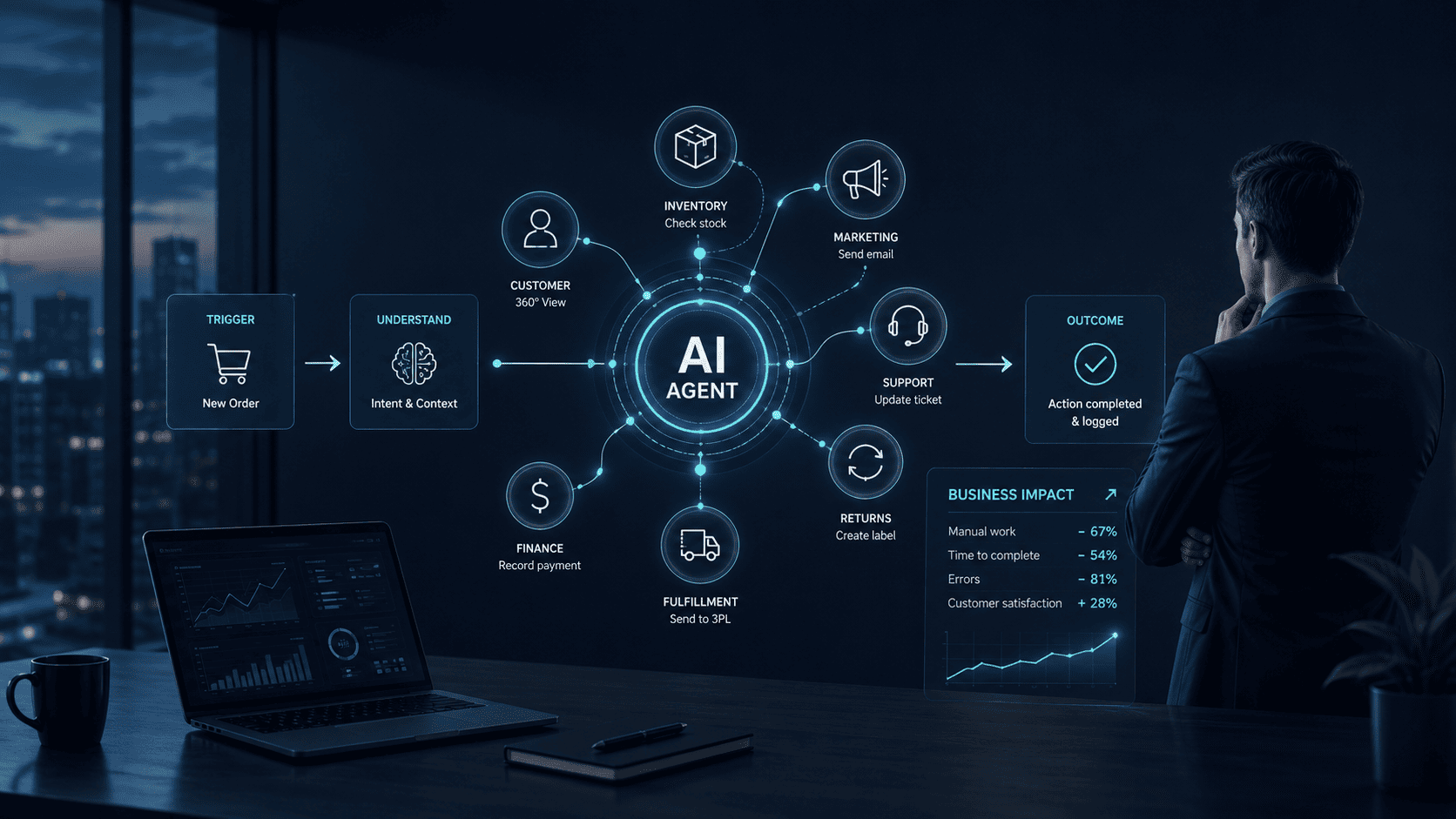
Most agentic AI examples sound useful at first: sales agents, support agents, finance agents, HR agents, research agents, and operations agents. The problem is that a list of ideas does not tell you which one is worth building.
An AI agent use case is worth automating when the workflow is frequent, measurable, rules-based enough to control, and valuable enough to justify the build. It should remove real manual work, improve speed, reduce errors, or help people make better decisions. It should also have clear limits so the agent does not create risk faster than it creates value.
Agentic AI is different from a simple assistant because it can pursue a goal with limited supervision. IBM describes agentic AI as a system that can accomplish a specific goal with limited supervision, often through agents that solve problems and coordinate subtasks.
That makes agent selection important. A weak use case becomes a demo. A strong use case becomes part of how the business operates.
This guide explains how to evaluate AI agent use cases, which examples are worth considering, which ones are better left alone, and how to turn a good idea into a controlled automation project.
Start With the Workflow, Not the Technology
The best AI agent ideas usually come from broken or overloaded workflows. They do not start with “we need an agent.” They start with a business process that creates repeated work, delays, missed handoffs, or poor visibility.
McKinsey makes a similar point about agentic AI: the value comes from reimagining and rebuilding workflows around agents, not adding agents on top of weak processes. It also warns that companies that skip this work risk building human-agent systems that fall short of the technology’s promise.
Before choosing a use case, map the workflow:
- What starts the process?
- Who owns each step?
- Which systems are involved?
- What data is needed?
- Which steps are repetitive?
- Which decisions need judgment?
- Where do delays happen?
- What happens when the process fails?
- How would the team measure improvement?
If the workflow cannot be explained clearly, it may not be ready for an agent. An AI readiness assessment can help identify gaps in process clarity, data quality, ownership, infrastructure, and governance before development begins. The team may need process cleanup, better data, or basic automation first.
What Makes an AI Agent Use Case Worth Automating?
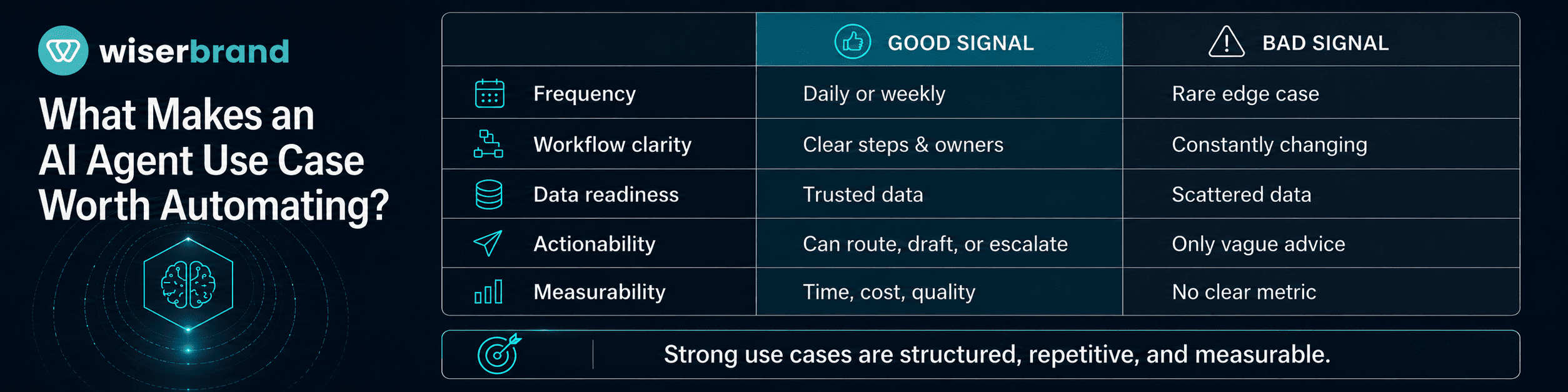
A good use case has a clear business reason. It also has enough structure for the agent to act safely.
Use this filter:
| Question | Good Signal | Bad Signal |
|---|---|---|
| Does the task happen often? | Weekly or daily volume | Rare edge case |
| Is the workflow clear? | Steps and owners are known | Process changes constantly |
| Is the data accessible? | Data exists in trusted systems | Data is scattered or unreliable |
| Can the agent take useful action? | It can draft, route, check, update, or escalate | It can only produce vague advice |
| Is risk manageable? | Risky steps can use approval | Wrong action could cause serious harm |
| Is success measurable? | Time, cost, quality, revenue, or backlog can be tracked | No clear metric |
| Will people use it? | Fits into current tools and habits | Creates another place to check |
The strongest use cases usually sit in the middle: important enough to matter, structured enough to control, and repetitive enough to pay back.
A good first agent should not be the most ambitious idea in the company. The best agentic AI examples are usually narrow enough to test and important enough to matter.
Agentic AI Examples Worth Considering
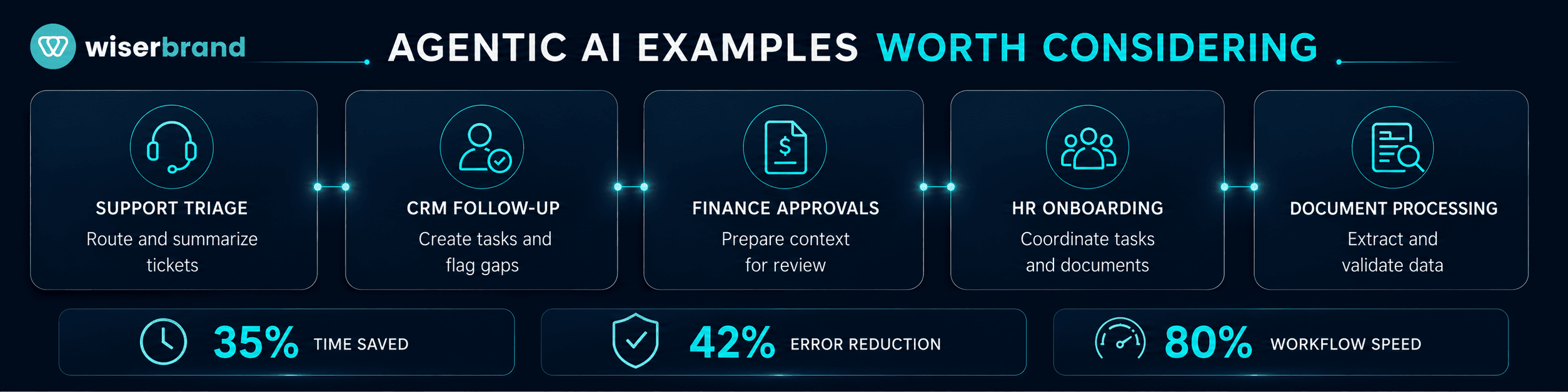
The best agentic AI examples are not generic. They connect a business problem to a specific workflow, system, owner, and success metric.
Customer Support Triage
A support triage agent can classify tickets, read customer history, summarize the issue, suggest the right queue, draft a first response, and escalate cases that match risk rules.
This is a strong use case when support teams handle high ticket volume and agents spend too much time reading context before acting. It is also measurable: handling time, first-contact resolution, backlog size, escalation rate, and customer satisfaction.
Keep human review for refunds, legal threats, angry customers, account closures, and high-value customers.
Sales Follow-Up and CRM Hygiene
A sales agent can review new leads, check account context, create follow-up tasks, summarize calls, flag missing CRM fields, and alert reps when deals go stale.
This use case works when reps lose time on admin work and managers do not trust pipeline data. The agent should help maintain the CRM without becoming another source of noise.
Good metrics include lead response time, follow-up completion rate, opportunities with next steps, stage hygiene, and forecast accuracy.
Finance Approval Preparation
A finance agent can collect invoice details, check purchase orders, summarize exceptions, prepare approval packets, and route requests to the right reviewer.
This is useful when finance teams spend time gathering context before making routine approvals. The agent should prepare the decision, not own the decision.
Keep approval gates for payments, vendor changes, large expenses, tax-sensitive issues, and policy exceptions.
HR Onboarding Coordination
An HR onboarding agent can create onboarding tasks, collect missing documents, notify IT and managers, answer common new-hire questions, and monitor incomplete steps.
This works when onboarding requires several teams and small misses create a poor employee experience. The agent can reduce coordination work while HR stays responsible for sensitive decisions.
Good metrics include onboarding completion time, missed tasks, HR admin hours, and new-hire satisfaction.
Operations Exception Monitoring
An operations agent can watch for stuck orders, missing data, delayed tasks, failed handoffs, or unusual patterns across systems. It can create alerts, assign owners, and summarize what needs attention.
This is a strong internal use case because it helps managers see problems earlier. It also avoids some customer-facing risk because the agent can work in review mode.
Metrics include exception volume, resolution time, missed SLA count, and manual status-checking time.
Knowledge and Research Agent
A research agent can gather internal documents, summarize policies, compare information, prepare briefs, and cite sources for review.
This can be useful for legal, sales, customer success, product, and strategy teams. It works best when the agent has access to approved knowledge sources and must show evidence.
The output should remain reviewable. Research agents should not make final business decisions without human judgment.
Back-Office Document Processing
A document agent can extract data from invoices, contracts, shipping documents, forms, or vendor files. It can validate fields, flag missing information, and prepare records for review.
This use case is often valuable because document work is repetitive and time-consuming. It is also easier to measure through processing time, error rate, backlog reduction, and manual review volume.
Human approval should stay in place for uncertain extractions and high-impact actions.
Use Cases That Are Usually Not Ready
Some ideas sound good but fail because the process is too vague or the risk is too high.
Avoid starting with use cases like these:
| Use Case | Why It Is Risky |
|---|---|
| “Agent that runs the whole sales process” | Too broad and hard to control. |
| “Agent that makes strategic decisions” | Usually lacks context, accountability, and clear metrics. |
| “Agent that approves refunds automatically” | Risky without policy logic, thresholds, and review. |
| “Agent that replaces account managers” | Relationship work needs judgment and trust. |
| “Agent that updates every system” | Broad permissions create security and data risks. |
| “Agent that answers anything employees ask” | Scope becomes impossible to evaluate. |
A weak agent scope often includes words like “everything,” “all,” “any,” or “fully autonomous.” Those words are warning signs.
Narrow use cases are easier to launch, measure, and improve. They also build trust with the people who will use the system.
Score Use Cases Before You Build
A simple scorecard helps teams compare agentic AI examples without getting distracted by the most exciting demo. This type of use-case prioritization is often part of AI strategy consulting, where opportunities are evaluated against business impact, feasibility, risk, and data readiness.
Rate each use case from 1 to 5:
| Factor | What to Score |
|---|---|
| Volume | How often the workflow happens. |
| Manual effort | How much time people spend on it. |
| Business impact | Revenue, cost, customer experience, risk, or speed. |
| Process clarity | How well the workflow and owners are defined. |
| Data readiness | How clean and accessible the data is. |
| Actionability | What useful action the agent can take. |
| Risk level | How serious a wrong action would be. |
| Measurement | How clearly success can be tracked. |
| Adoption fit | How naturally it fits into existing tools. |
High-value use cases have high volume, high manual effort, clear process, good data, useful actions, and manageable risk. If the business impact is high but data readiness is low, treat data cleanup as part of the project.
Use this scoring to pick the first agent. Do not pick the idea with the most impressive name. Pick the one most likely to work in production.
Agentic AI Examples vs. Traditional Automation
Traditional automation is best when the rule is clear. AI agents are useful when the workflow needs language understanding, context, tool use, and step-by-step reasoning.
| Task Type | Better Fit |
|---|---|
| Send an email after form submission | Traditional automation |
| Update a status based on one field | Traditional automation |
| Route a ticket using fixed categories | Traditional automation or simple AI |
| Summarize a long customer history | AI agent |
| Extract details from messy documents | AI agent with review |
| Compare policy, customer history, and order data | AI agent |
| Prepare a decision packet for approval | AI agent |
| Take high-risk action without review | Usually neither |
Microsoft describes AI agents as systems that can work with data, tools, and people to automate business processes or offer support, including task-specific agents connected to APIs, enterprise systems, and workflows.
That does not mean every automation needs an agent. If a simple workflow rule solves the problem, use the rule. Agents are most useful when the workflow needs reasoning across messy inputs, changing context, or multiple systems.
Data Readiness Matters More Than the Model
Many agent projects fail because the data is not ready. Even strong agentic AI examples break down when the agent cannot trust the records, policies, or tools behind the workflow. The model may be capable, but it cannot act well on missing, outdated, duplicate, or conflicting information.
Check data readiness before building:
- Are the required records available?
- Are fields complete enough?
- Is there a single source of truth?
- Are policies current and approved?
- Can the agent access data securely?
- Are there conflicting rules across teams?
- Can outputs be traced back to sources?
- Are there privacy or compliance limits?
If the agent depends on poor data, it may produce confident but unreliable actions. A strong use case with weak data may still be worth pursuing, but the first phase should include data cleanup and access design.
Risk and Governance Should Shape the Use Case
Agentic AI use cases need risk controls because agents can take action. The higher the autonomy, the stronger the governance should be.
NIST’s AI Risk Management Framework gives organizations a way to manage AI risks through Govern, Map, Measure, and Manage functions. That structure is useful for agent projects because risk changes across the lifecycle, from use case selection to deployment and monitoring.
At the use case stage, define:
| Control | Question |
|---|---|
| Scope | What can the agent do and not do? |
| Permissions | What systems and data can it access? |
| Approval | Which actions need human review? |
| Logging | What decisions and tool calls are recorded? |
| Escalation | When does the agent hand off to a person? |
| Testing | Which cases must pass before launch? |
| Monitoring | Which metrics show quality and risk? |
| Owner | Who maintains the use case after launch? |
Security should also be part of use case selection. OWASP’s Top 10 for LLM Applications includes risks such as prompt injection, insecure output handling, sensitive information disclosure, and excessive agency. These risks become more important when agents use tools and act across systems.
A use case is not production-ready until the team understands what could go wrong.
The Use Case Selection Blueprint
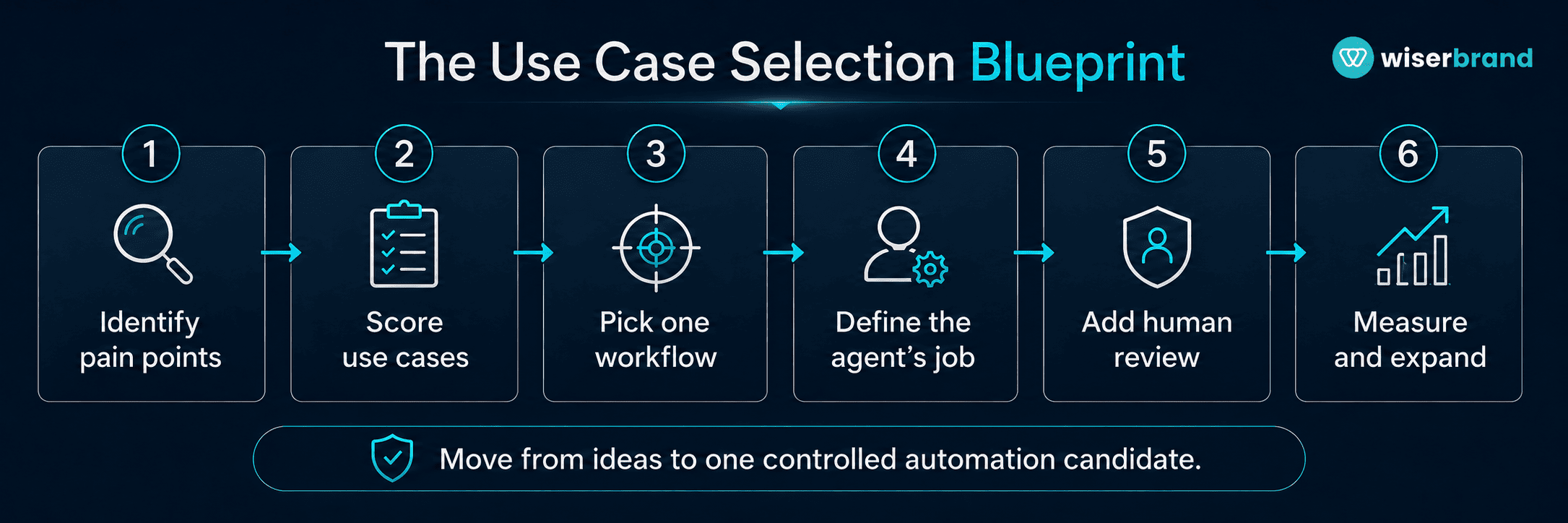
Use this process to move from agentic AI examples to an automation candidate.
- List workflow pain points. Ask teams where work repeats, stalls, or depends on manual follow-up.
- Group ideas by department. Sales, support, finance, HR, operations, and back office usually produce different agent opportunities.
- Remove vague ideas. Cut anything that cannot be tied to a specific workflow.
- Score the remaining use cases. Use volume, manual effort, business impact, process clarity, data readiness, risk, and measurement.
- Pick one narrow workflow. Choose a use case that can launch in a limited scope.
- Define the agent’s job. Decide what it reads, what it writes, what it can do, and what it must escalate.
- Design human review. Keep people in control of high-risk actions.
- Build the smallest useful version. A rapid AI proof of concept can test one queue, region, process, customer segment, or document type before the company commits to a broader rollout.
- Measure before and after. Track the business result, not only the agent’s activity.
- Expand only after proof. Reuse the pattern for similar workflows.
This blueprint helps prevent AI projects from turning into scattered experiments. It also keeps the focus on business value.
How to Measure a Good Use Case
Good agentic AI examples should have clear metrics before development starts.
| Use Case | Primary Metrics |
|---|---|
| Support triage | Handling time, backlog, escalation rate, first-contact resolution. |
| Sales follow-up | Response time, completed tasks, stale deals, CRM completeness. |
| Finance approvals | Approval cycle time, exception rate, manual review time. |
| HR onboarding | Task completion rate, onboarding time, missed steps. |
| Document processing | Processing time, extraction accuracy, review rate. |
| Operations monitoring | Exception resolution time, missed SLAs, manual checks avoided. |
| Research agent | Time to brief, source coverage, human correction rate. |
Do not measure only usage. People may use an agent because it is available, not because it improves the workflow.
Measure time saved, error reduction, quality, speed, cost, risk, and adoption. A use case is worth automating when those metrics improve enough to justify the build and maintenance.
Common Mistakes to Avoid
The most common mistake is choosing agentic AI examples because they sound impressive. The second is trying to automate too much at once.
Avoid these mistakes:
- Starting with a broad use case instead of a specific workflow.
- Building before data access and quality are understood.
- Giving the agent more permissions than it needs.
- Hiding critical business rules inside prompts.
- Skipping human review for high-risk actions.
- Measuring demos instead of production outcomes.
- Ignoring the people who own the workflow.
- Launching without logs, escalation, or monitoring.
- Treating agentic AI examples as copy-paste templates.
- Expanding before the first use case is stable.
A good agent use case should make work easier to run. If it creates confusion, extra review, or unclear accountability, the design needs to change.
FAQ
What Are Agentic AI Examples?
Agentic AI examples include support triage agents, sales follow-up agents, finance approval agents, HR onboarding agents, operations monitoring agents, research agents, and document processing agents. The best examples are tied to specific workflows, not broad job titles.
How Do You Find an AI Agent Use Case?
Start by mapping workflows where teams spend time on repeated tasks, manual handoffs, data lookup, document review, or status tracking. Then score each idea by volume, business impact, data readiness, process clarity, risk, and measurement.
What Makes a Use Case Worth Automating?
A use case is worth automating when it happens often, follows a clear workflow, uses accessible data, has measurable value, and can be controlled with permissions, approvals, logs, and escalation paths.
What Should Not Be Automated With AI Agents?
Avoid starting with vague, high-risk, or poorly owned workflows. Examples include fully autonomous strategic decisions, broad system updates, automatic approvals for sensitive actions, or agents that can answer anything without scope limits.
Are AI Agents Better Than Traditional Automation?
Not always. Traditional automation is better for simple rule-based workflows. AI agents are better when the workflow requires language understanding, context, reasoning across data sources, or multi-step tool use.
How Do You Reduce Risk in an Agentic AI Use Case?
Limit scope, use least-privilege access, keep high-risk actions human-approved, log tool calls, test edge cases, monitor performance, and assign a business owner.
What Is the Best First AI Agent to Build?
The best first agent is narrow, useful, and measurable. Support triage, document processing, CRM hygiene, onboarding coordination, and operations exception monitoring are often strong starting points.
Final Thoughts
Finding an AI agent use case worth automating is mostly a workflow decision. Agentic AI examples are useful only when they point to a process the business can improve. The question is not which agent sounds most advanced. The question is where an agent can remove repeated work, improve speed, reduce errors, or help people act with better context.
The strongest use cases have clear ownership, reliable data, manageable risk, and measurable business value. They start narrow, keep humans involved where judgment matters, and expand after the first workflow proves itself.
If your team has a list of agentic AI examples but needs help choosing what to automate first, our AI agent development team can evaluate use cases, map workflows, design controls, build the agent, and measure production results.