Agentic Workflows: How AI Agents Execute Business Processes

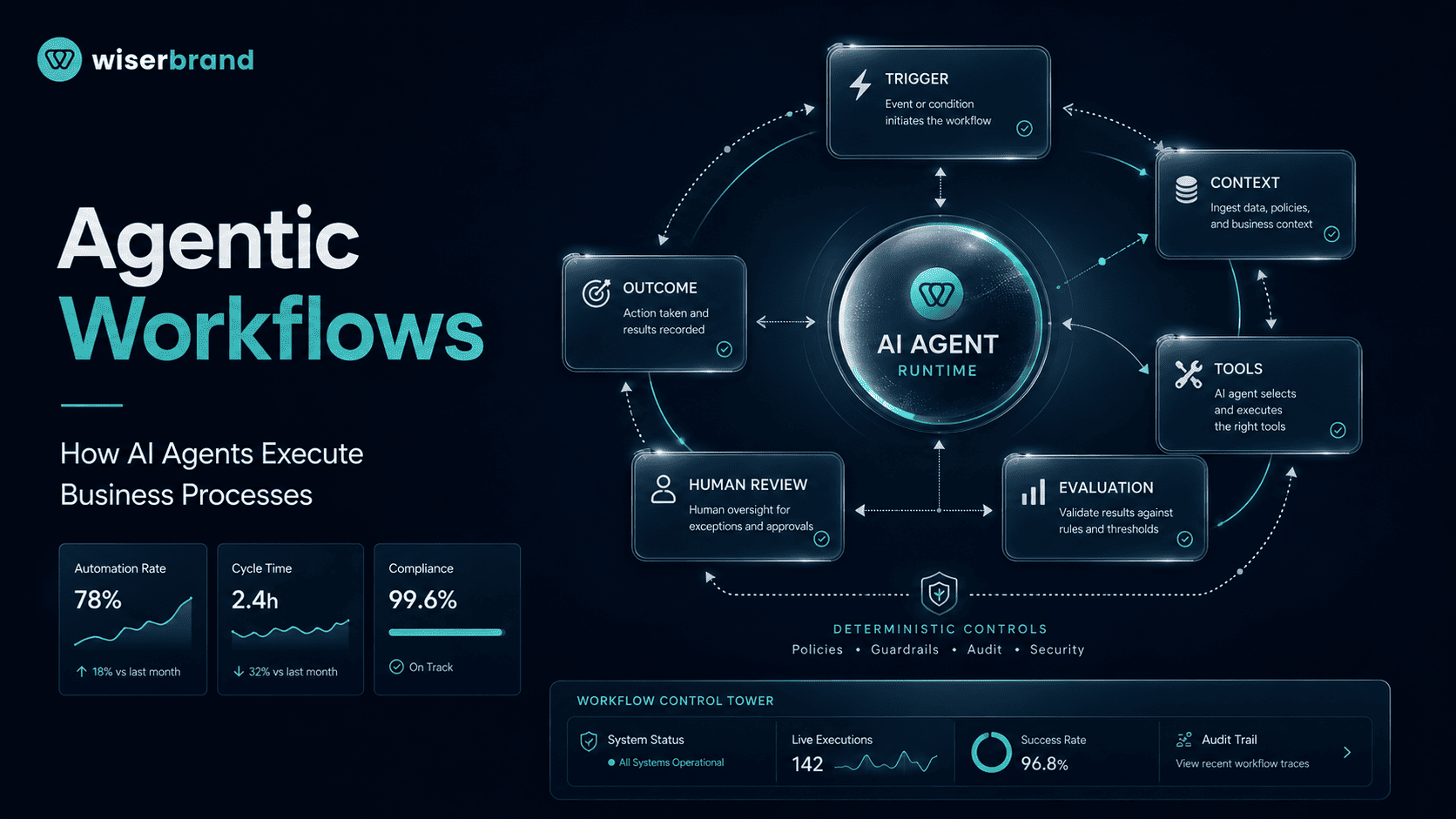
Agentic workflows are business processes in which an AI agent controls part of the execution. Instead of only generating a response, the agent interprets a goal, selects tools, uses business data, evaluates intermediate results, and decides which permitted step should happen next.
The agent should not control every part of the process. Stable calculations, permissions, eligibility rules, approvals, and irreversible transactions are usually safer in deterministic software. The agent handles the variable work around them, such as interpreting an email, investigating an exception, choosing an approved tool, or preparing a recommendation.
This distinction turns an AI demonstration into an operational system. A useful agentic workflow has a clear trigger, bounded authority, reliable integrations, durable state, exception handling, human escalation, and metrics tied to the completed business process.
What Are Agentic Workflows?
AI agent development turns this pattern into a production workflow by combining models, instructions, business data, tools, state, permissions, evaluation, and escalation around a defined outcome. The agent has some control over workflow execution. It can decide which approved action to take, respond to a tool result, retry within limits, or transfer the case when it cannot finish safely.
OpenAI defines an agent as a system that independently accomplishes tasks on a user’s behalf. Its practical agent guide separates agents from applications that merely call a language model: an agent uses a model to manage workflow execution and dynamically selects tools within guardrails.
An agentic workflow may be short. A support agent can read a ticket, retrieve an order, check a return rule, and draft a response. It may also be long-running. A procurement agent can collect vendor documents, wait for an approval, resume after a system event, and prepare the next action several days later.
The defining feature is not the number of steps or agents. It is the presence of bounded agentic judgment inside the process.
Agentic Workflow vs Traditional Automation
Traditional automation follows explicit logic. The designer defines the sequence, conditions, data transformations, and actions in advance. This model is reliable when the inputs and rules are predictable.
An agentic workflow introduces a probabilistic decision-maker. The agent interprets context and chooses among allowed steps. This helps when a process depends on unstructured information, variable exceptions, or tool selection that would be expensive to represent through a large rule tree.
| Decision Area | Traditional Workflow | Agentic Workflow |
|---|---|---|
| Path selection | Defined by rules or code | Selected by an agent within constraints |
| Inputs | Usually structured and expected | Can include documents, messages, and ambiguous requests |
| Tool use | Called at predetermined steps | Selected according to the current context |
| Exception handling | Explicit branches | Agent can investigate and select an approved response |
| Output | Predictable format and behavior | Variable output that requires evaluation |
| Best fit | Stable, repeatable processes | Variable multi-step work with semantic judgment |
| Main risk | Incorrect or incomplete rules | Incorrect reasoning, tool misuse, or unsupported action |
The architectures can work together. Business process automation can keep stable rules, approvals, routing, and system actions deterministic while agentic components handle variable interpretation and exception investigation. AWS recommends controlled workflow services for structured processes and agents for natural-language interaction and flexible goal fulfillment. This hybrid model keeps the predictable parts predictable while adding agentic behavior where it provides real value.
How an Agentic Workflow Executes a Process
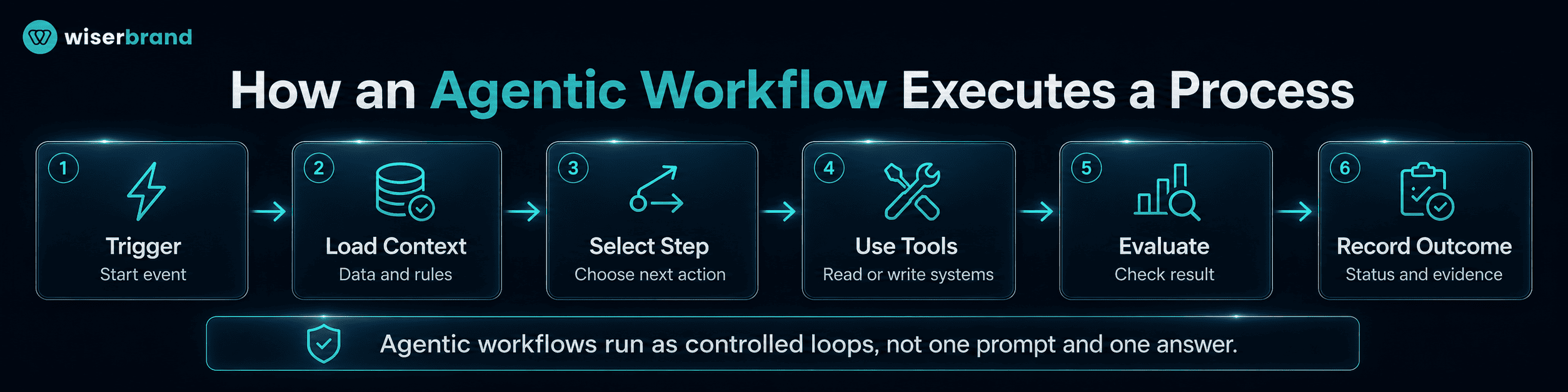
A production agentic workflow usually follows an execution loop rather than one prompt and one answer.
- A trigger starts the workflow. The trigger can be a user request, incoming email, CRM change, support ticket, scheduled event, document upload, monitoring alert, or message from another system. It should create a workflow instance with a unique identifier for state, tool calls, approvals, retries, and final status.
- The system loads context and constraints. The workflow retrieves the records, policies, messages, or documents required for the task. It also loads available tools, permissions, prohibited actions, approval thresholds, turn limits, timeout rules, and escalation conditions. Context and authority remain separate. An agent may read a payment record without receiving permission to change it.
- The agent selects the next permitted step. The model interprets the goal and current state. It may ask for missing information, retrieve another record, call a service, prepare a structured output, or escalate. Some tasks benefit from an initial plan, while others work better as an iterative loop that responds to each tool result. IBM describes agentic workflows as multistep, iterative processes in which agents can adapt their actions as conditions change.
- Tools read or change external systems. Tools may retrieve CRM data, search approved documents, create a ticket, update an ERP record, send a message, or invoke a deterministic calculation. Each tool needs a narrow purpose, validated parameters, scoped credentials, and a structured result. For write actions, the workflow should distinguish proposed, approved, submitted, completed, failed, and reversed states.
- The workflow evaluates the result. Deterministic checks, an evaluation model, or a human reviewer can verify the result. The agent may continue, revise, retry a transient failure, choose another approved tool, request clarification, escalate, or finish. Retries need limits because repeated paid API calls, duplicate messages, or repeated transactions can turn a small error into an incident.
- The system records the outcome. The final record should include workflow status, relevant inputs, retrieved sources, model and instruction version, structured decisions, tool calls, approvals, errors, and business result. Operators need execution evidence, not hidden chain-of-thought. The goal is to understand what the system received, what it did, which controls applied, and how the process ended.
The Core Components
| Component | Responsibility |
|---|---|
| Trigger | Starts a new workflow instance |
| Agent | Interprets context and selects permitted steps |
| Model | Supports language understanding and decision-making |
| Instructions | Define role, process guidance, scope, and escalation |
| Tools | Retrieve information or perform external actions |
| Workflow engine | Maintains state, sequencing, timers, and recovery |
| Rules and policy | Enforce calculations, eligibility, limits, and prohibited actions |
| Memory and state | Preserve approved context across steps or sessions |
| Human work queue | Handles approvals, corrections, and exceptions |
| Observability | Records execution, quality, failures, latency, and cost |
Not every implementation needs a separate product for each component. The responsibilities still need to exist somewhere in the architecture.
Deterministic and Agentic Boundaries
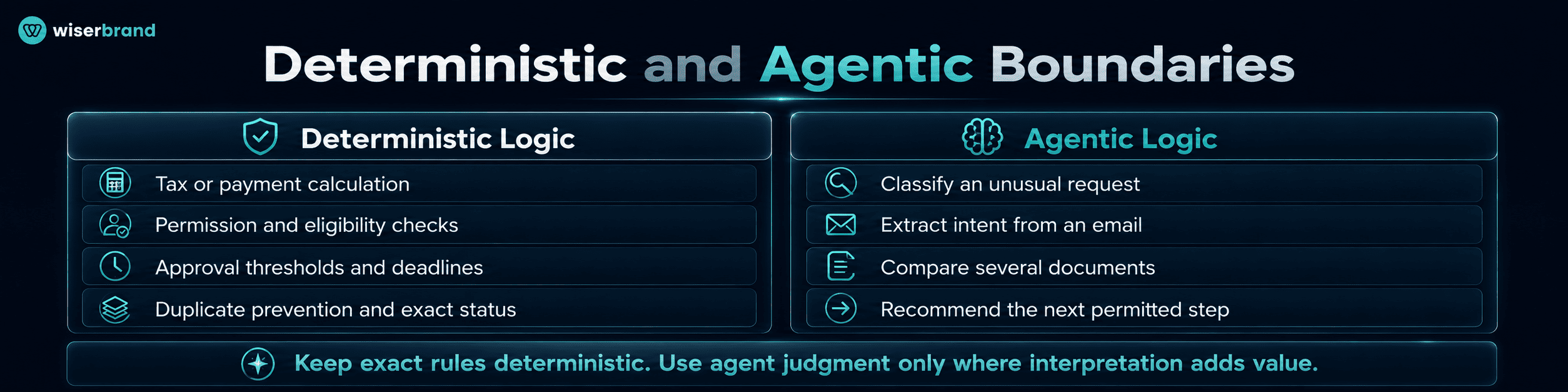
The most important design decision is where model judgment begins and ends.
Use deterministic logic when the result must be exact and the rule can be expressed clearly:
- calculate tax or a payment amount;
- verify a required field;
- check an account permission;
- compare a value with an approval threshold;
- prevent a duplicate transaction;
- apply an eligibility rule;
- enforce a deadline;
- record a system status.
Use agentic logic when the work requires interpretation or flexible investigation:
- classify an unusual request;
- extract intent from an email;
- compare several documents;
- decide which approved data source to query;
- summarize an exception;
- prepare questions for missing information;
- recommend the next permitted step.
A finance agent may explain why an invoice failed matching. The purchase-order match, tax calculation, bank-detail validation, and payment approval should remain in controlled services.
This boundary reduces risk and makes evaluation more practical. The model is tested on the judgment it actually provides rather than on tasks conventional software can perform more reliably.
Common Agentic Workflow Patterns
Agentic workflows can use one agent, several agents, or a hybrid of agents and deterministic orchestration. The pattern should follow the location of judgment, permission boundaries, and workflow ownership.
| Pattern | How It Works | Best Fit |
|---|---|---|
| Single-agent tool loop | One agent retains control and uses several tools | One policy and context can manage the process |
| Router and specialist | A router classifies the request and sends it to a specialist or fixed workflow | Shared entry points across distinct domains |
| Manager and workers | A manager agent calls specialist agents as tools and synthesizes their work | Separate tasks need different instructions or evaluation |
| Sequential handoff | Responsibility transfers from one stage or agent to another | The next component must own the case or user interaction |
| Parallel analysis | Independent investigations run concurrently and are later combined | Workstreams need separate agentic judgment or permission boundaries |
| Evaluator and optimizer | One component proposes an output and another checks it against criteria | Drafting, review, and iterative improvement |
| Human approval gate | The workflow pauses until an authorized person approves, rejects, or edits the action | Financial, legal, HR, customer-impacting, or irreversible actions |
A single agent does not become multi-agent because it calls five APIs, retrieves several documents, or runs parallel database queries. Separate agents are justified when parts of the process need distinct instructions, context, tools, permissions, evaluation criteria, or ownership.
OpenAI identifies manager and decentralized handoff patterns as common multi-agent approaches, while recommending that teams first maximize a single agent where practical. Every handoff should define required input, structured output, transferred context, new owner, timeout, rejection conditions, and fallback route.
An evaluator agent remains a model-based check. It does not replace human authorization for a high-impact action. Microsoft’s durable workflow guidance describes human interaction as a process that can pause for input and resume after approval or rejection. Production agent implementations commonly combine explicit sequencing, numerical thresholds, least-privilege access, retries, dead-letter handling, and approval gates.
Business Process Examples
Customer Support Resolution
A support workflow may begin when a ticket arrives:
- The agent identifies the customer and issue.
- Tools retrieve order history and current policy content.
- Rules determine which actions are available.
- The agent asks for missing information or selects an approved resolution.
- Low-risk actions, such as creating a replacement request within policy, can proceed through a controlled tool.
- Refunds above a threshold move to approval.
- The workflow records the resolution and updates the ticket.
Measure task completion, first-contact resolution, repeat contact, human escalation, tool failures, and cost per resolved case.
Invoice Exception Handling
A deterministic workflow extracts invoice data, matches the purchase order, validates totals, and checks vendor records. The agent enters when the standard match fails.
It can compare the invoice with the purchase order and receiving record, summarize the discrepancy, retrieve the relevant policy, and recommend the correct exception queue. Payment release stays behind an approval rule.
The main metrics are exception cycle time, manual touches, correction rate, duplicate payment attempts, and approved invoices per employee.
Sales and Revenue Operations
A CRM event can trigger an agentic workflow when an opportunity becomes inactive or a new account reaches a qualification stage.
The agent can review account history, meeting notes, engagement, and open tasks. It may prepare an account brief, identify missing CRM data, draft follow-up, and create a proposed next step.
Pricing exceptions, forecast commitments, and customer promises remain human-owned. Useful metrics include time to prepared brief, accepted task rate, stale opportunity reduction, and manual CRM work per account.
Procurement and Vendor Onboarding
The workflow can collect forms, contracts, tax records, security questionnaires, and banking evidence. Document services extract fields. Rules check required documents and approved thresholds. The agent summarizes gaps and coordinates follow-up.
Separate review may be justified when legal, security, finance, and operational risk require different instructions or data access. The workflow needs one final owner and a rule for conflicting recommendations.
IT Service Management
An IT agent can read a request, check device and account data, search approved procedures, run diagnostics, and prepare or execute a bounded fix.
Password resets, access changes, scripts, and infrastructure actions need identity checks, narrow tools, and rollback. The agent should stop after repeated failure or when the issue crosses into security response.
Order Exception Management
An ERP or OMS event can start a workflow when an order is delayed, blocked, or incomplete.
The agent may retrieve inventory, payment, carrier, and customer records; identify the likely cause; and recommend transfer, substitution, customer communication, or escalation. Deterministic rules control refunds, cancellations, compensation limits, and inventory reservations.
The process should be evaluated on time to resolution, order recovery, customer impact, human intervention, and failed or repeated actions.
When an Agentic Workflow Is the Right Fit
Consider agentic workflows when several of these conditions are present:
- the process is repeatable but its path varies;
- inputs include emails, documents, conversations, or other unstructured data;
- employees spend time investigating across several systems;
- the decision requires semantic comparison or context-sensitive judgment;
- the rules have become difficult to maintain because exceptions dominate;
- the system can use bounded tools and clear approval rules;
- the output and process outcome can be evaluated;
- failures can be detected and contained.
OpenAI’s implementation guidance recommends agents for workflows involving complex decisions, difficult-to-maintain rules, or heavy reliance on unstructured data. It also states that deterministic software may be sufficient when those conditions do not apply.
When Not to Use an Agentic Workflow
Do not add an agent when:
- a stable rule or integration solves the task;
- the process has no agreed owner or expected outcome;
- source data is unreliable or inaccessible;
- almost every case requires negotiation or specialist judgment;
- the action cannot be verified before serious harm occurs;
- the business cannot monitor or disable the workflow;
- the expected volume does not justify integration and maintenance;
- a predictive model, optimization engine, or search system is the real requirement.
A scheduled API synchronization is automation, not an agentic workflow. A dashboard alert is not an agent. A chatbot that only returns generated text is not an agent unless the model controls workflow execution.
Production Architecture
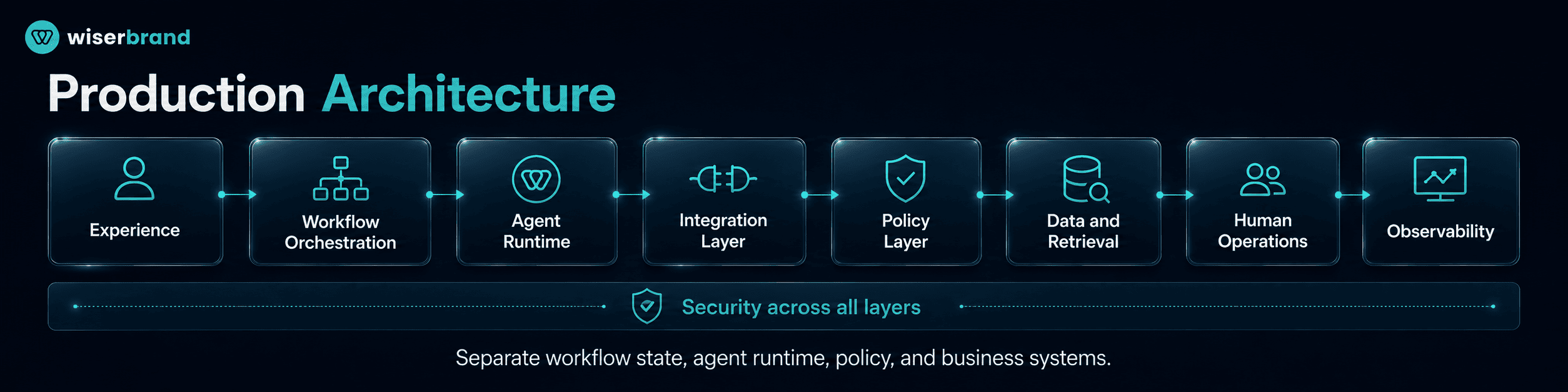
A production architecture should separate business process state from the model session. AI integration connects agents with CRM, ERP, help desk, databases, document stores, and external services through controlled APIs and workflow actions.
| Layer | Purpose |
|---|---|
| Experience | User interface, inbox, portal, API, or event source |
| Workflow orchestration | State, sequencing, timers, branching, and recovery |
| Agent runtime | Model calls, instructions, tool selection, and termination |
| Integration layer | CRM, ERP, help desk, databases, document stores, and external services |
| Policy layer | Permissions, thresholds, approvals, and hard business rules |
| Data and retrieval | Approved operational records and knowledge sources |
| Human operations | Review queues, exception management, and incident handling |
| Observability | Traces, metrics, evaluations, cost, and workflow status |
| Security | Identity, secrets, network boundaries, data controls, and threat detection |
The workflow engine should be able to resume after a model timeout, infrastructure restart, tool outage, or delayed approval. Microsoft’s current durable-agent guidance emphasizes checkpointing state transitions so completed model and tool steps are not repeated after a failure.
Durable State, Retries, and Idempotency
Long-running business processes cannot depend on one uninterrupted model session. Store approved state outside the prompt and checkpoint after meaningful transitions.
Every write tool should support idempotency or an equivalent duplicate-prevention mechanism. A retry must not send the same customer email twice, create two refunds, or update one record repeatedly.
Define:
- retryable and non-retryable errors;
- maximum retries;
- backoff;
- timeout;
- compensation or rollback;
- dead-letter queue;
- human escalation;
- final failure status.
Tool and Permission Design
Tools should expose business capabilities, not raw unrestricted system access. Prefer create_refund_request with policy validation over a generic database write tool.
Assign each tool a risk level based on data sensitivity, write access, reversibility, permissions, financial impact, and external exposure. High-risk tools should require stronger validation or human approval.
Observability and Evaluation
Production agentic workflows also benefit from MLOps practices for versioning, evaluation, monitoring, controlled releases, regression testing, and rollback as models, prompts, tools, and policies change.
- workflow and case identifier;
- model and instruction version;
- retrieved sources;
- tool selection and parameters;
- structured tool results;
- handoffs;
- retries and errors;
- approval decision;
- final workflow status;
- business outcome.
OpenAI’s agent tooling includes tracing for inspecting workflow execution, along with configurable handoffs and guardrails for agent applications.
Security and Governance Risks
Agentic systems create risk because model output can influence real tools and records.
| Risk | Example | Control |
|---|---|---|
| Prompt injection | A malicious document tells the agent to ignore policy | Isolate untrusted content, validate instructions, restrict tools |
| Excessive agency | The agent has broader write access than the task needs | Least privilege, narrow tools, transaction limits |
| Identity abuse | A workflow acts with the wrong user or service authority | Strong authentication, per-action authorization, scoped credentials |
| Data leakage | Sensitive records appear in prompts, outputs, or logs | Data minimization, masking, access controls, retention rules |
| Memory poisoning | False information persists across future runs | Trusted memory writes, provenance, expiry, correction controls |
| Duplicate action | A retry repeats a payment, message, or update | Idempotency, state checks, confirmed tool results |
| Unbounded execution | The agent loops or consumes excessive resources | Turn, time, cost, and tool-call limits |
| Weak handoff | Context or ownership is lost between agents | Typed handoff contracts and final ownership |
OWASP describes excessive agency as a condition in which excessive functionality, permissions, or autonomy allows damaging actions after model failure or manipulation. OWASP also notes that the impact of prompt injection depends heavily on the business context and the agency granted to the application.
Governance should be based on impact, reversibility, data sensitivity, permission level, regulatory requirements, and external exposure. Agent count alone does not determine risk. One agent with payment access may require stronger controls than several read-only research agents.
NIST’s AI Risk Management Framework organizes AI risk work through Govern, Map, Measure, and Manage. Its core guidance assigns responsibility for risk decisions and calls for defined roles in human-AI oversight.
Implementation Blueprint
- Select one bounded process.
Choose a recurring workflow with a clear trigger, owner, outcome, and measurable baseline. Avoid beginning with a general agent that can “handle operations.”
- Map the current work.
Document systems, data, decisions, exceptions, approvals, active work time, waiting time, error cost, and final status.
- Separate deterministic and agentic steps.
Keep stable validation, calculations, permissions, and irreversible gates in code or configured rules. Give the agent only the judgment that the workflow needs.
- Define authority.
List what the agent may read, recommend, draft, update, and execute. Add limits by record type, amount, user, system, and environment.
- Create clear tools.
Build narrow, tested operations with structured input and output. Validate parameters and return confirmed status.
- Build a single-agent baseline.
Start with one agent plus tools and deterministic controls. Add specialists only when testing shows a concrete problem with context, instructions, permissions, evaluation, or ownership.
- Add state and recovery.
Use workflow identifiers, checkpoints, timeouts, retries, duplicate protection, and a dead-letter or manual exception path.
- Create evaluation cases.
Test normal requests, missing data, conflicting sources, tool outages, stale records, repeated events, malicious instructions, unauthorized actions, and cases that must escalate.
- Launch with limited authority.
Begin in read-only or draft mode. Add reversible writes before high-impact actions.
- Monitor business outcomes.
Measure the completed workflow, not only response quality. Review failures and human corrections to improve instructions, tools, rules, and process design.
- Expand through governed releases.
Treat each new tool, data source, agent, model, or permission as a change that needs testing and ownership.
- Simplify after launch.
Remove tools, prompts, agents, and steps that do not improve completion, quality, control, or maintainability.
How to Measure Agentic Workflows
| Measurement Area | Example Metrics |
|---|---|
| Completion | Successful workflows, abandoned cases, unresolved exceptions |
| Speed | End-to-end cycle time, active handling time, waiting time |
| Human effort | Manual touches, approval time, escalation rate |
| Quality | Correct outcome, correction rate, reopened or repeated work |
| Tool reliability | Tool success, retry rate, timeout rate, duplicate prevention |
| Agent behavior | Correct tool selection, unauthorized attempts, loop rate |
| Economics | Cost per completed workflow, model and integration cost |
| Business outcome | Revenue protected, backlog reduced, response improved, cash released |
| Governance | Incidents, unresolved alerts, outdated versions, audit evidence |
Evaluate by workflow type and risk tier. A support agent and a payment exception agent should not share the same acceptance thresholds.
Cost per model call is rarely the deciding metric. Cost per correctly completed workflow is more useful because it includes retries, human review, failed tools, and rework.
Common Implementation Mistakes
- Turning every process step into a separate agent.
- Giving one general agent dozens of overlapping tools without testing selection accuracy.
- Using prompts as the only place for permissions and approval limits.
- Connecting the model directly to production databases with broad write access.
- Treating a generated statement as proof that an external action completed.
- Storing business state only in conversation history.
- Retrying non-idempotent actions without duplicate protection.
- Adding a reviewer agent and calling it human oversight.
- Monitoring final answers without recording tool results and workflow status.
- Measuring autonomy instead of completed business outcomes.
- Scaling before the team can pause, inspect, and recover the workflow.
FAQ
What Is an Agentic Workflow?
An agentic workflow is a structured business or software process in which an AI agent controls part of execution. The agent interprets context, selects approved tools, responds to intermediate results, and decides which permitted step should occur next.
How Is an Agentic Workflow Different From an AI Workflow?
An AI workflow can use AI for one fixed step, such as classification or summarization, while conventional logic controls the process. An agentic workflow gives an AI agent some responsibility for selecting and sequencing actions.
Do Agentic Workflows Require Multiple Agents?
No. Many agentic workflows use one agent with several tools and deterministic controls. Multiple agents are useful when separate stages need distinct instructions, context, permissions, evaluation, or ownership.
Can an Agentic Workflow Run Without Human Review?
It can complete low-risk, bounded, and reversible actions without case-by-case review after the organization has validated the workflow. High-impact, sensitive, or difficult-to-reverse actions should use approval or another strong control appropriate to the risk.
Which Business Processes Are Good Candidates?
Good candidates include support resolution, document-heavy intake, invoice exceptions, sales preparation, procurement onboarding, IT service management, and order exceptions. The process should be repeatable, measurable, and supported by reliable systems and data.
What Tools Do AI Agents Use?
Agents can use retrieval services, databases, APIs, workflow actions, messaging systems, CRMs, ERPs, help desks, document processors, code execution environments, and other agents. Each tool should have a narrow purpose, scoped permissions, validation, and a structured result.
How Should a Business Start?
Choose one bounded process, map the current workflow, separate deterministic rules from agentic judgment, and build a read-only or draft-first version. Add write authority only after realistic testing, monitoring, recovery, and human escalation work reliably.
Final Thoughts
Agentic workflows extend automation into processes where the path cannot be fully specified in advance. An agent can interpret unstructured input, investigate across systems, choose an approved tool, and adapt to intermediate results.
That flexibility needs a controlled operating model. Keep hard business rules and irreversible gates in deterministic services. Give tools narrow permissions. Store durable process state outside the model session. Add retries, duplicate protection, approval, observability, and recovery before granting more authority.
Start with one measurable workflow and one agent. Add more agents only when separate judgment, permissions, context, or ownership create a measurable improvement.
We help companies map agentic workflows, define tool and approval boundaries, connect enterprise systems, and deploy monitored agents around real business processes. WiserBrand’s AI agent development and business process automation services cover use-case discovery, architecture, integration, evaluation, and production support.