SaaS Application Architecture

SaaS application architecture shapes how a product runs, scales, stores data, connects with other systems, and supports many customers at once. The right structure helps a SaaS product stay reliable as usage grows. It also makes it easier to release updates, manage costs, and protect customer data.
A strong software as a service architecture has to do more than keep the app online. It needs to support multi-tenancy, handle uneven traffic, maintain performance under load, and give teams room to improve the product without breaking core systems. That is why SaaS cloud architecture and SaaS platform architecture decisions matter early. They influence everything from deployment and monitoring to security and tenant isolation.
This article explains the core parts of SaaS architecture, the design principles behind stable systems, and the SaaS deployment models teams use in practice. It also covers SaaS architecture best practices that help teams make sound decisions without adding complexity too soon.
SaaS App Architecture Definition
SaaS app architecture is the structure behind a software product delivered over the internet on a subscription or usage basis. It defines how the application is built, how its services interact, where data lives, how users are authenticated, and how the system runs across cloud infrastructure.
Unlike traditional software, SaaS applications architecture has to support continuous delivery, shared infrastructure, and ongoing product updates without manual installs on the customer side. In most cases, one platform serves many customers at the same time. That creates different architectural demands around tenant separation, performance, billing, access control, and uptime.
A practical SaaS application architecture usually covers five areas: the application layer, the data layer, the infrastructure layer, the integration layer, and the security and identity layer. Together, these parts shape how the product behaves under growth, change, and failure.
The best architecture is rarely the most complex one. A good foundation supports current product needs, leaves room for future growth, and avoids forcing the team into costly rewrites too early.
Core Components of SaaS Architecture
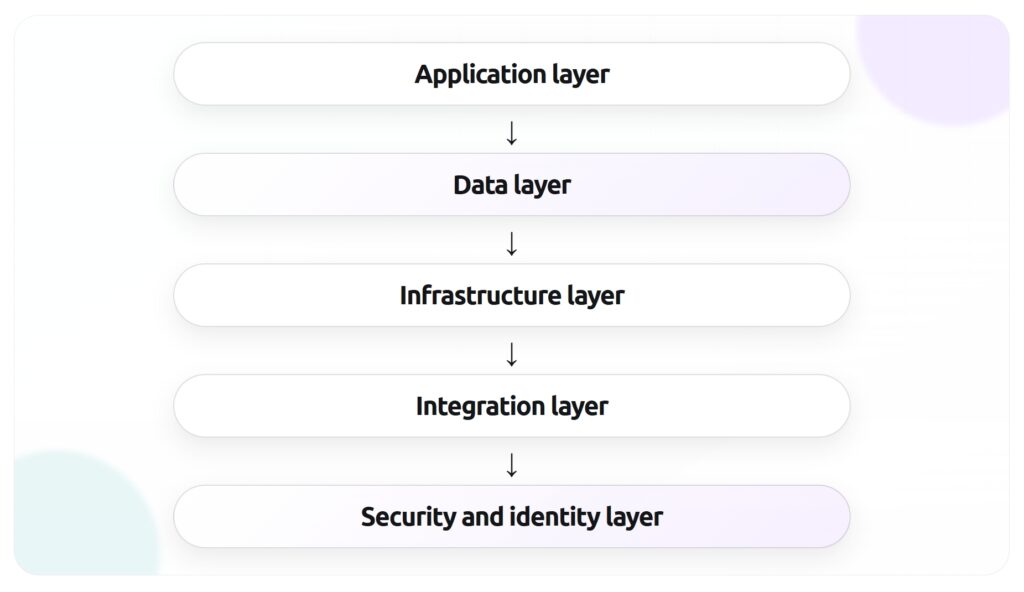
A solid SaaS architecture is built from a small set of layers that work together. Each layer has a different job, but the quality of the whole system depends on how well those parts connect. When teams talk about SaaS infrastructure or SaaS platform architecture, they are usually talking about decisions inside these core components.
Application layer
The application layer is the part users interact with. It includes the frontend, backend services, business logic, APIs, background jobs, and admin tools. This layer handles user requests, applies product rules, and returns the right data or actions.
In simpler products, the application layer may start as a monolith. That can be a reasonable choice when the team is small and the product scope is still changing. As the product grows, teams often split functions into services to improve deployment flexibility, isolate failures, or support scaling in specific areas. That is where SaaS microservices may become useful, though they should solve a real problem rather than follow a trend.
The main goal at this layer is clear service boundaries. Teams need to know which part of the system owns billing, user management, notifications, reporting, search, or other product functions. Clean boundaries reduce confusion and make the system easier to test and change.
Data layer
The data layer stores and manages application data. This usually includes transactional databases, caches, object storage, search indexes, analytics stores, and backup systems. In SaaS applications architecture, data design has a direct impact on performance, cost, reporting, and tenant isolation.
The architecture also has to define how tenant data is separated. Some products use a shared database with tenant identifiers. Others use separate schemas or separate databases for stronger isolation. The right model depends on compliance needs, scale, product complexity, and operational maturity.
Infrastructure layer
The infrastructure layer provides the computing environment where the SaaS application runs. It includes cloud services, containers, virtual machines, networking, load balancers, storage, content delivery, and deployment pipelines. This is the foundation of SaaS cloud architecture.
A strong infrastructure layer supports repeatable deployments, elastic scaling, and fault tolerance. It should also make environments predictable across development, staging, and production. Infrastructure as code is often part of this setup because it helps teams version changes, reduce manual configuration, and recover faster when something breaks.
This layer also shapes cost control. Poor infrastructure decisions can lead to overprovisioning, weak observability, and hard-to-manage environments. Good ones give teams visibility into usage, performance, and capacity before problems grow.
Integration layer
Most SaaS products do not operate alone. They connect with CRMs, ERPs, payment systems, marketing tools, identity providers, support platforms, analytics tools, and internal services. The integration layer manages those connections.
This layer often includes public APIs, webhooks, message queues, event buses, ETL flows, and connector services. Its job is to move data between systems in a reliable and secure way. It also needs to handle versioning, retries, rate limits, and failures from third-party services.
For many products, the integration layer becomes a major part of the value proposition. A SaaS platform that fits easily into a customer’s existing stack is easier to adopt and harder to replace.
Security and identity layer
The security and identity layer protects access to the platform and governs how users, services, and systems are authenticated and authorized. It usually includes login flows, single sign-on, role-based access control, encryption, secrets management, audit logs, and policy enforcement.
In software as a service architecture, security cannot sit on the edge of the system as an afterthought. It affects how services communicate, how data is stored, how permissions are checked, and how incidents are investigated. Identity design also matters at the tenant level. The platform has to know who a user is, which tenant they belong to, and what actions they can take.
Key Principles Behind Strong Architecture
Strong SaaS application architecture starts with a few core principles. These principles help teams make better design choices as the product grows. Without them, SaaS infrastructure often becomes harder to change, more expensive to run, and more fragile under load.
Scalability
Scalability is the ability to handle growth without a drop in performance or reliability. In SaaS, growth rarely happens in a smooth line. Traffic spikes, large customer accounts, background jobs, data volume, and third-party integrations can all put pressure on the system in different ways.
Good SaaS cloud architecture plans for that pressure early. The goal is to scale the parts of the system that need it most instead of scaling everything at once. Stateless services, distributed caching, queue-based processing, autoscaling, and read replicas are common ways to support growth without rebuilding the whole platform.
Multi-tenancy
Multi-tenancy is one of the defining traits of software as a service architecture. It means one application instance or platform serves multiple customers while keeping their data, settings, and access separated.
This model can improve cost efficiency and make product updates easier to manage. Teams can release new features once and make them available across the platform. They can also operate shared SaaS components instead of maintaining isolated environments for every customer.
At the same time, multi-tenancy adds architectural pressure. The system has to isolate tenant data, apply tenant-specific configuration, protect performance across accounts, and prevent one customer’s usage from affecting others. Those concerns influence data models, caching rules, access control, and infrastructure policies from the start.
Availability and resilience
Availability is about keeping the service accessible. Resilience is about how the system behaves when something fails. Both matter in SaaS applications architecture because failures are not rare events. Servers restart, dependencies time out, cloud services degrade, deployment mistakes happen, and external APIs go down.
A well-structured system expects these events and limits their impact. That includes redundancy across zones or regions, health checks, failover plans, circuit breakers, retries with limits, queue buffering, and clear recovery procedures. Monitoring also plays a central role. Teams need to know what failed, how users were affected, and what to fix first.
SaaS Deployment Models
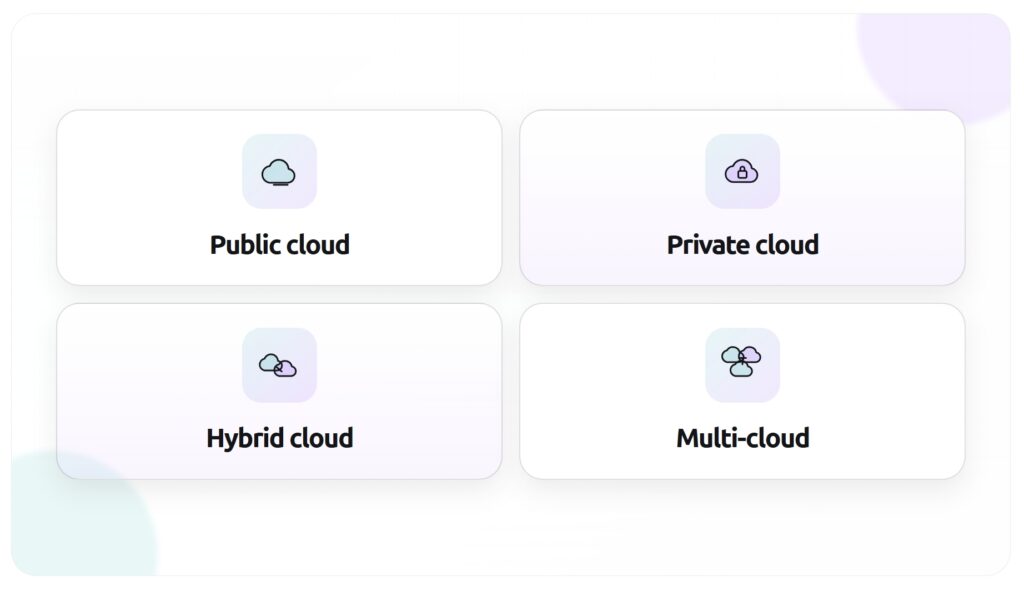
SaaS deployment models define where the application runs and how infrastructure is managed. The right model depends on security requirements, compliance needs, customer expectations, internal resources, and cost structure. For most teams, this is a practical business decision as much as a technical one.
Public cloud
Public cloud is the most common model for SaaS deployment. The application runs on shared cloud infrastructure provided by platforms such as AWS, Microsoft Azure, or Google Cloud. Teams use managed services for compute, storage, databases, networking, monitoring, and security.
This model gives product teams speed and flexibility. New environments can be created quickly, capacity can grow with demand, and managed services reduce the amount of infrastructure work the team has to handle directly. Public cloud also supports many common SaaS architecture best practices, including automation, autoscaling, observability, and infrastructure as code.
The tradeoff is dependency on a third-party provider’s service model, pricing, and architecture rules. Costs can also rise fast when environments grow without strong governance.
Private cloud
Private cloud runs on dedicated infrastructure for one organization. It may be hosted in the company’s own data center or managed by a third-party provider in a private environment. This model is often used when a business has strict compliance, security, or data residency requirements.
A private cloud can offer more control over infrastructure policies, network design, and data handling. For some industries, that level of control is worth the added operational load. It can also make sense when enterprise customers expect dedicated environments as part of the product offer.
The downside is complexity. Private environments usually require more operational effort, more internal expertise, and higher fixed costs. That makes them harder to manage for early-stage SaaS companies or teams with limited platform resources.
Hybrid cloud
Hybrid cloud combines public cloud resources with private infrastructure or on-premises systems. A SaaS product may run its core application in the public cloud while keeping sensitive data, legacy systems, or regulated workloads in a separate environment.
This model can support gradual modernization. It allows teams to move parts of the system without shifting everything at once. It is also common in organizations that need to connect cloud-native SaaS components with older internal systems.
Hybrid cloud adds integration and operations complexity. Teams need clear rules for data movement, identity management, monitoring, networking, and recovery across different environments. Without that discipline, hybrid architecture can become difficult to support.
Multi-cloud
Multi-cloud means using services from more than one cloud provider. A team may do this for resilience, geographic coverage, pricing leverage, regulatory reasons, or access to provider-specific capabilities. In some cases, a SaaS platform uses one provider for core workloads and another for analytics, AI services, or regional hosting.
This model can reduce dependency on a single vendor, but it comes with real overhead. Teams have to manage different tooling, service models, security controls, deployment patterns, and support processes. That creates more moving parts across the SaaS infrastructure.
Multi-cloud works best when there is a clear reason behind it. It should solve a concrete business or technical need. Using multiple clouds without that reason often adds complexity faster than it adds value.
SaaS Design Best Practices
Good SaaS application architecture comes from a series of practical choices. Teams do not need to solve every future problem on day one, but they do need a foundation that supports growth, change, and stable operations. These SaaS architecture best practices help teams build that foundation without adding unnecessary complexity.
Design for tenant isolation
Tenant isolation should be part of the architecture from the start. In a SaaS product, customers may share application services and infrastructure, but they should never be able to access each other’s data, settings, or activity. That separation has to exist in the data model, permission system, caching rules, file storage, logging, and API behavior.
A good starting point is to define isolation at three levels:
- Data isolation: how tenant records, files, and backups are separated
- Access isolation: how users, admins, and services are restricted to the right tenant scope
- Performance isolation: how one tenant’s heavy usage is prevented from degrading service for others
The right implementation depends on the product and its compliance needs. Some teams use shared databases with tenant IDs. Others move high-value or regulated accounts into separate schemas or separate databases. The important part is to make the isolation model explicit, test it, and revisit it as the customer base grows.
Build APIs first
API-first design helps SaaS platform architecture stay consistent across web apps, mobile apps, partner integrations, and internal tools. When teams define the contract between systems early, they reduce guesswork and make the product easier to extend later.
This does not mean every product needs a large public API on day one. It means core business functions should be accessible through clear interfaces instead of being buried inside one frontend or one service. That approach supports reuse and makes integrations easier to manage.
API-first design also improves internal development. Teams can version endpoints, document behavior, validate payloads, and set rules for authentication, rate limits, and error handling. Over time, that discipline reduces friction between product, engineering, and integration work.
Plan for horizontal scaling
Many SaaS teams hit scaling problems because the system grows around vertical upgrades alone. Adding more CPU or memory can help for a while, but it rarely solves long-term growth. Strong SaaS cloud architecture plans for horizontal scaling so services can run across multiple instances when demand rises.
That often means keeping application services stateless, moving long-running work to queues, using shared caches carefully, and avoiding tight dependencies on one machine or one process. It also means identifying which SaaS components are likely to scale at different rates. Search, reporting, file processing, notifications, and billing may all have different traffic patterns.
Teams should also test scaling behavior before it becomes urgent. Load tests, database stress tests, and failover exercises can reveal weak points early. It is easier to fix bottlenecks before large customers depend on the system every day.
Prioritize monitoring and incident response
Observability is part of architecture, not something added after launch. Teams need a clear view of how the system behaves in production, where failures happen, and how incidents affect users. Without that visibility, even a well-built platform becomes hard to operate.
A useful monitoring setup usually includes:
- Metrics for latency, error rates, throughput, and resource usage
- Centralized logs across services and environments
- Distributed tracing for request flows across systems
- Alerts tied to real service impact, not just raw infrastructure noise
- Runbooks for common failures and recovery steps
Incident response matters just as much as detection. Teams should know who owns a service, how issues are escalated, how customer communication works, and how root cause analysis is documented after the incident. That level of discipline supports availability and helps the platform improve after each failure.
Design for security from the start
Security decisions shape software as a service architecture at every layer. They affect authentication, authorization, data storage, service communication, deployment workflows, and vendor integrations. When security is delayed until later phases, fixing the gaps often becomes expensive and disruptive.
A practical security foundation includes strong identity controls, encryption in transit and at rest, secrets management, audit logging, vulnerability scanning, dependency review, and access policies based on least privilege. Teams should also think about operational security. That includes how credentials are rotated, how production access is controlled, and how suspicious activity is investigated.
Security design should match the product’s risk profile. A B2B SaaS platform serving finance or healthcare will need stronger controls than an internal productivity tool. Still, every SaaS product benefits from a security model that is documented, tested, and built into the release process.
Keep the architecture simple until complexity is justified
Many architecture mistakes come from solving problems too early. A system does not become stronger because it uses more services, more layers, or more patterns. Complexity is only useful when it addresses a real need.
A monolith can be the right starting point for a SaaS product. It is often easier to ship, test, deploy, and understand. Teams should split systems when there is a clear reason, such as deployment bottlenecks, team ownership issues, scaling differences, or fault isolation needs. The same logic applies to SaaS microservices. They can be powerful, but they also add network overhead, service coordination, monitoring burden, and operational complexity.
A simple architecture with clear boundaries usually beats a distributed system that the team struggles to manage. Good design principles are not about adding more. They are about making sound tradeoffs at the right time.
FAQ
SaaS application architecture is the structure behind a cloud-based software product. It defines how the application is built, how data is stored, how services interact, how users are authenticated, and how the system scales across tenants and workloads.
Traditional software is often installed and managed per customer or per device. SaaS applications architecture is built for centralized delivery over the internet, ongoing updates, shared infrastructure, and support for many customers at the same time. That changes how teams approach multi-tenancy, deployment, security, and uptime.
Multi-tenancy means one application or platform serves multiple customers while keeping their data and access separated. It is one of the core design patterns in software as a service architecture because it allows teams to run shared SaaS infrastructure while still giving each customer an isolated experience.
No, microservices are not required. SaaS microservices can help when a product needs independent scaling, stronger service boundaries, or separate deployment cycles, but they also add operational overhead. Many SaaS products start with a monolith and move to services later when that tradeoff becomes worthwhile.
There is no universal best option. Public cloud is the default choice for many teams because it supports fast SaaS deployment and flexible scaling. Private cloud, hybrid cloud, and multi-cloud can also make sense when compliance, customer requirements, or legacy systems shape the decision.