Odoo Automation Services: What to Automate and How Implementation Works

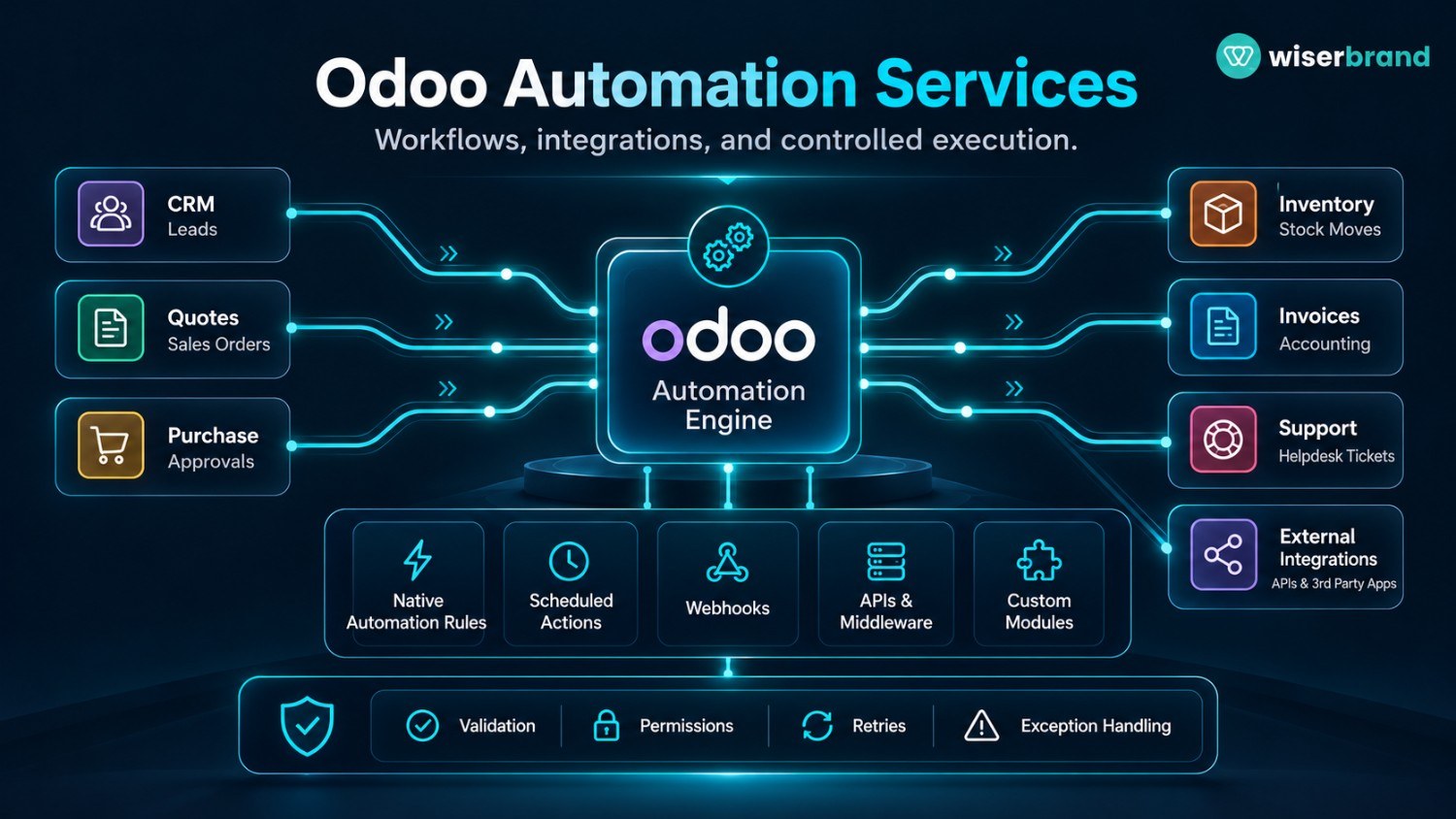
Odoo automation services turn repeatable business rules and cross-system handoffs into controlled workflows inside or around Odoo. The work can involve Studio automation rules, scheduled actions, server actions, webhooks, APIs, or custom modules. The right implementation depends on the trigger, the record that owns the business state, the action that follows, and the risk of an incorrect update.
A useful automation project starts with the process, not with a list of features. If Odoo already owns the record and the rule is stable, native automation may be enough. If the workflow spans ecommerce, finance, logistics, support, or an external data service, the design may require APIs, middleware, or a custom module. This guide explains how to choose the automation layer, build the workflow, handle failures, and measure the result.
What Odoo Automation Services Cover
Odoo automation services cover the design and implementation work needed to move a business event through a defined process. A typical engagement may include workflow mapping, Odoo configuration, automation-rule design, API integration, custom module development, testing, permissions, logging, exception handling, and production support.
Odoo 19 documents automation rules that execute predefined actions after triggers such as record changes, timing conditions, email events, or external webhooks. Available actions include updating or creating records, creating activities, sending messages, executing code, and sending webhook notifications. This makes native rules a strong fit when the business event and response are already represented inside Odoo.
Automation services add value when the workflow has to be translated into precise ownership and control. The team must decide which record starts the process, which fields are required, which system may change them, what happens after a retry, and when a person must review an exception. Those decisions matter more than the number of automated steps.
Start With the Workflow, Not the Automation Tool
Before configuring anything, write the workflow as a sequence of business states. A sales order, support ticket, invoice, manufacturing order, purchase request, or CRM opportunity should have a clear owner and a clear condition that marks the next step.
For example, consider a quote-to-production handoff. The trigger might be confirmation of a sales order. Odoo holds the customer, items, quantities, promised date, and commercial terms. The workflow then checks that required product and manufacturing data exist. If the order is complete, a deterministic action can create the next operational record. Missing configuration moves the order to an exception queue rather than guessing.
That structure gives the implementation team five things to define before development: trigger, source-of-truth record, validation rules, permitted actions, and completion condition. It also exposes where manual work exists because of missing data rather than because automation is absent.
Which Odoo Automation Layer Fits the Process?
| Automation Layer | Best Fit | Main Boundary |
|---|---|---|
| Studio automation rules | Record changes, timing events, simple internal actions, webhook-triggered steps | Keep conditions explicit and scope record updates carefully |
| Scheduled actions | Periodic jobs such as synchronization, checks, batch processing, or reminders | Long jobs need bounded batches and retry-safe logic |
| Server actions | Database updates or defined actions tied to Odoo events | Avoid broad code execution when a standard action is sufficient |
| Webhooks | Event exchange with external applications | Define authentication, payload validation, duplicate handling, and failure response |
| External API or middleware | Multi-system data exchange and orchestration | Assign field ownership and make retries idempotent |
| Custom Odoo module | Domain-specific logic, UI, data models, or workflows not represented by configuration | Adds development, testing, upgrade, and maintenance responsibility |
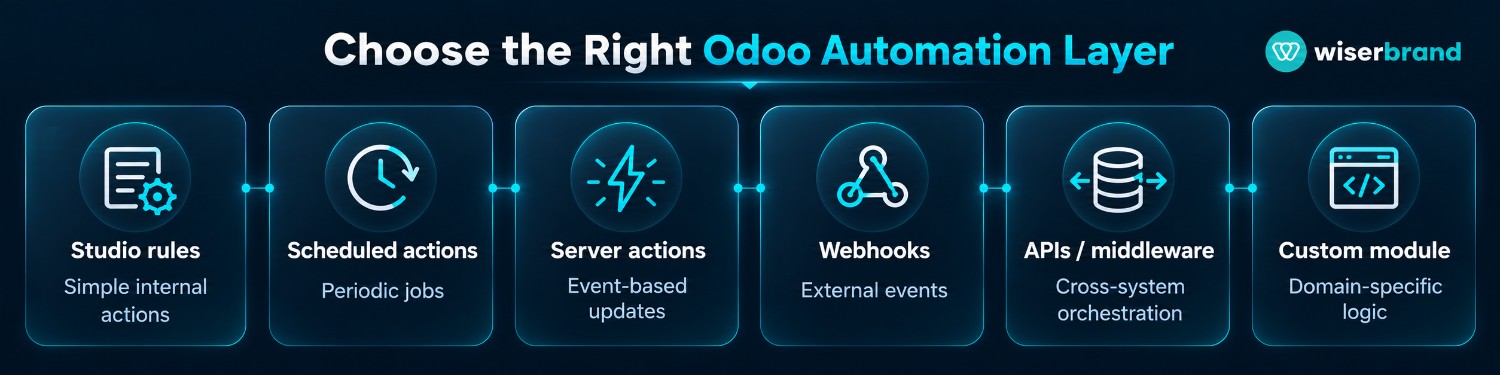
Use the least complex layer that represents the business rule correctly. A simple field update should not become a custom integration. A multi-system order exception should not be forced into a single record rule if the workflow needs state, retries, or reconciliation across systems.
Common Odoo Workflows Worth Automating
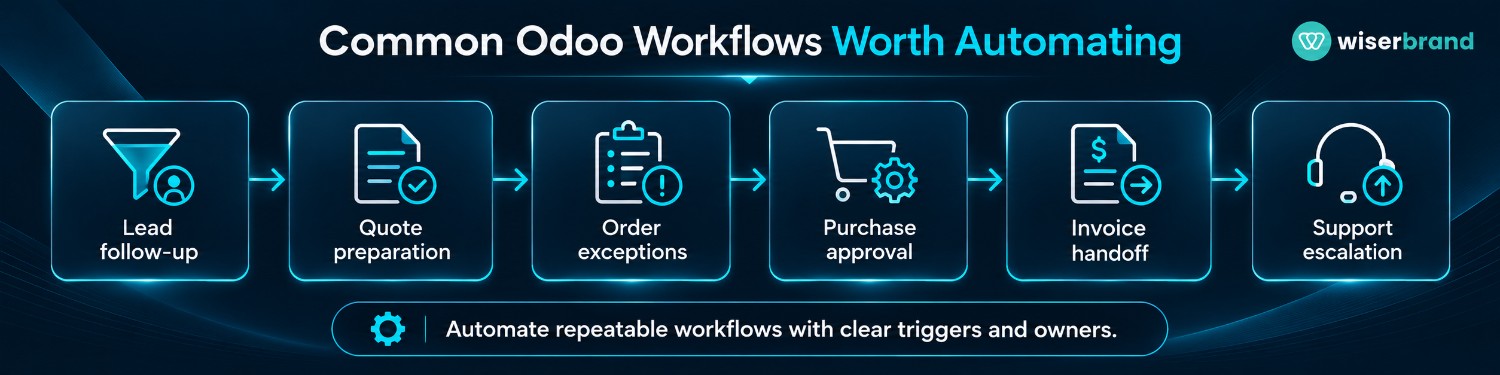
| Workflow | Trigger | Odoo Data | Automated Action | Human Boundary | KPI |
|---|---|---|---|---|---|
| Lead follow-up | Lead reaches a defined stage or age | Lead, owner, activity history | Create task, send approved message, or route by rule | Ambiguous ownership or strategic accounts | Follow-up completion time |
| Quote preparation | Qualified opportunity or request | Customer, products, price lists, terms | Prepare draft quote or required tasks | Nonstandard pricing or commercial exception | Quote turnaround time |
| Order exception routing | Confirmed order fails a defined condition | Order, stock, delivery, customer | Classify exception and route to owner | Cancellation, substitution, or customer commitment | Exception resolution time |
| Purchase approval | Request reaches approval condition | Vendor, item, amount, requester | Create approval activity and notify reviewer | Approval remains with authorized person | Approval turnaround time |
| Invoice handoff | Validated billing milestone | Invoice, order, project or service data | Prepare or transfer validated data | Financial posting or exception review | Manual review rate |
| Inventory alert | Stock or forecast crosses a rule | Product, location, quantity | Create activity, request, or external notification | Purchasing decision when business context is incomplete | Stock-exception backlog |
| Support escalation | Ticket meets urgency or age rule | Ticket, customer, SLA, history | Assign, notify, or create follow-up activity | High-impact customer or policy exception | Escalation and resolution time |
Native Automation Is Best for Stable Business Rules
Use native Odoo automation when the trigger and action are already available in the platform and the process follows stable logic. Examples include creating an activity when a stage changes, notifying an owner before a deadline, updating a field after a defined event, or calling a webhook when a record enters a specific state.
The main design question is not how many actions can be chained. It is how to stop repeated or conflicting execution. Automation rules should use specific conditions, avoid ambiguous ownership, and account for the possibility that another workflow updates the same record. A rule that fires again after its own update can create duplicate messages, activities, or downstream calls.
For business-critical records, test both the state before the action and the expected state after it. If the postcondition is not met, stop or route the record rather than continuing with later actions.
Scheduled Jobs Need State and Bounded Processing
Odoo 19 also documents scheduled actions for work that runs at a predefined frequency. Its developer guidance recommends processing scheduled work in batches so a job continues to make progress without blocking a worker for too long or running into timeout conditions.
This pattern fits periodic synchronization, aging checks, nightly data preparation, or back-office tasks that do not depend on an immediate user event. The implementation should store enough state to know what has already been processed. A retry must not create a second invoice, activity, shipment request, or external event simply because the previous run ended after the action succeeded but before the job recorded completion.
Batch size, retry policy, run frequency, and failure visibility should be treated as operating decisions. A scheduled task that silently fails for three days may be more damaging than a slower process with a visible exception queue.
When Odoo Must Exchange Data With Other Systems
Cross-system automation needs a field-by-field ownership model. One system should own each business state that matters. For example, Odoo might own sales orders while a warehouse platform owns carrier scans. The integration can copy the scan result into Odoo, but it should not create a second independent delivery state that conflicts with the warehouse record.
Odoo documents an External RPC API for external access and integration. The Odoo 19 documentation also notes that the older XML-RPC and JSON-RPC endpoints are scheduled for removal in later releases and identifies the External JSON-2 API as the replacement. Integration design should therefore account for the deployment version and planned Odoo upgrade path rather than treating an older endpoint as permanent.
A production integration should define the matching key, payload schema, authentication, allowed operations, timeout, retry behavior, and duplicate-event strategy. It should also log enough context to reconstruct what happened without placing sensitive credentials or unnecessary personal data in logs.
When Odoo must exchange records with ecommerce, finance, logistics, or proprietary systems, API development services can support the integration layer, including field mapping, validation, and custom endpoints.
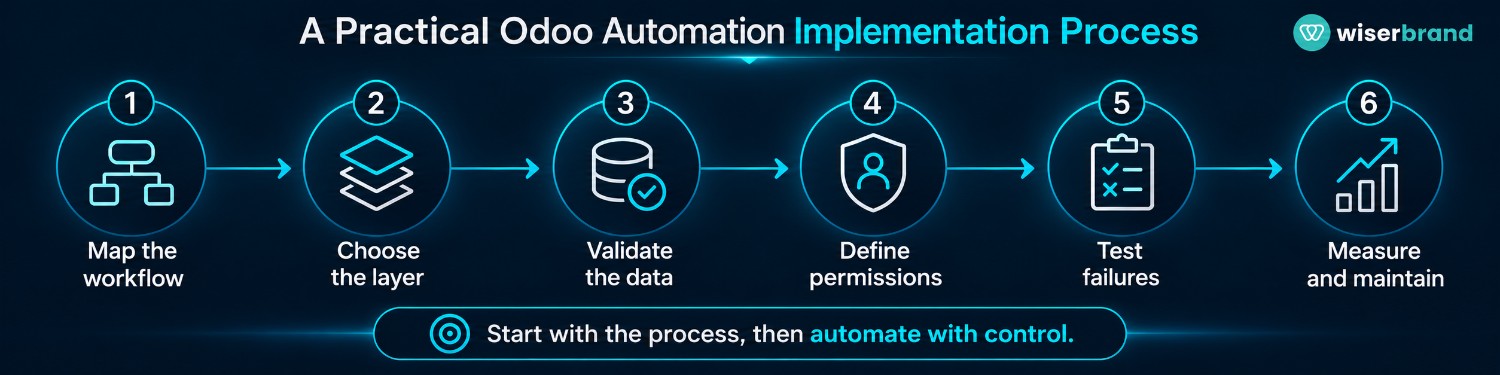
A Practical Odoo Automation Implementation Process
- Map One Workflow: Document the current trigger, records, decisions, manual steps, exceptions, owner, and completion condition. Measure a baseline such as cycle time, manual touch rate, or backlog before changing the process.
- Assign Source-of-Truth Ownership: Decide which Odoo object or external system owns every status and field that drives the workflow. Remove duplicate ownership before adding bidirectional synchronization.
- Choose the Simplest Automation Layer: Use configuration for stable record rules, scheduled jobs for periodic work, APIs for cross-system events, and custom modules only when the process needs logic or data structures that configuration cannot represent cleanly.
- Define Permissions and Approval Gates: Limit service accounts and users to the records and operations required by the workflow. Keep financial commitments, destructive changes, pricing exceptions, access changes, and other high-impact actions behind explicit approval when business risk requires it.
- Build Failure Paths Before Rollout: Specify what happens when required data is missing, an API times out, a webhook is duplicated, a record changes during processing, or an action succeeds only partially. Decide which failures retry and which move to manual review.
- Test With Representative Records: Include normal cases, edge cases, stale data, duplicates, permission denials, and integration failures. Verify the final record state, not only that the automation ran.
- Release in a Controlled Scope: Start with a limited business unit, record type, customer segment, or transaction class. Monitor exceptions and corrections before expanding the rule set.
- Measure and Maintain: Track workflow completion, error categories, manual handling, retries, cycle time, and business outcomes. Re-test after Odoo upgrades, schema changes, or modifications to connected systems.
Teams that need help mapping processes and choosing between native configuration, integration, and custom development can use business process automation services to structure the automation around operating rules rather than isolated scripts.
Permissions, Approvals, and Failure Handling
An automation should receive the smallest set of permissions needed to complete its job. If a rule only creates an internal activity, it does not need authority to modify financial records. If an integration reads product availability, it does not automatically need permission to change inventory quantities.
High-impact actions need a clear approval model. A purchase request can be prepared automatically while the authorized manager approves it. A billing workflow can assemble validated data while finance retains control over posting or payment. The implementation should record who approved the action and which record state existed at the time of approval.
Failures also need ownership. An integration error should create a visible state with enough context for the responsible team to recover. Repeated retries without a limit can amplify a bad payload or overload another system. A manual queue is a valid part of an automated process when the exception cannot be resolved safely from the available data.
How AI Fits Into Odoo Automation
AI is useful only for steps that require interpretation, extraction, classification, or drafting. It should not replace a deterministic rule that can be stated precisely. For example, an AI component might classify the reason for an order exception from notes and messages. A standard workflow can then validate inventory state and route the case according to approved policy.
Keep model output separate from executed business actions. Before an AI-generated value changes an Odoo record, validate its format and check the action against permissions and business rules. Customer commitments, financial changes, HR decisions, and other consequential actions should use review or approval controls that match the risk.
If the use case requires external models or AI services to work with Odoo records, AI integration services can connect model calls to existing business systems while keeping record ownership and action boundaries explicit.
Metrics for Evaluating Odoo Automation Services
| Metric | What It Measures | Why It Matters |
|---|---|---|
| Workflow completion rate | Share of initiated workflows that reach the intended state | Separates successful automation from rules that only trigger |
| Manual handling rate | Share of cases requiring human work | Shows where exceptions or approvals still consume capacity |
| Cycle time | Time from trigger to completed business outcome | Captures waiting and handoff delays, not only script execution |
| Duplicate action rate | Repeated updates, messages, or downstream events that should occur once | Reveals idempotency and trigger-design problems |
| Integration failure rate | Calls or events that fail after retries | Identifies reliability issues across system boundaries |
| Exception backlog | Unresolved cases waiting for manual or technical action | Shows whether automation is creating hidden operational debt |
| Human correction rate | Automated outcomes changed by a reviewer | Useful for evaluating rules, templates, or AI-assisted steps |
| Cost per completed workflow | Relevant operating cost divided by successful outcomes | Connects infrastructure and review cost to delivered work |
Do not treat a lower manual handling rate as success by itself. If automation increases corrections, duplicate actions, or customer-impacting errors, the workflow has shifted work rather than improved it. Measure speed together with completion quality and exception behavior.
Common Implementation Mistakes
- The first mistake is automating a process with unclear record ownership. Two systems then update the same field and trigger each other. The result is difficult to debug because neither application is the authoritative state.
- The second is building a custom module for logic that standard Odoo configuration already represents. Custom code increases upgrade and maintenance work, so it needs a real functional reason.
- The third is ignoring duplicate execution. Webhooks can be delivered more than once, users can update records during processing, and scheduled jobs can restart after partial completion. Every action that creates external side effects should have a strategy for detecting work that already happened.
- The fourth is measuring technical execution instead of the business outcome. A job that ran 10,000 times says little about quote turnaround, invoice accuracy, exception backlog, or service response. Pick the operational metric before launch.
When Not to Automate a Workflow in Odoo
Do not automate a process simply because it is repetitive. Keep the work manual or redesign it first when inputs are inconsistent, policy changes case by case, record ownership is disputed, the action is hard to reverse, or the team cannot define what a correct outcome looks like.
A small-volume task may also be a poor target when implementation and maintenance cost exceed the operational burden. In that case, a template, report, saved filter, or small user-interface improvement may solve the problem with less technical ownership.
Frequently Asked Questions
What Are Odoo Automation Services?
Odoo automation services design and implement workflows that use Odoo rules, scheduled jobs, APIs, webhooks, or custom modules to move records through repeatable business processes. The work also includes permissions, validation, failure handling, testing, and measurement when those controls are relevant to the workflow.
What Is the Best Odoo Process to Automate First?
Start with a workflow that has a clear trigger, structured source data, stable rules, visible manual effort, and a measurable endpoint. Quote handoffs, follow-up activities, approval preparation, and exception routing are often easier to control than workflows that depend on ambiguous judgment.
Do Odoo Automations Require Custom Code?
No. Many workflows fit Studio automation rules, standard application configuration, or scheduled actions. Custom code is justified when the process needs unsupported logic, a new data model, a specialized interface, or cross-system state that native configuration cannot represent cleanly.
Can Odoo Automation Connect to External Systems?
Yes. Odoo supports webhook patterns and external APIs. The implementation still needs authentication, stable identifiers, payload validation, retry behavior, duplicate protection, and clear field ownership. The exact API approach should match the Odoo deployment and version.
Should AI Be Added to Every Odoo Automation?
No. AI is useful for interpretation, extraction, classification, or drafting. Fixed validations, calculations, permissions, approvals, and business thresholds should remain deterministic when the rule can be stated precisely.
How Should an Odoo Automation Be Tested?
Test the workflow with representative records, missing fields, stale data, duplicates, permission failures, API timeouts, and partial completion. Verify the final business state and side effects, then monitor exceptions after release rather than checking only that the trigger fired.
Final Thoughts
The best Odoo automation is the one that preserves a clear source of truth while removing a specific handoff, delay, or repetitive decision. Start with a bounded workflow, choose the simplest layer that can represent it, and design failure handling before increasing automation scope.
For organizations planning a broader Odoo workflow program, custom software development services can support cases where standard configuration and integrations do not cover the required business logic. Keep custom development focused on requirements that cannot be represented cleanly with native Odoo tools.