How to Use AI in HubSpot CRM: Integrations, Agents, and Automation

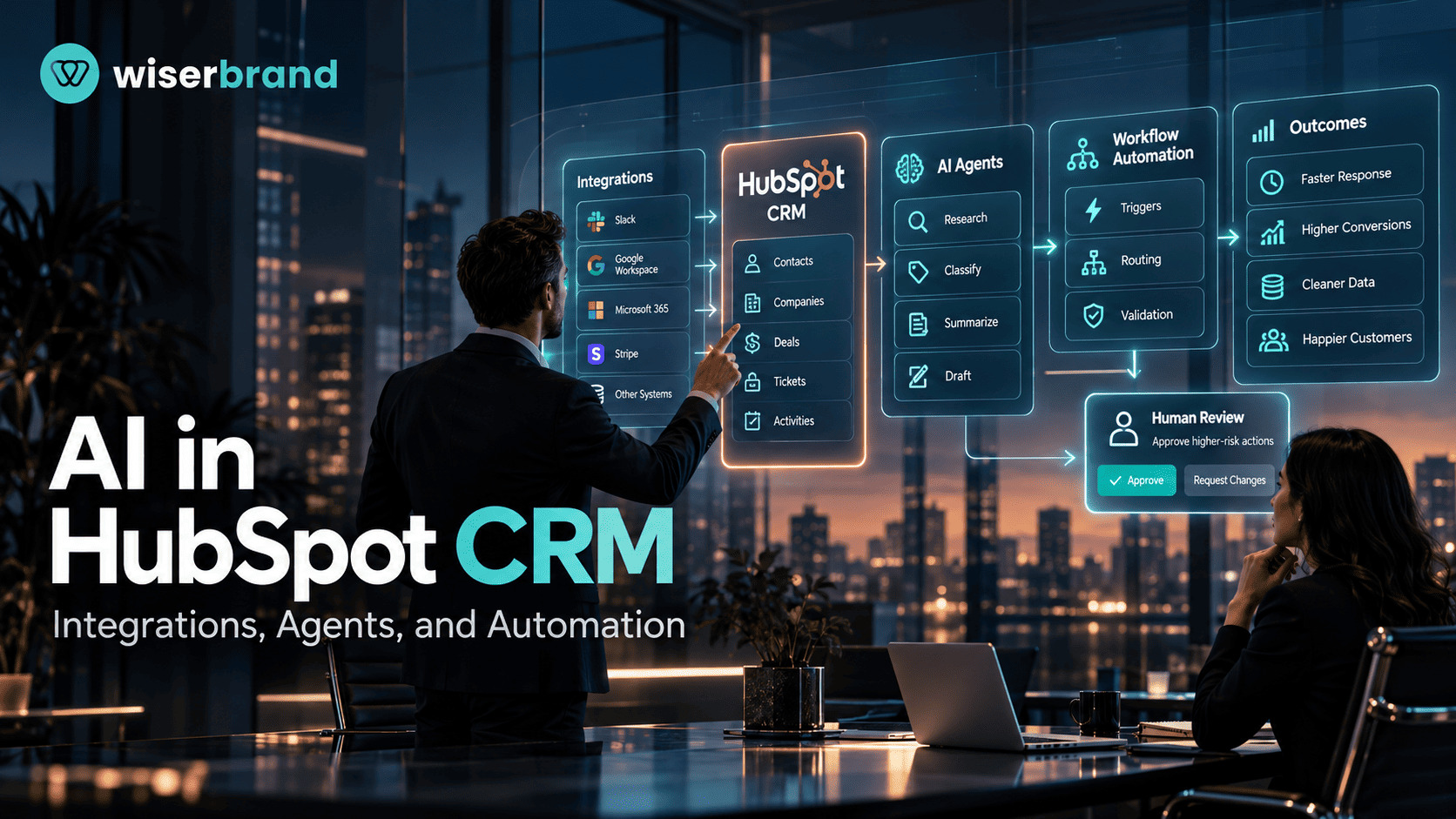
How to use AI in HubSpot CRM depends on the job you want AI to perform. HubSpot now combines CRM workflow automation with an Agent Hub that supports agents and agentic workflows, while external tools can extend the process through integrations and APIs. The practical question is not how much AI to add. It is which steps need interpretation, which steps should stay deterministic, and which actions require human review.
A good HubSpot AI design keeps the CRM as the source of truth. AI can research accounts, classify context, summarize activity, draft follow-ups, or prepare recommendations. HubSpot workflows or application logic should still enforce fixed rules such as required fields, consent status, assignment logic, approval thresholds, and duplicate checks.
This guide explains how HubSpot integrates AI into CRM work, where agents fit, how Instantly can connect to HubSpot, how AI-assisted social replies work, and how to design a production workflow with permissions, failure handling, and measurable KPIs.
How Does HubSpot Integrate AI Into Its Solutions?
HubSpot's current AI architecture includes Agent Hub, pre-built and custom agents, agentic workflows, and AI context that can use business information and knowledge sources. HubSpot also lists Data Agent, Prospecting Agent, Deal Progression, and Customer Agent among the agentic features available in Agent Hub. Availability depends on subscription, credits, and feature status, and parts of Agent Hub are still labeled beta.
According to HubSpot's Agent Hub documentation, teams can configure agents by changing their inputs, instructions, tools, knowledge sources, and automation settings. Agentic workflows can combine triggers, actions, and agents inside a multi-step process. That means HubSpot AI can sit inside an existing CRM process instead of operating as a separate chat interface.
The operating boundary matters more than the product label. An agent can interpret context or select a supported path. A workflow can enforce fixed conditions. The CRM stores the business state. A reviewer can approve actions that carry customer, revenue, privacy, or data-quality risk.
A useful way to think about the platform is shown below.
| Layer | Best Fit | Keep Deterministic |
|---|---|---|
| CRM records | Customer, company, deal, activity, and service context | Required fields, record identity, ownership |
| AI agent | Research, classification, summarization, recommendation, drafting | Hard policy rules and irreversible gates |
| Workflow | Triggers, routing, validation, follow-up steps | Consent, thresholds, deduplication, permissions |
| Human review | Judgment on material or ambiguous cases | Approval ownership and escalation path |
How to Use AI in HubSpot CRM: A Practical Operating Model
The safest operating model separates AI interpretation from business execution. Start with the CRM record, then validate the data required for the workflow. Only after those checks should an AI step interpret free text, research a company, classify a request, or prepare a recommendation. The workflow should validate the AI output before any record update or customer-facing action.
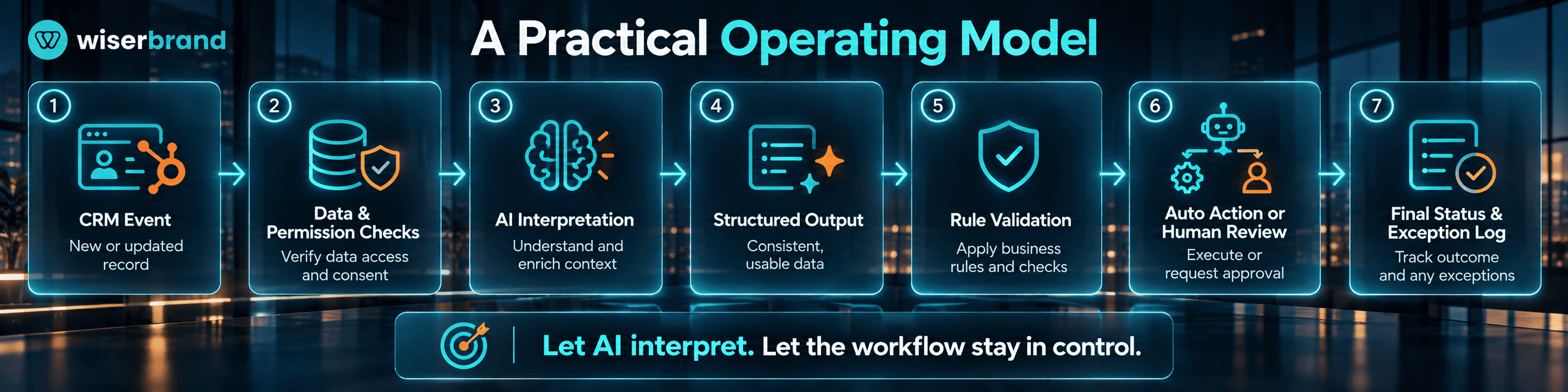
A common sequence is:
- A CRM event starts the process, such as a new lead, a deal-stage change, a completed call, or a new support conversation.
- HubSpot checks identity, required fields, permissions, consent, ownership, and duplicate conditions.
- The AI step receives only the data needed for the task.
- The model or agent produces structured output, a summary, a classification, or a draft.
- Deterministic logic checks the output against schema and business rules.
- Low-risk actions continue automatically. Higher-risk actions move to review.
- HubSpot stores the final status, action result, and any exception for follow-up.
This pattern gives AI room to handle variable information without asking the model to decide fixed policy. It also makes failures easier to trace because each step has a clear owner and completion condition.
Practical AI Workflows in HubSpot
AI is most useful in HubSpot when the bottleneck involves reading or interpreting context rather than applying a fixed rule. The workflows below show where that boundary usually sits.
| Workflow | AI Role | Control Boundary | Useful KPI |
|---|---|---|---|
| Account research | Summarize company context and available signals | Duplicate and ownership checks before CRM updates | Research time; field completeness |
| Lead qualification support | Interpret fit and intent evidence | Required fields, consent, territory, and routing stay rule-based | Rep override rate; routing accuracy |
| Meeting preparation | Summarize recent activity and open deal context | Rep reviews the summary before use | Preparation time; correction rate |
| Follow-up drafting | Draft a message from call or deal context | User approves customer-facing content when risk is material | Draft acceptance rate; follow-up completion |
| Support triage | Classify the request and prepare a response | Escalation rules and restricted actions stay deterministic | Routing accuracy; escalation rate |
Account Research and Lead Qualification
For account research, AI can turn scattered CRM notes and external context into a short account brief. The workflow should still decide which company record is authoritative and what fields may be changed. If the company cannot be matched confidently, the process should stop or route the record to review instead of creating a duplicate.
The same principle applies to lead qualification. AI can interpret unstructured evidence, such as a message, call note, or company description. It should not override a fixed territory rule or consent flag. A useful output is a structured recommendation with the evidence used, followed by deterministic routing.
Sales Preparation and Follow-Up
Meeting preparation and follow-up drafting are lower-risk places to start because the AI can prepare work without owning the final business action. A rep can review an account summary before a meeting and approve a draft before it reaches a prospect.
That review step also produces useful evaluation data. Track how often reps edit or reject the output, which fields were missing, and which workflow categories produce the most rework. Those signals are more useful than counting the number of AI runs.
Support Triage and Response
Support workflows need a clearer escalation path. AI can classify the issue, summarize the account history, and draft a response. Deterministic logic should route sensitive requests, unsupported topics, refunds above policy limits, or missing-account cases to a human queue.
The workflow should record why a case escalated. That gives the operations team a way to distinguish model errors from missing data, unclear policies, or integration failures.
AI Agents vs HubSpot Workflows
HubSpot workflows and AI agents overlap, but they should not be treated as interchangeable.
Use a workflow when the next step can be defined in advance. Examples include checking if a required field is present, assigning a lead by territory, waiting a fixed period, or routing a record when a threshold is met.
Use an agent when one part of the process requires interpretation or a flexible sequence. Examples include researching a company, deciding which available information is relevant, summarizing a long interaction history, or choosing from a bounded set of tools to complete a research task.
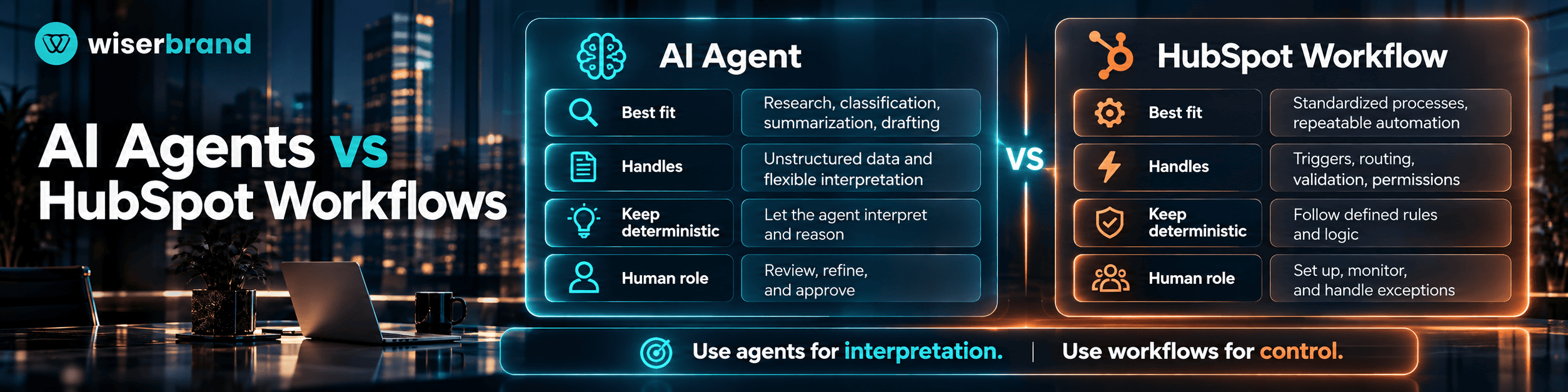
A mixed architecture is often the better fit. The workflow controls the trigger, validation, permissions, and completion path. The agent handles the variable step. If the agent returns malformed output, cannot access a tool, or lacks enough context, the workflow should pause, retry within a defined limit, or route the case to review.
This distinction keeps the system easier to test. Teams can evaluate the agent on interpretation quality while evaluating the workflow on completion, routing, exceptions, and business outcomes.
How Do I Integrate Instantly AI With HubSpot?
Teams asking how do I integrate Instantly AI with HubSpot usually need to solve two separate problems: connecting the platforms and deciding which system owns each part of the outbound process.
Instantly's current HubSpot integration guide says the connection can support importing leads, exporting SuperSearch leads, and using HubSpot in Instantly Automations. The setup starts from the Instantly Integrations area, where the user signs in to HubSpot, selects the HubSpot account, and connects the app.
The technical connection is only the first step. Before using the integration in production, define which system owns contact identity, campaign state, suppression status, and sales ownership. If both platforms write the same field independently, sync loops and conflicting record state become much more likely.
Define System Ownership Before Syncing Data
A simple ownership model is to keep HubSpot as the CRM source of truth and let Instantly manage outbound campaign execution. Under that model, HubSpot owns the contact and company record, lifecycle stage, ownership, and suppression state. Instantly owns the campaign sequence and returns relevant events to HubSpot.
The team should document:
- the unique identifier used to match records;
- which fields move in each direction;
- which system creates a new contact;
- how duplicates are handled;
- how opt-outs and suppression states propagate;
- which campaign events update HubSpot;
- what happens after a failed sync.
If the native connection does not cover the required objects or transformations, API development services can be used to add controlled field mapping, validation, middleware, or custom endpoints around the integration.
Add AI After the Integration Is Stable
Do not add AI classification or drafting until the data path works reliably. First test create, update, suppression, duplicate, and failure scenarios without an AI step. Once the sync is stable, AI can research or classify a lead before a workflow chooses the next allowed action.
This order matters because an AI model cannot compensate for an unclear source-of-truth rule. If two systems disagree about the same contact or campaign state, the workflow needs a deterministic resolution policy.
Can a HubSpot AI Agent Respond to Social Media Comments?
A HubSpot AI agent should not be assumed to publish autonomous replies to every social media comment. HubSpot's social reply recommendations documentation describes a narrower capability: Breeze AI can generate reply recommendations for social interactions and feeds. The user can review the recommendation before posting it.
For teams searching for a way to have a HubSpot AI agent respond to social media comments, that distinction is important. AI-assisted reply generation is different from giving an agent unrestricted permission to publish publicly across every connected network.
A practical workflow is to generate a recommended reply, check the comment and customer context, then let a user edit or publish the response. Higher-risk interactions, such as complaints, legal threats, refunds, or account-specific issues, should route to a person before a public reply is posted.
When Native HubSpot AI Is Enough
For teams learning how to use AI in HubSpot CRM, native HubSpot AI is usually the better starting point when the required data already lives in HubSpot and the task fits an existing agent, CRM workflow, or supported AI feature.
Good native candidates include:
- account and contact research;
- CRM data enrichment or maintenance;
- preparation of summaries and recommendations;
- workflow steps that use AI-generated context;
- bounded sales or service tasks supported by HubSpot agents;
- AI-assisted social reply recommendations.
The main advantage is operational simplicity. The team can keep identity, permissions, records, workflow state, and reporting in the same platform. A custom layer becomes harder to justify if it only recreates a capability that HubSpot already supports well enough for the business requirement.
When a Custom AI Layer Makes Sense
A custom AI layer becomes relevant when the workflow crosses systems, requires organization-specific tools, or needs controls that do not fit the native platform.
Consider an account-research workflow that reads HubSpot records, retrieves product data from an internal database, checks documents in a private knowledge base, calls an external model, and returns a structured recommendation to HubSpot. HubSpot remains the CRM source of truth, but the workflow needs orchestration outside the CRM.
AI integration services are useful in this situation because the work is mainly about connecting models, data, and business systems with explicit permissions and validation. If the workflow also needs a model-controlled sequence of tools or decisions, AI agent development services may be a better fit.
A custom layer should have a specific reason to exist. Common reasons include:
- proprietary data outside HubSpot;
- several external systems or APIs;
- specialized retrieval or evaluation;
- custom approval logic;
- model-provider choice;
- detailed observability across multiple systems;
- state that must survive beyond a single CRM action.
Custom development also adds maintenance. The team owns more integration logic, error handling, monitoring, versioning, and recovery paths, so the added control must justify that operating cost.
How to Implement AI in HubSpot Without Breaking CRM Operations
Implementation should start with one bounded workflow and a baseline. The goal is to make the operating model testable before expanding permissions or adding more AI steps.
1. Define the trigger and completion condition. State what starts the workflow and what a successful outcome looks like.
2. Identify the source of truth. List the HubSpot objects, properties, and external systems that represent the actual business state.
3. Set data and tool permissions. Give the AI step only the context and tools required for its task.
4. Separate interpretation from policy. Use AI for classification, research, summarization, or drafting. Keep required fields, consent, thresholds, and fixed routing rules deterministic.
5. Define failure paths. Decide what happens when data is missing, an integration is unavailable, an output is invalid, or a user rejects the proposed action.
6. Test representative and edge cases. Include duplicates, stale records, conflicting notes, permission failures, malformed external data, and unsupported requests.
7. Deploy with limited authority. Start with read-only, recommendation, or draft-first behavior when an incorrect action would affect a customer or business record.
8. Measure the complete workflow. Track completion, rework, overrides, exceptions, and the business metric that motivated the automation.
For cross-system implementations, map these boundaries before the workflow receives broader access. The implementation should make it possible to pause the automation, remove a tool permission, or revert a workflow version if production behavior changes.
Metrics for HubSpot AI Automation
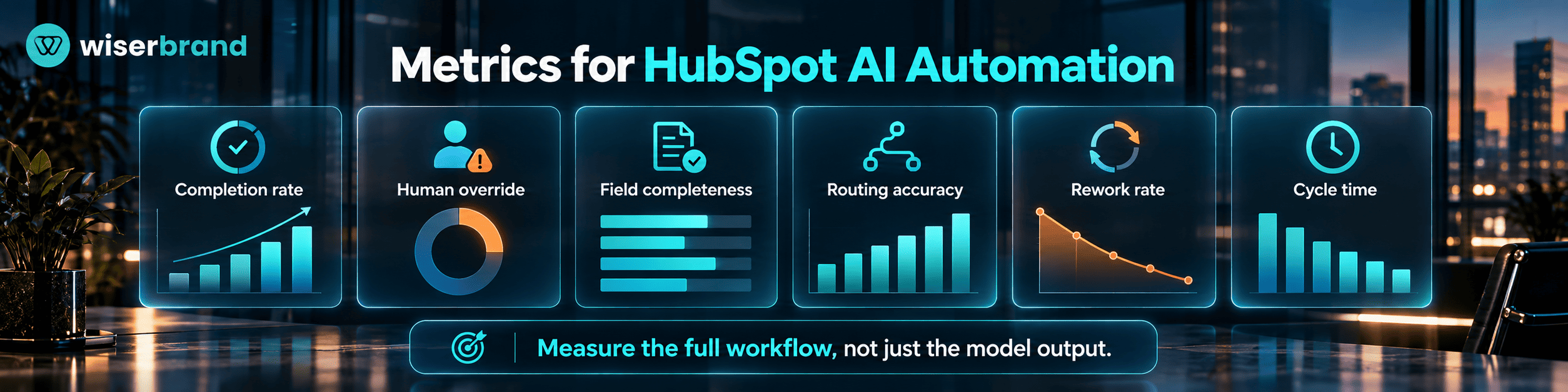
The right metric depends on the workflow. Model-output quality matters, but a production process also needs end-to-end measures that show what happened after the AI step.
| Metric | What It Shows | Why It Matters |
|---|---|---|
| Workflow completion rate | Share of started workflows that reach the intended end state | Detects broken handoffs and incomplete automation |
| Human override rate | Share of AI recommendations changed by a person | Shows where interpretation or policy is weak |
| CRM field completeness | Required information present after the workflow | Useful for enrichment and research use cases |
| Routing accuracy | Records sent to the correct owner or queue | Connects classification to operational quality |
| Rework rate | Completed cases that need correction | Prevents speed gains from hiding downstream work |
| Cycle time | Time from trigger to completed outcome | Shows if the workflow reduces waiting and handling |
Balance speed with quality. A faster lead-research process is not a success if reps regularly correct the output. Fewer escalations are not automatically better if difficult cases are being handled incorrectly. For each KPI, define the baseline, target, owner, measurement period, and acceptable trade-off before launch.
Common Implementation Mistakes
Several implementation errors appear repeatedly in CRM AI projects.
First, teams give AI low-quality CRM context and expect the model to repair it. Duplicate contacts, stale owners, inconsistent lifecycle stages, and missing properties should be addressed in the workflow design.
Second, teams use AI for rules that should be explicit. Territory ownership, consent, approval limits, and required fields do not need probabilistic interpretation.
Third, write permissions expand too early. Start with summaries, recommendations, or drafts when the impact of a bad update is material. Broader write authority should follow testing, permission review, and a clear recovery path.
Fourth, integrations are built without directional ownership. When HubSpot and an external tool both update the same state, document which event wins and how duplicate updates are prevented.
Finally, teams measure AI activity instead of business performance. Agent runs and generated drafts are diagnostic metrics. The business should care about workflow completion, rework, response time, routing quality, conversion, or another outcome tied to the original bottleneck.
Frequently Asked Questions
These questions cover the distinctions that matter most when teams move from experimentation to a controlled HubSpot AI workflow.
Does Every HubSpot AI Workflow Need an Agent?
No. A deterministic HubSpot workflow is a better fit when the process follows stable trigger-condition-action logic. Use an agent only when the task benefits from interpretation, flexible research, or selecting among a bounded set of tools. Adding an agent to a fixed rule usually increases testing and maintenance without improving the decision.
Can HubSpot AI Change CRM Records Automatically?
Potentially, but the permission and execution path must be explicit. A production design should identify which component performs the update, which records it may change, how the output is validated, and which actions require approval. Start with narrow permissions and expand them only after the workflow has been tested against failure and exception cases.
Where Should Human Approval Sit in a HubSpot AI Workflow?
Use human approval when an incorrect action would create meaningful customer, revenue, privacy, legal, or data-quality risk. The reviewer should see the proposed action, the relevant context, and the reason for the recommendation. The workflow should also define what happens when the reviewer rejects the action or does not respond.
Can HubSpot Work With External AI Models?
Yes, when the required architecture connects HubSpot to an external model or orchestration layer through supported APIs and integrations. Keep HubSpot's role clear: define which CRM records are authoritative, which data may leave the platform, and what the external component is allowed to return or change.
What Should Teams Measure Before Expanding HubSpot AI?
Measure a baseline before launch. For sales and CRM workflows, useful measures include research time, CRM field completeness, duplicate rate, routing accuracy, human override rate, rework, and conversion at the next meaningful stage. Expand the workflow only when the team can show that automation improves the process without creating unacceptable error or review load.
Final Thoughts
How to use AI in HubSpot CRM comes down to one design rule: give AI responsibility for interpretation, and keep fixed business policy in deterministic controls. HubSpot agents and workflows can support a large part of that model natively. External tools such as Instantly extend the process when outbound execution or data needs sit outside the CRM.
Start with one workflow, define the source of truth, limit permissions, and decide how exceptions move to a person. Measure the complete process before adding more authority or more systems.
For organizations that need help turning a HubSpot AI use case into a production architecture, generative AI consulting can support workflow selection, integration design, evaluation, approval boundaries, and rollout planning.