How AI Improves Operational Efficiency Across Business Workflows

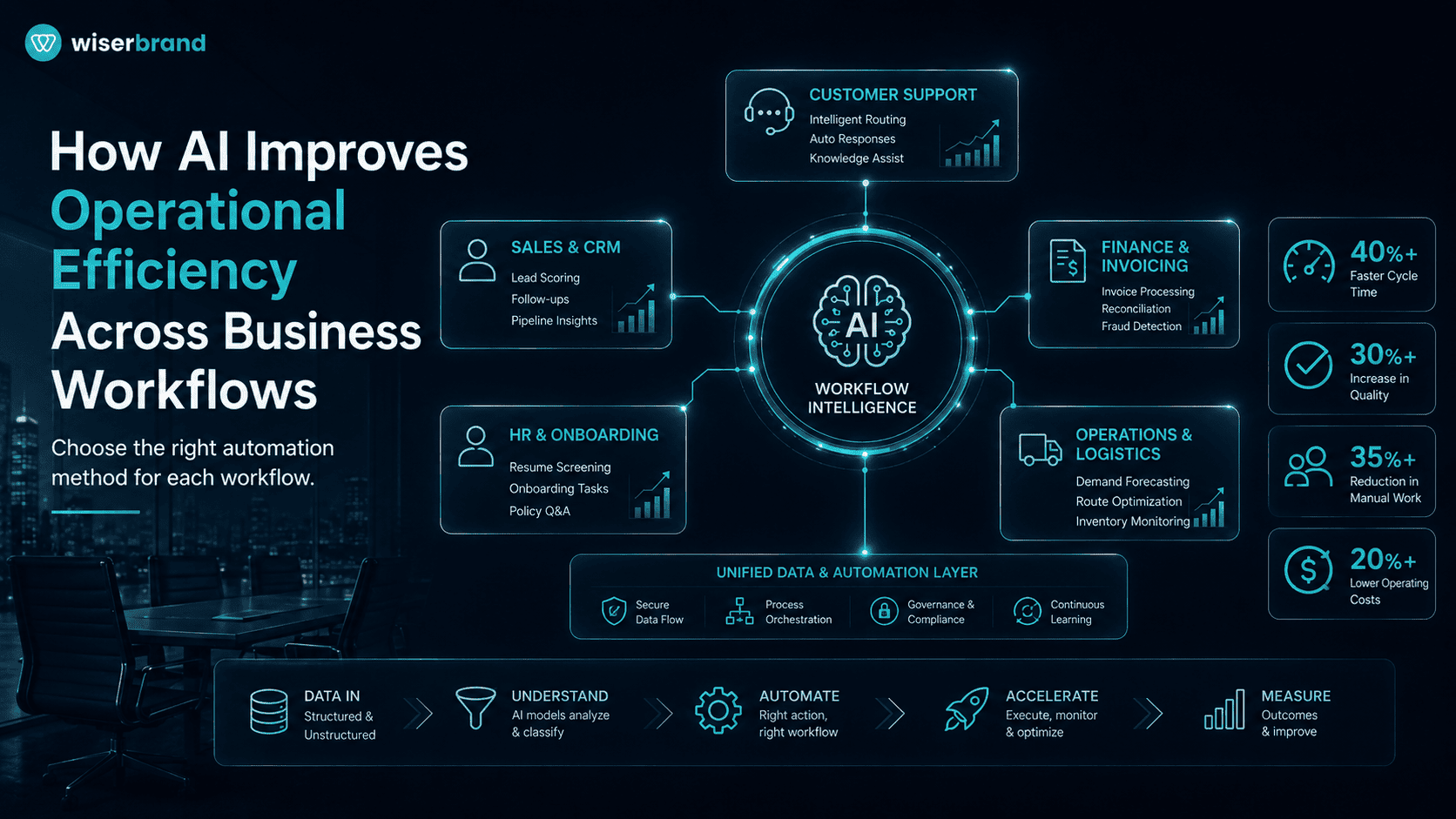
AI operational efficiency comes from changing how work moves through a process, not from adding a model to an existing task. AI can reduce manual handling, shorten waiting time, improve first-pass quality, prepare decisions, and route exceptions to the right person. The result is useful only when the full workflow becomes faster, less costly, or more reliable.
A practical implementation combines several methods. Rules handle exact conditions. APIs move data between systems. Robotic process automation covers justified legacy gaps. Predictive models estimate defined outcomes. Generative AI searches, summarizes, and drafts. AI agents coordinate variable multi-step work through approved tools.
This guide explains where AI improves operations, which workflows are suitable, how to select the right approach, and how to measure gains after human review, errors, and maintenance are included.
What AI Operational Efficiency Means
AI operational efficiency is the measurable improvement produced when AI reduces the time, labor, error, delay, or cost required to complete a business workflow. The unit of analysis is the completed process, such as resolving a support case, approving an invoice, onboarding an employee, or recovering a delayed order.
This is broader than employee productivity. A worker may prepare a report faster while the process still waits two days for missing data or approval. A chatbot may answer immediately while customers contact the company again because the issue was not resolved. Local speed does not prove end-to-end efficiency.
Business process automation combines workflow logic, integrations, rules, RPA, and selected AI capabilities to reduce manual handling and move work through a process with fewer delays and exceptions. The purpose is to connect interpretation and decision support with controlled process execution rather than treat AI as a separate interface.
The Five Operational Efficiency Levers
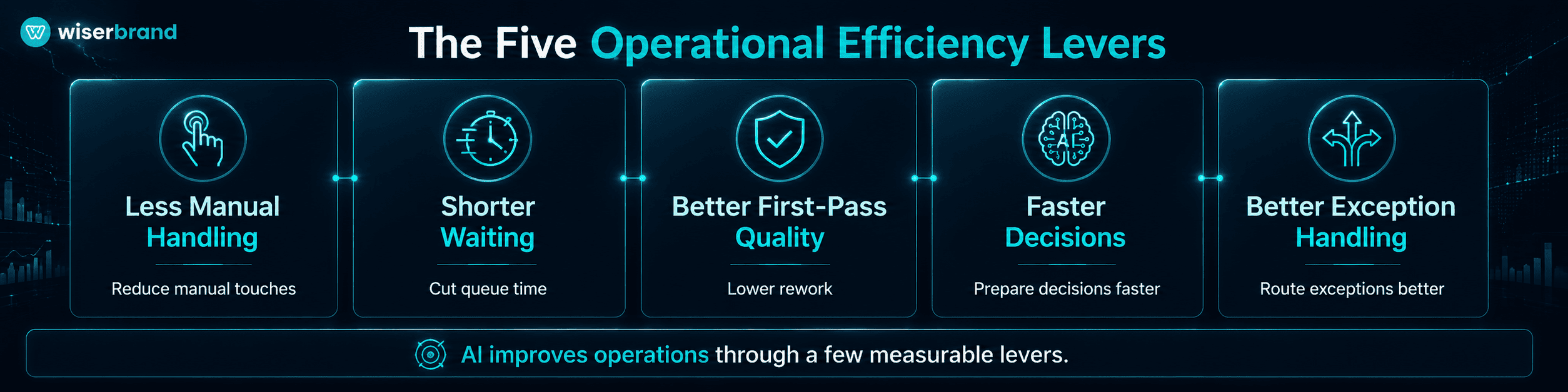
Most AI workflow value can be traced to five mechanisms.
| Efficiency Lever | What Changes | Example Metric |
|---|---|---|
| Less manual handling | The system extracts, classifies, drafts, or updates records | Manual touches per case |
| Shorter waiting | Events trigger work and route it without inbox delays | Queue time and total cycle time |
| Better first-pass quality | Validation catches missing, inconsistent, or unsupported information | Rework and correction rate |
| Faster decisions | AI assembles evidence and explains exceptions for review | Time from complete data to decision |
| Better exception handling | Unusual cases reach the right owner with context attached | Exception resolution time |
A project should identify its primary lever before development. If the business case depends on all five at once, the scope is probably too broad for an initial release.
Less Manual Handling
Language models and document AI can convert emails, forms, invoices, notes, and contracts into structured fields. Workflow services can then create tasks, update records, or request missing information.
The measurable gain is not the number of extracted fields. It is the reduction in active employee time after corrections and review are counted.
Shorter Waiting
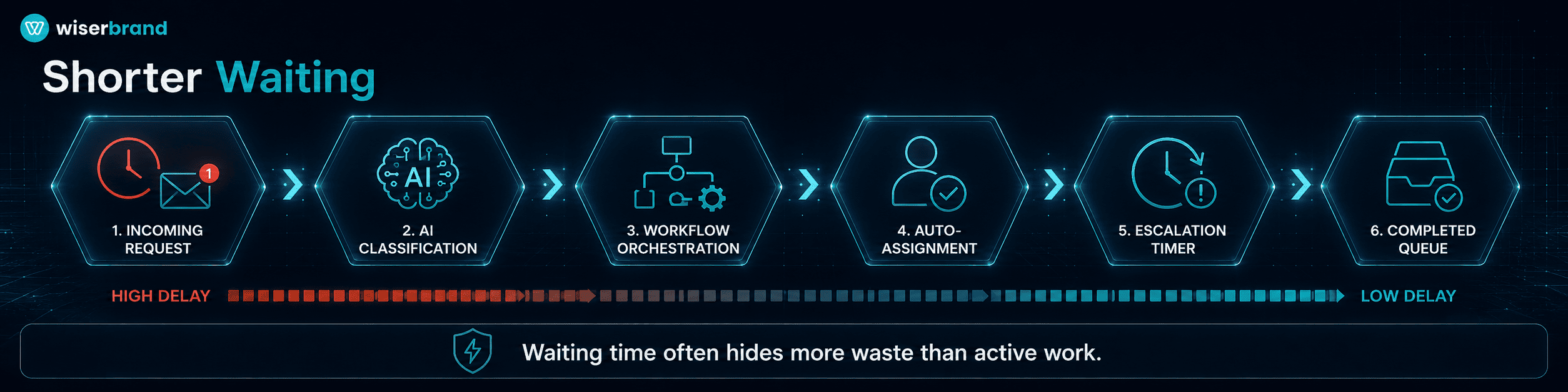
Many processes spend more time waiting than being worked. Requests sit in inboxes, approvals wait for context, and exceptions move between teams without an owner.
AI can classify a request and assemble the next step, while workflow orchestration assigns the task, starts a timer, and escalates an overdue case. Process mining uses event data from systems of record to show how processes actually run, compare variants, locate bottlenecks, and monitor KPIs.
Better First-Pass Quality
AI can check if required information is present, compare documents, identify conflicting values, and prepare a correction request. Deterministic validation should still handle exact rules such as totals, dates, permissions, and required identifiers.
First-pass quality matters because repeated corrections create hidden labor and waiting. A workflow that processes more cases but doubles downstream rework is not more efficient.
Faster Decisions
Managers and specialists often spend time assembling information before judgment begins. AI can retrieve records, summarize changes, compare scenarios, and prepare a decision brief.
The person retains authority for financial, legal, HR, safety-sensitive, or difficult-to-reverse decisions. The gain comes from reducing preparation, not replacing accountable judgment.
Better Exception Handling
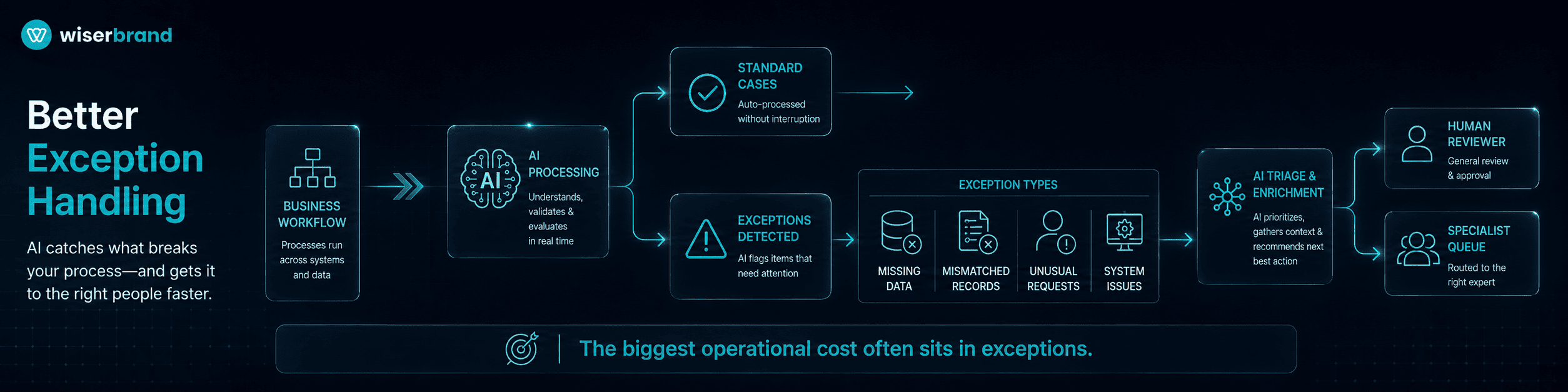
Standard cases are usually easy to automate. Operational cost often remains concentrated in exceptions: missing documents, mismatched records, unusual customer requests, system outages, or cases outside policy.
AI can interpret the exception, retrieve supporting context, and select an approved route. An AI agent becomes relevant when a model controls part of workflow execution and dynamically selects tools within guardrails. A single-turn model call or classifier is not an agent.
AI and Traditional Automation Play Different Roles
AI should not replace deterministic software when the result must be exact.
| Work Type | Best Primary Approach | Example |
|---|---|---|
| Fixed trigger and action | Workflow automation | Create a renewal task 90 days before expiration |
| Exact calculation or condition | Rules engine | Check an approval threshold |
| Data movement between modern systems | API integration | Sync an approved CRM update to ERP |
| Repeated work in a legacy interface | RPA | Enter data into a desktop application without an API |
| Prediction | Machine learning | Estimate demand or late-payment risk |
| Document interpretation | Document AI | Extract invoice or application fields |
| Search, summarization, and drafting | Generative AI copilot | Prepare a case summary from approved sources |
| Variable multi-step execution | AI agent | Investigate an order exception through several tools |
The simplest reliable method should own each step. This is the core of a practical AI operational efficiency design. An agent can interpret a request, but a rules service should verify eligibility. A model can draft a payment exception summary, but a controlled service should calculate the amount and an authorized employee should approve release.
AI Operational Efficiency Across Business Functions
Customer Service
AI can classify incoming contacts, retrieve account context, search approved knowledge, draft responses, and prepare low-risk service actions.
A practical support workflow may:
- identify the customer and intent;
- retrieve the relevant account, order, or subscription;
- find the current policy or product answer;
- prepare a response or approved action;
- route uncertainty, complaints, or high-value exceptions to an employee;
- update the case after confirmation.
Measure successful resolution, repeat contact, employee handling time, escalation quality, and correction rate. Containment alone can reward a bot that blocks access to a person without solving the issue.
Finance and Accounting
Finance workflows often combine structured rules with unstructured documents. AI can extract invoice data, summarize discrepancies, classify expenses, prepare reconciliations, and draft collection messages.
A purchase-to-pay process can use document AI for invoice fields, deterministic services for totals and matching, workflow automation for approval, and generative AI for exception explanations. Payment creation, bank-detail changes, and release remain behind identity checks and authority limits.
Useful metrics include invoice cycle time, touchless processing, exception backlog, duplicate attempts, late-payment fees, and employee correction time.
Sales and Revenue Operations
AI can summarize calls, enrich account briefs, classify leads, prepare follow-up, identify missing CRM fields, and flag opportunities that have stalled according to defined criteria.
The operational gain comes from reducing preparation and record maintenance. Pricing exceptions, forecasts, commitments, and relationship strategy stay human-owned.
Measure time spent on CRM administration, accepted follow-up tasks, lead response time, missing-field rate, and opportunities progressing after an AI-supported action.
Marketing Operations
Marketing teams can use AI to adapt approved campaign content, classify feedback, summarize performance, generate test variants, and prepare audience or channel briefs.
AI should work from approved offers, product facts, brand rules, consent, and campaign dates. Analytics and experimentation should determine performance. Generated volume is not a business outcome.
Relevant metrics include review time, approved asset rate, launch cycle time, correction rate, experiment velocity, and performance against the existing baseline.
Supply Chain and Order Management
AI can help investigate delayed orders, shortages, supplier exceptions, damaged shipments, and incomplete fulfillment records.
A workflow may retrieve inventory, purchase-order, warehouse, carrier, and customer data. The model prepares an explanation and recommended next step. Rules and optimization systems control allocation, reservation, refunds, and supplier commitments.
Measure exception cycle time, manual touches, recovered orders, expedite cost, repeat customer contacts, and failed or duplicate actions.
Manufacturing and Field Operations
In manufacturing, AI can search technical procedures, summarize maintenance history, prepare shift reports, explain anomaly alerts, and draft work orders.
Predictive maintenance models, computer vision, control software, and optimization systems handle different problems. A language model can explain a predicted failure or prepare context, but it should not declare equipment safe or directly control a production process.
Useful metrics include time to technical information, maintenance preparation time, repeat failure analysis, report preparation, correction rate, and equipment downtime linked to the supported workflow.
HR and Employee Operations
AI can support candidate intake, policy search, onboarding, employee request routing, training content, and document preparation.
Hiring, compensation, performance, disciplinary, and employee-access decisions require stronger human and legal controls. The system should not turn historical patterns into an unreviewed personnel decision.
Measure request resolution time, onboarding completion, recruiter preparation time, repeated employee questions, and corrections to AI-prepared records.
IT and Internal Support
AI can classify incidents, collect diagnostics, search runbooks, prepare remediation steps, summarize incidents, and execute bounded low-risk actions through approved tools.
Access changes, production scripts, security incidents, and infrastructure modifications need identity checks, permissions, approvals, and rollback. The model should stop when the issue crosses its supported scope.
Measure mean time to assignment, diagnostic preparation, first-contact resolution, reopen rate, failed tool calls, and time to recover.
Reporting and Knowledge Work
AI can prepare recurring operational reports by retrieving approved data, summarizing changes, and explaining exceptions. It can also help employees find current policies, product information, and technical documentation.
Calculations should come from governed data models or reporting systems. The language model explains the result and links to the source. It should not recreate financial or operational metrics from fragments in a prompt.
The main metrics are report preparation time, source accuracy, corrections, repeated searches, and time from an event to an informed decision.
A Complete AI-Enabled Workflow
A production AI operational efficiency workflow needs more than a prompt.
| Component | Responsibility |
|---|---|
| Trigger | Starts work from an event, request, schedule, or record change |
| Workflow state | Records progress, deadlines, retries, and final status |
| Data retrieval | Loads only the records and documents needed for the case |
| AI capability | Classifies, extracts, predicts, summarizes, or selects a step |
| Rules and policy | Applies exact conditions, permissions, and limits |
| Tools and integrations | Read or update CRM, ERP, ticketing, databases, and other systems |
| Human work queue | Handles approvals, corrections, and exceptions |
| Observability | Records quality, tool activity, failures, latency, and cost |
| Recovery | Supports retries, rollback, and manual completion |
AI integration connects models to operational systems such as CRM, ERP, ticketing, analytics, and document platforms through APIs and controlled connectors. The integration layer is what turns a generated suggestion into a usable workflow component.
How to Find the Right Workflow
Start with process evidence rather than a list of AI features. An AI readiness assessment can help identify which workflows have enough process stability, data access, ownership, measurable volume, and controllable risk to justify AI implementation.
Map the Current Process
Document:
- the trigger;
- users and owners;
- source systems;
- active work time;
- waiting time;
- handoffs;
- decisions;
- exceptions;
- rework;
- final business result.
Interviews reveal context and unofficial work. Process mining reveals paths and waiting from system events. Task mining can analyze recorded desktop actions to identify repeated steps, common mistakes, and automation candidates.
Score Candidate Use Cases
| Criterion | Strong Candidate | Weak Candidate |
|---|---|---|
| Frequency | Daily or weekly recurring work | Rare special case |
| Manual effort | Repeated reading, entry, search, or comparison | Little active work |
| Waiting | Delays come from routing or missing context | Delay is caused by an external dependency |
| Process stability | Trigger, owner, and outcome are clear | Every team follows a different process |
| Data readiness | Required data is accessible and current | Sources conflict or lack ownership |
| Exceptions | Cases can be identified and routed | Almost every case is unique |
| Risk | Mistakes are reviewable or reversible | Errors cause immediate serious harm |
| Measurement | Baseline and business owner exist | No agreed outcome metric |
A practical first project has one primary efficiency lever and one measurable workflow result.
Remove Process Waste First
Do not automate duplicate approvals, obsolete reports, unnecessary data entry, or a policy that no longer serves the business. Process redesign may remove more work than AI.
The best technical design may be a form, API, rule, or dashboard. AI should enter only where interpretation, prediction, or generation adds enough value.
Choosing the Right AI Approach
Use this decision sequence:
- Can a rule solve the task? Use a rule.
- Can an API move the data? Use an API.
- Is the only barrier a legacy interface? Consider RPA.
- Does the work involve documents or images? Use extraction or computer vision.
- Is the output a probability or forecast? Use a predictive model.
- Does an employee need faster search, summary, or drafting? Use a copilot.
- Does the process require variable multi-step action across tools? Consider an agent.
- Is the action high impact? Add human approval or retain human authority.
Agents are useful for complex decisions, unstructured information, and workflows that are difficult to represent through fixed rules. Guidance for production agents also recommends starting with one agent and adding more only when the workflow needs separate specialization, context, permissions, or ownership.
Data Readiness Determines the Efficiency Ceiling
AI operational efficiency depends on complete, current, accessible data. AI cannot reliably improve a workflow if the system receives incomplete, stale, conflicting, or inaccessible data.
Review:
- systems of record;
- identifiers shared across systems;
- document ownership and versions;
- event and timestamp quality;
- access permissions;
- API coverage;
- missing and conflicting fields;
- data latency;
- retention;
- source traceability;
- historical outcome quality.
A data engineering workstream may be required before AI implementation if the workflow cannot retrieve trusted information consistently across systems, identifiers, documents, and operational events. WiserBrand’s data engineering services describe this foundation in terms of data integration, quality baselines, data products, and infrastructure for analytics and automation.
Start with the smallest governed dataset needed for the selected process. Broad access increases security and maintenance without proving more value.
Human Roles in an Efficient AI Workflow
Human involvement should be placed where judgment, authority, empathy, negotiation, or accountability matters.
| Human Role | Responsibility |
|---|---|
| Process owner | Defines the business result and operating rules |
| Subject-matter reviewer | Validates domain quality and exceptions |
| Data owner | Approves sources, access, and quality standards |
| Technical owner | Operates integrations, models, and workflow services |
| Risk or compliance owner | Reviews regulated, sensitive, or high-impact use |
| Operations team | Handles unresolved cases and incident response |
| End user | Reviews, corrects, approves, or acts on AI output |
Human review should not become a universal manual step that removes the benefit. Use risk tiers. Low-risk, reversible tasks may run automatically after validation. High-impact actions require stronger approval.
The reviewer needs source evidence, proposed action, confidence or validation status, and authority to reject or edit the result. Clicking “approve” without this information is ceremonial oversight.
Risks That Can Reduce Operational Efficiency
AI can add new delay, rework, and maintenance if risks are ignored.
| Risk | Operational Effect | Control |
|---|---|---|
| Unsupported output | Employees spend time checking or correcting answers | Grounding, validation, evaluation, escalation |
| Poor data | The system creates polished but wrong summaries | Data ownership, source checks, timestamps |
| Excessive access | An error affects more records or systems | Least privilege and narrow tools |
| Prompt injection | Untrusted content changes model behavior | Input isolation, tool restrictions, adversarial testing |
| Duplicate action | Retries create repeated messages or transactions | Idempotency and state checks |
| Weak handoff | People repeat investigation after escalation | Structured transfer with context |
| Model drift | Quality declines after data or model changes | Monitoring, regression tests, rollback |
| Hidden review work | Employees spend more time correcting than before | Measure review and correction time |
| Tool sprawl | Maintenance and licensing exceed the saved effort | Architecture standards and periodic retirement |
NIST’s AI Risk Management Framework is a voluntary, use-case-agnostic framework for managing AI risk across design, development, deployment, use, and evaluation. Its current resource center also supports testing, evaluation, verification, and validation practices.
Implementation Blueprint
- Define the outcome.
Choose a completed business result such as resolved ticket, approved invoice, completed onboarding, recovered order, or prepared maintenance case.
- Establish the baseline.
Measure volume, cycle time, active work, waiting, rework, exception rate, cost, and service quality before the change.
- Map the workflow.
Record triggers, systems, owners, decisions, approvals, and failure paths. Identify the five efficiency levers that apply.
- Simplify the process.
Remove unnecessary steps and clarify ownership before development.
- Select the smallest suitable technology.
Use deterministic automation for predictable work and AI only for interpretation, prediction, generation, or variable action.
- Prepare data and access.
Connect the minimum approved sources. Define identity, roles, retention, and tool permissions.
- Build a read-only or draft-first release.
Start with extraction, classification, summaries, or proposed actions. Keep high-impact writes disabled.
- Test real cases and failures.
Include incomplete data, conflicting records, system outages, duplicate events, malicious instructions, unsupported requests, and cases that need escalation.
- Pilot with one bounded group.
Limit by team, process type, region, product, or customer segment. Compare results with the baseline.
- Add controlled execution.
Introduce reversible updates first. Use confirmation, validation, approval, audit logs, and rollback for external actions.
- Monitor the full workflow.
Track business results, model quality, tool activity, exceptions, human corrections, latency, and cost.
- Expand through governed releases.
Treat each new process, model, data source, tool, or permission as a change that needs testing and ownership.
Business process automation services can support this sequence by connecting process analysis, workflow design, system integration, testing, and ongoing operation rather than treating the model as the entire solution.
How to Measure AI Operational Efficiency
The AI operational efficiency measurement model should include speed, labor, quality, service, cost, and risk.
| Measurement Area | Example Metrics |
|---|---|
| End-to-end speed | Total cycle time, waiting time, time to decision |
| Labor | Manual touches, active handling time, cases per employee |
| Quality | First-pass completion, error rate, rework, reopen rate |
| Automation | Straight-through completion, exception rate, failed actions |
| AI quality | Accepted output, human override, unsupported answer rate |
| Reliability | Availability, timeout, retry, duplicate prevention |
| Customer or employee experience | Repeat contact, abandonment, task satisfaction |
| Economics | Cost per completed case, backlog cost, capacity released |
| Risk | Unauthorized actions, privacy incidents, unresolved alerts |
Use cost per correctly completed workflow rather than cost per model call. Include integration, infrastructure, licensing, employee review, retries, exceptions, and support.
Review results by process variant. An average can hide that the system works well for routine cases but creates delays for one product, region, language, or customer group.
An Operational Efficiency Calculation
A simple business case can model capacity released:
Capacity released =
Monthly case volume
× (Baseline active minutes - New active minutes)
× Adoption rate
× Successful completion rate
This is an estimate, not realized savings. Convert the result into financial value only if the business can redeploy the capacity, avoid planned hiring, reduce outsourcing, increase completed work, or improve another measurable outcome.
Then subtract:
Net operating value =
Capacity or outcome value
− Model and platform cost
− Integration and maintenance
− Human review
− Exception handling
− Change management
Avoid counting waiting time as labor savings unless it affects overtime, staffing, revenue, penalties, or service capacity.
When AI Is Not the Right Next Step
AI may not improve operations when:
- the process changes constantly;
- teams disagree about the correct outcome;
- data has no reliable owner;
- a simple integration or rule can solve the problem;
- the task occurs too rarely;
- almost every case requires negotiation;
- the company cannot monitor or stop the system;
- the cost of failure cannot be contained;
- no baseline exists;
- the process should be removed rather than automated.
In these situations, process redesign, data cleanup, system integration, clearer policy, or conventional automation may produce value sooner.
FAQ
How Does AI Improve Operational Efficiency?
AI improves operational efficiency by reducing manual handling, waiting, rework, decision preparation, and exception investigation. The gain should be measured across the completed workflow after human review, errors, system failures, and operating cost are included.
What Is the Best AI Use Case for Operations?
A strong first use case is frequent, measurable, supported by reliable data, and limited enough to test. Document intake, support triage, recurring summaries, invoice exceptions, internal knowledge search, and order investigation are common candidates.
Is AI More Efficient Than Traditional Automation?
Not for every task. Rules, APIs, workflow engines, and RPA are often better for predictable execution. AI adds value when the process includes unstructured information, prediction, semantic comparison, drafting, or variable multi-step work.
Do Businesses Need AI Agents to Improve Efficiency?
No. Many improvements need only workflow automation, document processing, predictive models, or an employee copilot. Use an AI agent when a model must control part of a variable workflow and select among approved tools.
Which Metrics Show Real Operational Improvement?
Useful metrics include total cycle time, active handling time, first-pass completion, rework, exception resolution, cost per completed case, customer repeat contact, and human override. Model accuracy alone does not show business value.
How Should a Business Start?
Choose one completed process, establish a baseline, map the real workflow, and identify the main efficiency lever. Build a limited read-only or draft-first release, test failure cases, and add execution only after quality and controls are stable.
What Are the Main Risks?
The main risks are incorrect output, poor source data, excessive access, prompt injection, duplicate actions, hidden review work, weak human handoff, model drift, and maintenance cost. Risk controls should match the impact and reversibility of the workflow.
Final Thoughts
AI improves operations when it changes the full workflow rather than accelerating one isolated task. The most useful systems reduce manual work, shorten waiting, improve first-pass quality, prepare decisions, and handle exceptions with less repeated investigation.
Start with a process owner, a baseline, and one measurable outcome. Keep exact rules in deterministic services. Use AI for interpretation, prediction, search, drafting, or bounded workflow decisions. Add system authority only after data, validation, human escalation, monitoring, and recovery are ready.
We help businesses map operational workflows, connect AI to existing systems, and build controlled automation around measurable process outcomes. WiserBrand’s AI integration and business process automation services cover discovery, data and system integration, workflow implementation, evaluation, and production support.