Intelligent Automation Solutions: How to Choose the Right Approach for Your Business

An intelligent automation solution combines process logic, software integration, and selected AI capabilities to reduce manual work without giving every task to a model. The right design may use workflow automation, robotic process automation, document processing, predictive models, generative AI, or AI agents. The choice depends on the process, data, risk, system access, and value of the expected result.
The main mistake is starting with a tool. A company buys an RPA platform, adds a chatbot, or launches an agent before defining the workflow. The result may automate a few clicks while leaving the underlying delay, ownership gap, or data problem untouched.
This guide explains the main intelligent automation approaches, how to match them to business problems, when custom development makes sense, and which controls keep automation useful after launch.
What Is an Intelligent Automation Solution?
An intelligent automation solution often starts with business process automation, then adds technologies that can interpret data, support decisions, or handle variable inputs where the workflow requires them. IBM defines intelligent automation as the combined use of artificial intelligence, business process management, and robotic process automation to improve and scale organizational decision-making.
The term does not describe one product category. It describes an architecture that may include several components:
- business rules and workflows;
- APIs and system integrations;
- robotic process automation;
- optical character recognition and document extraction;
- machine learning;
- natural language processing;
- generative AI assistants;
- AI agents;
- process and task mining;
- human review and approval.
A simple invoice workflow may need document extraction, validation rules, ERP integration, and an approval step. It may not need a conversational interface or an autonomous agent. A customer support workflow may need intent classification, knowledge retrieval, response drafting, ticket updates, and escalation. The right solution follows the work.
Why Tool-First Automation Fails
Tool-first projects often confuse technical capability with business value. A platform may automate a step, but the process can still fail because data is missing, ownership is unclear, exceptions are common, or downstream systems do not agree.
Common failure patterns include:
| Failure Pattern | What Happens |
|---|---|
| Automating an unstable process | Rules change often, so the automation needs constant repair |
| Copying the manual workflow | Existing waste becomes faster instead of disappearing |
| Using AI for deterministic work | A probabilistic model performs a task that clear rules could handle better |
| Ignoring exceptions | Standard cases work, but staff still manage the hardest cases manually |
| Connecting through the user interface by default | Small screen changes break the workflow |
| Starting without a baseline | The team cannot prove time, cost, or quality improved |
| Giving the system broad access | One failure can affect more records, users, or systems than intended |
| No long-term owner | The automation keeps running after the process or policy changes |
Process discovery should come before architecture. Microsoft describes process mining as a way to use system event data to understand how processes actually operate, identify bottlenecks, compare variants, and find automation opportunities.
Interviews and workshops still matter, but system data can reveal rework, waiting time, duplicate paths, and unofficial workarounds that a process diagram may miss.
The Main Intelligent Automation Approaches
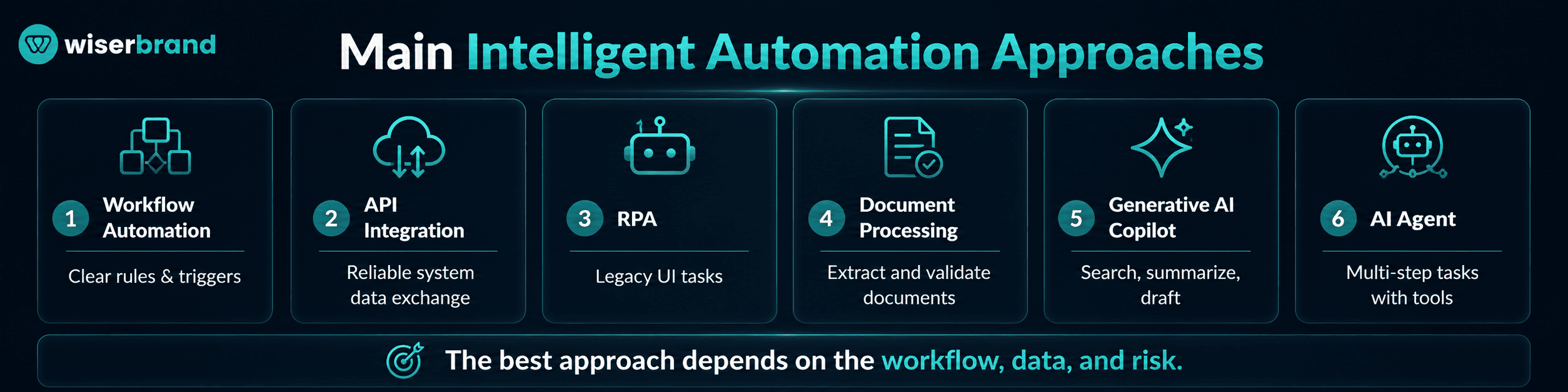
The right approach depends on the type of work. Some processes need deterministic execution. Others need language understanding, prediction, or human judgment.
| Approach | Best Fit | Typical Example | Main Limitation |
|---|---|---|---|
| Workflow automation | Clear triggers, rules, and system actions | Route an approved request to finance | Weak fit for messy inputs |
| Business process management | Long-running processes with roles, states, and approvals | Customer onboarding across several teams | Requires process discipline |
| API integration | Reliable data exchange between systems | Sync qualified leads from CRM to reporting | Depends on available APIs and data models |
| RPA | Repetitive work in systems without practical APIs | Copy values from a legacy desktop app | User interface changes can break the bot |
| Intelligent document processing | High-volume documents with semi-structured content | Extract invoice fields and route exceptions | Needs validation and document-specific testing |
| Predictive AI | Forecasting or scoring from historical data | Predict late-payment risk | Requires relevant data and ongoing monitoring |
| Generative AI copilot | Search, summarization, drafting, and guided assistance | Prepare a support response from approved sources | Output needs grounding and review |
| AI agent | Multi-step work with tools and conditional actions | Investigate an order exception and prepare next steps | Higher governance and observability needs |
| Process mining | Process discovery and performance analysis | Find rework in order-to-cash | Does not fix the process by itself |
These approaches can work together. An agent may interpret a request, a rules service may check eligibility, an API may update the ERP, and a workflow engine may request approval. The model should not own every part of the process simply because AI is present.
How to Choose the Right Approach
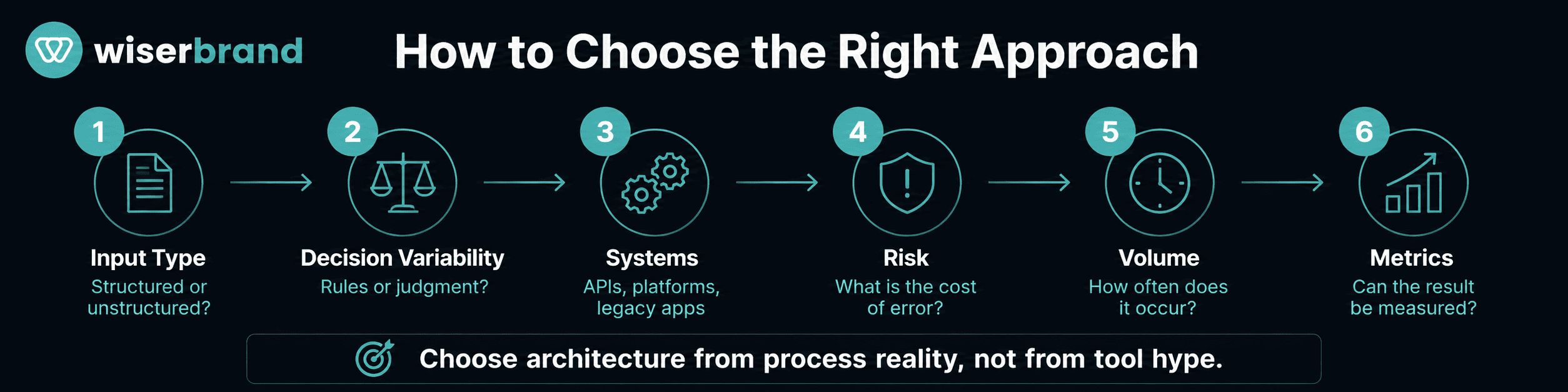
A practical selection process starts with six questions. AI strategy consulting can help teams compare candidate workflows by business value, process stability, data readiness, integration effort, risk, and measurement potential.
What Kind of Input Starts the Work?
Structured inputs favor deterministic automation. Examples include a status change, form submission, scheduled date, approved record, or database event.
Unstructured inputs may need document processing or language models. Examples include emails, contracts, support messages, images, notes, and policy documents.
The presence of text does not automatically require generative AI. A fixed form or a small set of document templates may be handled more reliably with extraction rules and validation.
How Variable Is the Decision?
Use rules when the decision can be expressed clearly:
- amount above a threshold;
- customer belongs to a defined region;
- invoice matches an approved purchase order;
- request contains all required fields;
- SLA deadline is within two hours.
Use AI when the task involves classification, prediction, semantic matching, summarization, or working with ambiguous language.
Keep a person involved when the decision depends on negotiation, policy exceptions, sensitive customer impact, legal interpretation, employee judgment, or incomplete evidence.
Which Systems Must the Automation Use?
APIs are usually the preferred integration path because they provide structured operations, authentication, and clearer error responses. RPA is useful when a critical legacy application has no practical integration interface. IBM describes RPA as software robotics used for repetitive office tasks such as extracting data, filling forms, and moving files.
Do not use RPA to imitate clicks in a modern system that already offers a suitable API. The bot may be fast to prototype but expensive to maintain.
For workflows that span CRM, ERP, finance, support, or other business platforms, AI integration connects model-driven steps with APIs, source systems, deterministic rules, and controlled actions.
For cross-system workflows, identify:
- the system of record;
- data ownership;
- authentication method;
- update frequency;
- failure behavior;
- duplicate-action protection;
- audit requirements;
- rollback options.
What Is the Cost of a Wrong Action?
Risk should shape autonomy.
| Impact | Recommended Control |
|---|---|
| Low and reversible | Automate with logs and monitoring |
| Moderate | Add thresholds, validation, and an exception queue |
| High but reversible | Require human approval before execution |
| High and difficult to reverse | Keep final authority human-owned |
| Safety, legal, financial, or access-critical | Use formal controls, independent testing, and accountable approval |
Creating an internal task is low risk. Issuing a refund, changing a supplier bank account, modifying employee access, or sending a legal notice has a different risk profile.
How Often Does the Process Occur?
High-volume work can justify deeper integration and custom development. Low-volume work may not.
Volume should be evaluated alongside manual effort and error cost. A task that occurs 100 times per day but takes ten seconds may be less valuable than a weekly process that blocks revenue for two days.
Estimate:
- cases per period;
- active work time;
- waiting time;
- correction and rework;
- exception rate;
- cost of delay;
- cost of error;
- expected maintenance.
Can the Result Be Measured?
A useful intelligent automation solution has a baseline and a target. Do not use “more efficient” as the only objective.
Possible metrics include:
- cycle time;
- manual touches per case;
- task completion rate;
- error and rework rate;
- backlog;
- SLA compliance;
- cost per case;
- employee review time;
- customer response time;
- revenue or cash released;
- human override rate;
- automation failure rate.
The metric should match the workflow. A document extraction project should not be judged mainly by model accuracy if staff still spend the same time correcting and routing the document.
Decision Matrix by Business Problem
| Business Problem | Recommended Starting Approach |
|---|---|
| Employees copy data between modern cloud systems | API integration and workflow automation |
| Teams move work through several approvals | BPM or workflow orchestration |
| A legacy desktop system requires repeated data entry | RPA with monitoring and fallback procedures |
| Staff read invoices, claims, forms, or shipping documents | Intelligent document processing plus validation |
| Managers need a risk score or demand forecast | Predictive machine learning |
| Employees search policies and prepare recurring drafts | Retrieval-grounded generative AI copilot |
| A workflow needs several tools, conditional steps, and escalation | Controlled AI agent with deterministic business rules |
| The organization does not know where delays occur | Process mining and process mapping |
| Several approaches are needed across one end-to-end process | Orchestrated intelligent automation architecture |
This table is a starting point. The final design should reflect local systems, data, risk, and operating ownership.
Where Intelligent Automation Creates Value
An intelligent automation solution is most useful when it changes a measurable workflow rather than adding another interface.
Finance and Accounting
Finance teams can automate invoice intake, matching, approval, payment-status updates, reconciliation preparation, and collections alerts.
A common architecture includes:
- Document extraction reads the invoice.
- Validation checks supplier, amount, tax, and purchase-order data.
- The ERP provides matching records.
- The workflow routes exceptions.
- An authorized employee approves payment.
- Reporting tracks cycle time and unresolved cases.
Generative AI may summarize a complex exception. It should not decide that an unsupported bank-account change is safe.
Customer Service
Customer service automation can classify requests, retrieve account context, suggest replies, create tasks, and route unusual cases.
A low-risk system may draft a response for an employee. A more mature system can answer routine questions using approved knowledge and complete bounded actions through APIs.
Keep sensitive complaints, high-value refunds, legal threats, vulnerable customers, and unclear identity cases in a human-owned path.
Sales and Revenue Operations
Sales automation can assign leads, create follow-up tasks, summarize calls, prepare account briefs, update approved CRM fields, and flag stalled opportunities.
The strongest systems connect marketing, CRM, sales activity, and downstream outcomes. This lets the business automate around qualified pipeline rather than raw lead volume.
AI can interpret notes and prepare next steps. Sales strategy, forecast judgment, pricing exceptions, and relationship decisions still need people.
HR and Employee Operations
HR workflows can support onboarding, document intake, internal requests, policy search, training reminders, and case routing.
Sensitive employee data needs role-based access and clear retention rules. Hiring, compensation, performance, and disciplinary decisions need stronger review than routine onboarding tasks.
Supply Chain and Operations
Operational teams can automate order exceptions, supplier updates, inventory alerts, shipment documentation, replenishment tasks, and recurring reports.
A multi-system exception workflow may use an agent to collect context, rules to identify the approved path, and a workflow engine to assign the next action.
Direct changes to purchase orders, prices, inventory, or customer commitments should follow defined authority limits.
IT and Internal Support
IT automation can classify requests, reset approved credentials, provision standard access, collect diagnostics, and prepare incident summaries.
Access changes need identity validation, role controls, audit records, and approval based on sensitivity. A conversational interface should not bypass the organization’s access-management process.
Rule-Based Automation, Copilot, or AI Agent?
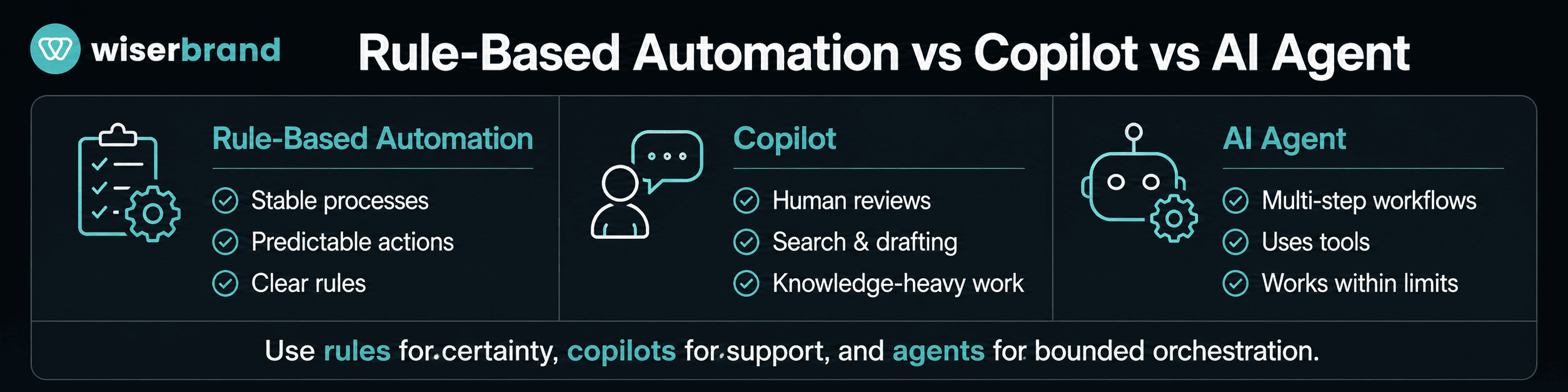
This decision is central to many current projects.
| Pattern | User Role | System Role | Best Fit |
|---|---|---|---|
| Rule-based automation | Defines the rule and handles exceptions | Executes a predictable action | Stable, deterministic processes |
| Copilot | Reviews and decides | Searches, summarizes, drafts, recommends | Knowledge-heavy employee work |
| AI agent | Supervises through limits and approvals | Plans steps, uses tools, and completes bounded work | Variable multi-step workflows |
Choose rule-based automation when the inputs and outputs are predictable. Choose a copilot when human judgment remains central but information work is expensive. Choose AI agent development when the process contains variable language or context, several systems, and a clear boundary for model-controlled decisions and tool use.
Do not choose an agent only because it can combine several tools. A workflow engine with rules may be cheaper, faster, and easier to audit.
Build, Buy, or Customize?
The delivery model affects cost, speed, control, and maintenance.
| Option | Strong Fit | Tradeoff |
|---|---|---|
| Native automation inside an existing platform | Common workflows within one product ecosystem | Limited cross-system flexibility |
| Low-code automation platform | Department workflows and common connectors | Governance and licensing can become complex at scale |
| Specialized SaaS tool | Standard document, support, finance, or sales use case | Process may need to adapt to the product |
| RPA platform | Legacy applications and high-volume desktop work | Bot maintenance and infrastructure |
| Custom intelligent automation solution | Differentiated workflow, unusual systems, or strict controls | Higher engineering and operating responsibility |
| Hybrid architecture | Shared platform with custom integrations, rules, or AI | Requires clear component ownership |
Buy when the workflow is common and the product fits the operating model. Customize when the platform covers most needs but requires business-specific logic or integrations. Build when the workflow is differentiated, the data boundary is strict, or off-the-shelf limitations would create long-term manual work.
Evaluate total operating cost, not only license price. Include integration, testing, change management, support, monitoring, model usage, vendor updates, and exit costs.
Architecture of an Intelligent Automation Solution
A production architecture may include these layers:
| Layer | Purpose |
|---|---|
| User experience | Forms, portals, chat, email, mobile, or embedded screens |
| Workflow orchestration | State, routing, timers, approvals, and exception handling |
| Integration services | APIs, events, connectors, and data transformation |
| Automation workers | RPA bots, document processors, scheduled jobs |
| AI services | Classification, prediction, retrieval, generation, or agents |
| Rules and policy | Eligibility, calculations, limits, and prohibited actions |
| Human work queues | Review, approval, correction, and escalation |
| Data and records | Systems of record, event logs, documents, and analytics |
| Observability | Logs, traces, failures, latency, cost, and business metrics |
| Security and governance | Identity, permissions, data controls, versioning, and incident response |
Critical rules should not exist only in prompts. Put thresholds, calculations, permissions, and irreversible gates in deterministic services.
Each external action should return a confirmed result. The system should know the difference between “request prepared,” “request submitted,” and “request completed.”
Governance and Risk Controls
Automation can move faster than the business can inspect it. AI increases that risk because model outputs can vary and agents can choose among tools.
NIST’s AI Risk Management Framework is a voluntary resource for managing AI risks to individuals, organizations, and society. It organizes activities around Govern, Map, Measure, and Manage, which can help teams connect use-case ownership, evaluation, monitoring, and response.
A practical control set includes:
- named business and technical owners;
- use-case and system inventory;
- data classification;
- least-privilege access;
- approved tools and actions;
- human review thresholds;
- output and transaction validation;
- evaluation before release;
- runtime monitoring;
- version and change records;
- incident and rollback procedures;
- periodic value review.
Controls should match risk. A meeting-summary assistant needs less governance than an agent that updates financial records. Both still need an owner, approved data, basic testing, and a stop path.
Implementation Blueprint
- Choose one business outcome.
Start with a problem such as slow invoice approval, repeated support triage, long onboarding, or manual order exception handling.
Name the owner and the metric. Avoid a broad goal such as “automate operations.”
- Map the current process.
Document the trigger, steps, systems, roles, waiting time, rework, exceptions, and final result. Use interviews, event data, and task observation.
Process mining can reveal process variants and bottlenecks from system records, while task mining can help identify repeated desktop work.
- Improve the process before automating.
Remove duplicate approvals, unclear fields, unnecessary transfers, and outdated rules. Do not spend engineering time automating work the business no longer needs.
- Select the smallest suitable technology.
Use rules for rules. Use APIs for system exchange. Use RPA only where the interface is the practical integration path. Use AI for variable inputs, prediction, semantic work, or bounded reasoning.
- Define the exception path.
List missing data, policy conflicts, system failures, duplicates, low-confidence outputs, and requests outside scope. Assign each case to a queue and owner.
- Build a limited first release.
Start with one team, process type, region, document set, or system path. Keep higher-risk writes disabled until read-only behavior is stable.
- Test production-like cases.
Include normal cases, incomplete records, duplicate submissions, permission failures, unavailable systems, policy changes, adversarial inputs, and cases that require human review.
- Add monitoring and rollback.
Track every action, failure, retry, correction, approval, and business result. The team should be able to pause the workflow and recover affected records.
- Measure against the baseline.
Compare cycle time, work effort, errors, backlog, SLA, cost, and quality. Separate technical success from business value.
- Scale reusable components.
Reuse connectors, identity, logging, document pipelines, rules, evaluation, and human queues. Recheck local process differences before copying the workflow to another team.
Common Mistakes to Avoid
- Automating before the business agrees on the process.
- Treating every automation problem as an AI problem.
- Using RPA when a stable API is available.
- Giving an AI agent broad access to save development time.
- Keeping critical business rules inside prompts.
- Ignoring manual exceptions in the business case.
- Counting generated outputs instead of completed outcomes.
- Launching without an operational owner.
- Skipping employee training and feedback.
- Expanding after a successful demo but before production monitoring is ready.
- Assuming a vendor’s reported result will apply to a different process and data set.
- Keeping automation that no longer produces enough value to justify maintenance.
When Not to Automate
Automation may be the wrong next step when:
- the process changes every week;
- staff cannot agree on the correct workflow;
- source data is incomplete or untrusted;
- the task occurs too rarely to justify implementation;
- the work depends mainly on negotiation or relationship judgment;
- the cost of a wrong action cannot be contained;
- there is no owner for exceptions and maintenance;
- a process change could remove the work entirely;
- the business cannot measure the result.
The alternative may be process redesign, better system integration, clearer policy, improved data quality, or a simple employee tool.
How to Measure Success
| Metric Area | Example Measures |
|---|---|
| Speed | End-to-end cycle time, waiting time, time to first action |
| Labor | Manual touches, active work time, cases per employee |
| Quality | Error rate, rework, correction rate, duplicate actions |
| Service | SLA compliance, response time, completion rate |
| Automation | Straight-through processing, exception rate, bot or tool failure |
| AI quality | Acceptance, human override, groundedness, escalation |
| Cost | Cost per completed case, platform and model cost |
| Business outcome | Cash released, revenue protected, backlog reduced, customer retention |
| Adoption | Eligible users, repeat use, workflow abandonment |
Do not optimize straight-through processing in isolation. A high automation rate can hide incorrect decisions, poor customer outcomes, or work transferred to another team.
FAQ
What Is an Intelligent Automation Solution?
An intelligent automation solution combines workflow technology with tools such as APIs, RPA, document processing, machine learning, generative AI, or AI agents. It is designed around a business process and uses human review where risk or judgment requires it.
What Is the Difference Between Intelligent Automation and RPA?
RPA reproduces repeated actions in software interfaces. Intelligent automation is broader. It may include RPA, but it can also use workflow orchestration, document extraction, AI, system integrations, business rules, and human approvals across an end-to-end process.
Does Intelligent Automation Always Require AI?
No. Many business problems are best solved with rules, APIs, and workflow engines. AI is useful when the process involves variable language, documents, prediction, classification, semantic search, or multi-step reasoning.
How Do You Choose the Best Automation Approach?
Map the process, define the business outcome, classify the inputs and decisions, review the systems involved, assess the cost of failure, and select the simplest technology that can perform the work reliably.
Should a Business Buy or Build an Intelligent Automation Solution?
Buy when the workflow is standard and a product fits the process. Customize when a platform covers most needs but requires specific rules or integrations. Build when the workflow is differentiated, system access is unusual, or the business needs tighter control than a packaged product provides.
What Is a Good First Automation Use Case?
A good first use case is frequent, measurable, stable, and bounded. Examples include invoice intake, support triage, employee onboarding tasks, CRM updates, document processing, and internal knowledge search.
How Long Does Implementation Take?
The timeline depends on process scope, integrations, data readiness, exception volume, risk, and testing requirements. A narrow workflow can move faster than an end-to-end process across legacy systems. Planning should be based on release criteria rather than a generic estimate.
Final Thoughts
The right intelligent automation solution follows the process instead of forcing the process into a fashionable tool. Start with the business outcome, map the real workflow, and choose the smallest technology set that can handle the inputs, decisions, systems, and exceptions.
Use deterministic automation for stable rules. Add RPA for legacy gaps, AI for variable information, and agents for bounded multi-step work. Keep critical permissions, calculations, approvals, and irreversible decisions outside probabilistic model control.
We help companies assess processes, select an architecture, connect existing systems, and build monitored automation that fits real operations. WiserBrand’s business process automation and AI integration services cover workflow analysis, RPA, custom integrations, AI-assisted automation, testing, and ongoing improvement.