Single Agent vs Multi Agent Systems for Business Workflows

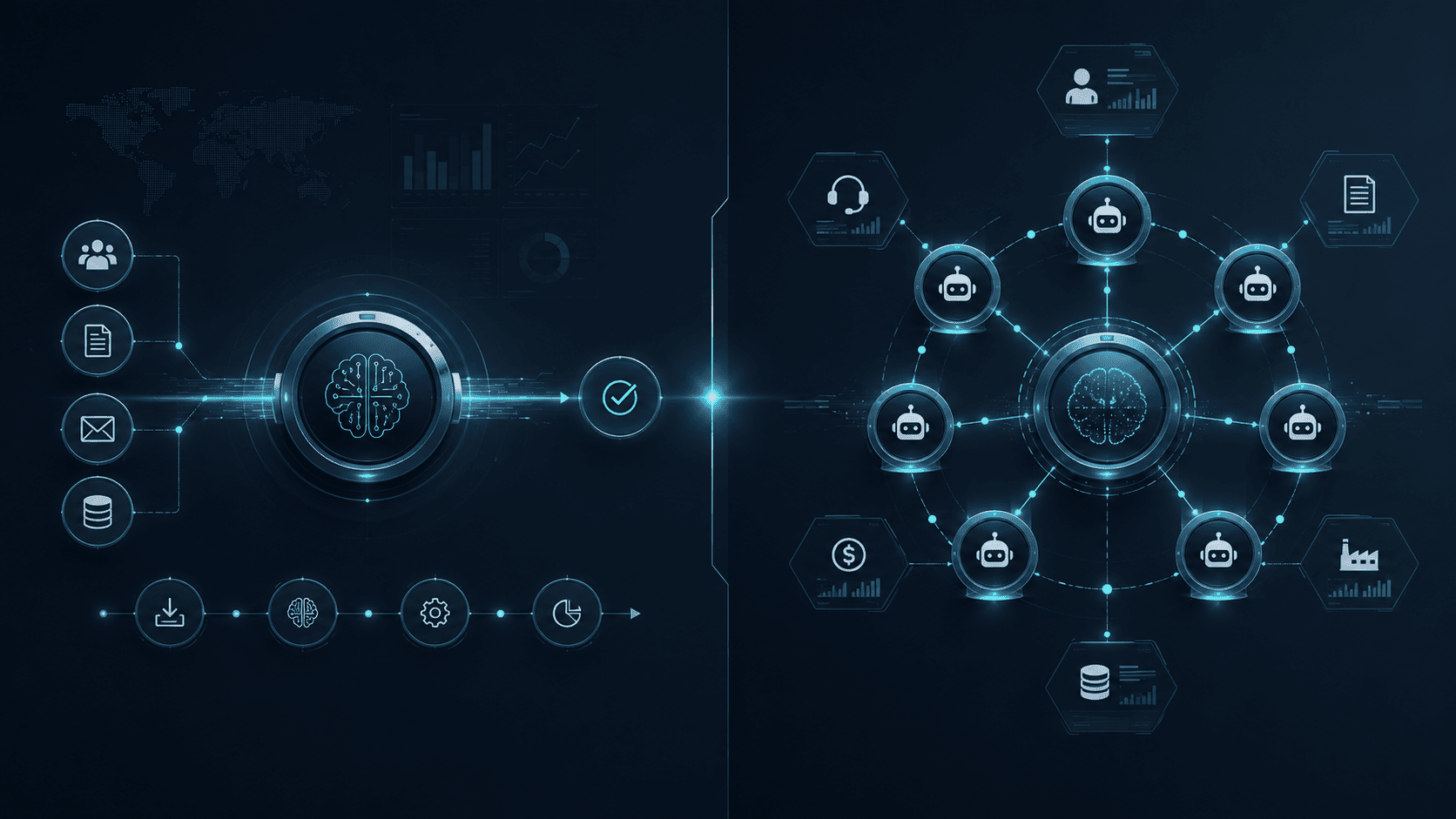
The single agent vs multi agent decision is no longer only a technical architecture question. For business workflows, it affects cost, speed, reliability, governance, and how much control the company keeps as AI starts doing real work.
A single-agent system uses one agent to understand the task, gather context, call tools, and complete the workflow. A multi-agent system splits work across several agents, often with specialized roles such as planner, researcher, executor, reviewer, or coordinator.
Both patterns can work. The mistake is assuming that multi-agent systems are always more advanced or that a single agent is always simpler. The right choice depends on workflow structure, risk, context size, tool access, and the level of specialization needed.
IBM defines AI agent orchestration as coordinating multiple specialized AI agents within a unified system to achieve shared objectives. That is useful for complex workflows, but it also adds more moving parts to govern.
This guide explains how to choose between single-agent and multi-agent systems for business workflows, when each pattern fits, what failure modes to watch for, and how to scale without creating unnecessary complexity.
TLDR
Use a single-agent system when the workflow is narrow, sequential, and easy to keep in one context. It is usually better for drafting, summarization, simple research, support intake, CRM preparation, document review, and internal assistants.
Use a multi-agent system when the workflow has distinct roles, parallel steps, many data sources, or built-in review needs. It can work well for order exception management, onboarding, compliance review, revenue operations, procurement, and complex back-office workflows.
Do not choose multi-agent architecture because it sounds more powerful. Choose it when the task structure justifies coordination overhead.
The best single agent vs multi agent decision comes down to one question: does splitting the work improve quality, speed, control, or reliability enough to justify the extra cost and governance?
What Single-Agent and Multi-Agent Systems Mean
In AI agent development, a single-agent system has one main agent responsible for understanding and controlling the workflow. It may use many tools, such as CRM, helpdesk, email, database, ERP, or document storage, but the reasoning and task control stay in one agent.
For example, a single support agent may read a ticket, summarize the issue, check the order status, draft a reply, and recommend escalation if the case is unusual.
A multi-agent system uses several agents that work together. Each agent may have a specialized role, a specific toolset, or a limited context. One agent may plan the task, another may collect data, another may check policy, and another may review the final output.
LangChain’s documentation describes multi-agent systems as coordinating specialized components to handle complex workflows. It also notes common patterns such as tool-calling, where one agent calls another agent as a tool, and handoffs, where control moves between agents.
In business terms, the difference is not “small task vs big task.” The real difference is ownership of reasoning. In a single-agent system, one agent owns the workflow. In a multi-agent system, responsibility is distributed and needs coordination.
Why the Decision Matters for Business Workflows
Architecture affects how a workflow behaves in production. A single agent may be easier to test, monitor, and explain. A multi-agent system may be better at dividing work, checking itself, and handling complex inputs.
But multi-agent systems also create new problems. Agents can pass incomplete context to each other. One bad assumption can spread through the workflow. Costs can rise because multiple agents call models and tools. Logs become harder to review. Ownership becomes less clear if the system fails.
The single agent vs multi agent choice should be tied to business outcomes:
| Decision Area | Why It Matters |
|---|---|
| Speed | Parallel agents may finish some workflows faster, but coordination can slow simple tasks. |
| Cost | More agents usually mean more model calls, tool calls, and monitoring work. |
| Quality | Specialized agents can improve output, but handoffs can lose context. |
| Risk | Multi-agent systems need stronger controls because more components can act. |
| Maintenance | Single-agent systems are usually easier to debug and change. |
| Scale | Multi-agent systems can scale complex workflows when roles are clearly separated. |
A business workflow should not become multi-agent by default. It should become multi-agent when the process itself already has meaningful parts that benefit from separation.
When a Single-Agent System Is the Better Choice
A single-agent system is often the right starting point. It is simpler to build, easier to evaluate, and easier for business users to understand.
Use one agent when the task has a clear start and end, uses a limited number of tools, and does not need several specialist roles.
Good single-agent workflow signs include:
- The task is mostly sequential.
- The agent can keep the needed context in one session.
- The output is a draft, summary, recommendation, or low-risk action.
- The workflow has one main business owner.
- Human review is simple.
- The cost of a wrong action is manageable.
- The agent does not need to coordinate with other agents.
Single-agent systems work well for support summaries, sales research briefs, CRM hygiene suggestions, contract intake, internal knowledge search, content drafts, meeting summaries, and simple document processing.
A single agent can still be powerful. It can use tools, call APIs, retrieve documents, create tasks, and prepare actions for review. The key is that one agent controls the workflow logic.
When a Multi-Agent System Is the Better Choice
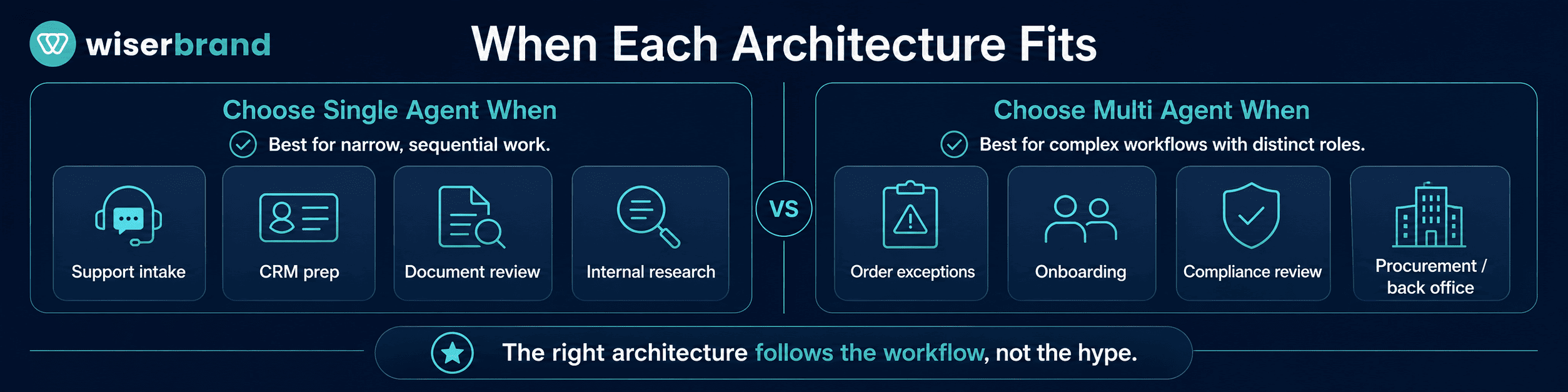
A multi-agent system makes sense when the workflow is complex enough that one general agent becomes hard to control or evaluate. In these cases, custom AI development can separate responsibilities across specialized agents, permissions, tools, and review stages.
Use multiple agents when the task has distinct roles, independent workstreams, or built-in review needs. For example, one agent can gather data, another can check policy, another can calculate risk, and another can prepare the final recommendation.
Google Cloud explains that multi-agent systems differ from single-agent systems in how they approach problem-solving and interaction scope. In business workflows, that difference matters when one workflow crosses functions, systems, and decision types.
Good multi-agent workflow signs include:
- The task can be split into clear sub-tasks.
- Different agents need different tools or permissions.
- Parts of the work can happen in parallel.
- Review or verification is important.
- The workflow crosses departments.
- The context is too large for one agent to handle cleanly.
- The business needs better audit separation between steps.
Multi-agent systems can work well for order exception management, claims review, vendor onboarding, customer onboarding, compliance workflows, revenue operations, procurement review, complex research, and multi-system back-office automation.
The important word is “can.” Multi-agent systems are not automatically better. They need orchestration, shared state, clear boundaries, and monitoring.
Decision Criteria for Single Agent vs Multi Agent
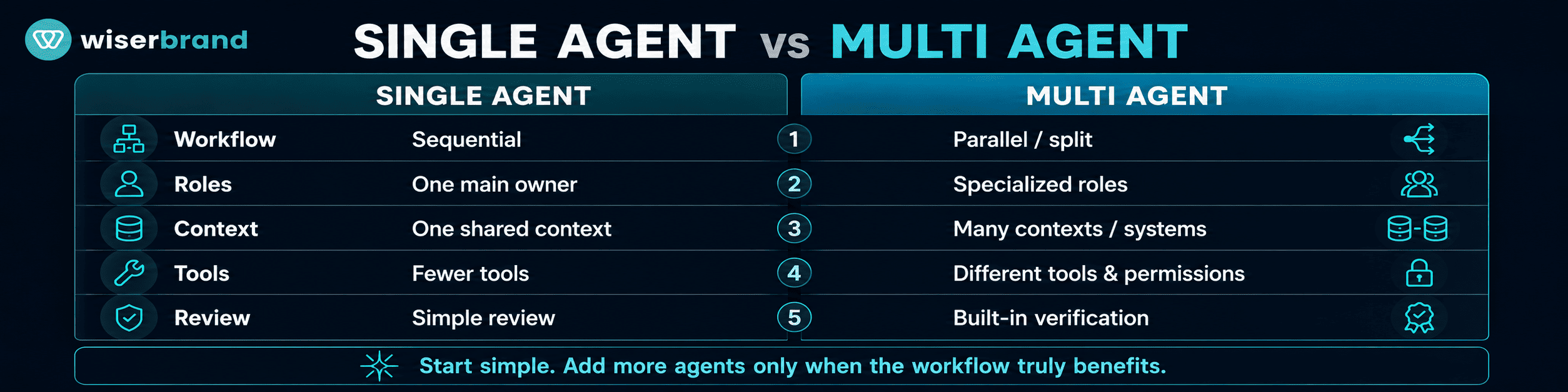
The single agent vs multi agent decision should be based on task structure, not preference.
Use this decision table:
| Question | Choose Single Agent When | Choose Multi-Agent When |
|---|---|---|
| Is the task sequential or parallel? | Steps happen one after another. | Several steps can run at the same time. |
| How many roles are needed? | One role can handle the task. | Research, execution, review, and approval need separation. |
| How much context is needed? | Context is manageable in one session. | Context comes from many systems or documents. |
| How risky are the actions? | Outputs are low risk or human-reviewed. | Risk requires independent checking or approval. |
| How many tools are involved? | Few tools with clear access. | Different tools need different permissions. |
| How hard is evaluation? | One output can be checked directly. | Each step needs separate evaluation. |
| How important is auditability? | Simple logs are enough. | The business needs step-level traceability. |
| What is the expected volume? | Moderate volume or simple tasks. | High volume, complex routing, or parallel handling. |
If most answers sit in the left column, start with a single agent. If several answers sit in the right column, consider a multi-agent pattern.
Business Workflow Examples
The most useful way to compare single agent vs multi agent systems is by workflow.
Customer Support Intake
A single agent is often enough for support intake. It can read a ticket, classify the issue, summarize the customer history, check order data, draft a reply, and recommend escalation.
A multi-agent setup may make sense when support cases require several checks. One agent reviews the customer history, another checks warranty policy, another checks fraud risk, and another prepares a final response for approval.
Start with one agent unless the support workflow already has clear specialist paths.
Sales and CRM Operations
A single agent can prepare account briefs, summarize call notes, create follow-up tasks, and flag missing CRM fields. This is useful because the workflow is usually tied to one rep and one account.
A multi-agent setup may fit enterprise sales operations. One agent researches the account, another reviews CRM history, another checks buying signals, and another prepares a deal-risk summary for the manager.
Use multiple agents when the workflow needs several perspectives, not just more data.
Finance and Approval Workflows
Finance workflows often benefit from role separation. A single agent can collect invoice details, match a purchase order, and prepare a summary.
A multi-agent system may be better when the workflow includes policy review, budget check, vendor risk, tax review, and approval routing. Each step can have a narrow agent with limited permissions.
Financial actions should usually stay human-approved. Agents can prepare the work, but payment release, vendor changes, and policy exceptions need stronger controls.
HR Onboarding
A single agent can answer onboarding questions, collect missing information, and create tasks for HR, IT, and managers.
A multi-agent workflow may help when onboarding involves role-specific steps. One agent coordinates equipment, another handles document checks, another tracks training, and another reports completion status.
This is useful when onboarding crosses departments and missing one step creates delays.
Order Exception Management
Order exception management is a strong multi-agent candidate. A delayed or unusual order may involve customer service, warehouse status, payment status, inventory, shipping, and fraud review.
One agent can check fulfillment. Another can check payment. Another can review customer history. Another can prepare a customer update. A coordinator agent can assemble the final recommendation.
This works because the workflow has natural sub-tasks and requires AI integration with several systems, such as the storefront, ERP, CRM, payment platform, inventory database, and fulfillment tools. A single agent can handle small order issues, but complex exceptions may benefit from specialization.
Common Multi-Agent Patterns
Multi-agent systems are easier to manage when the pattern is clear.
| Pattern | How It Works | Best Fit |
|---|---|---|
| Coordinator-Worker | One coordinator breaks the task into parts and assigns work to specialist agents. | Complex workflows with clear sub-tasks. |
| Researcher-Writer-Reviewer | One agent gathers data, another drafts, another checks quality. | Reports, proposals, knowledge work. |
| Router-Specialist | A router sends tasks to the right agent based on category or intent. | Support, HR, IT, procurement. |
| Parallel Review | Several agents review the same issue from different angles. | Compliance, risk, security, finance. |
| Human-in-the-Loop | Agents prepare work and humans approve high-risk actions. | Customer-facing, financial, legal, HR workflows. |
Do not mix patterns casually. A system that has a coordinator, router, reviewer, and several workers may be valid, but only if the workflow needs that complexity.
A clean architecture is easier to monitor and improve.
Cost and Performance Tradeoffs
Multi-agent systems can improve performance when tasks are divisible. They can also increase cost because every agent may use tokens, tool calls, retrieval steps, and logs.
The cost difference can come from:
- More model calls.
- More tool calls.
- Longer prompts for agent roles.
- More duplicated context.
- More retries when agents disagree.
- More monitoring and evaluation work.
- More engineering effort.
A single agent may be cheaper and faster for simple workflows. A multi-agent system may be worth the cost when it improves accuracy, speed, review quality, or throughput enough to justify the overhead.
The business metric matters. Do not compare only token cost. Compare cost per completed workflow, time saved, error reduction, and risk reduction.
If a multi-agent workflow costs more but prevents revenue leakage, compliance errors, or operational delays, it may be worth it. If it only produces a slightly longer answer, it is probably not.
Failure Modes to Watch For
Multi-agent systems introduce failure modes that single-agent systems may not have.
| Failure Mode | What It Looks Like |
|---|---|
| Context loss | One agent passes an incomplete summary to another. |
| Error propagation | A wrong assumption from one agent becomes the basis for later actions. |
| Conflicting outputs | Agents disagree, but the system has no resolution rule. |
| Coordination overhead | The system spends too much time routing and reconciling work. |
| Duplicate work | Several agents repeat the same research or tool call. |
| Permission sprawl | Agents receive broader access than their role requires. |
| Hidden ownership | No one knows which agent caused the issue. |
| Weak audit trail | Logs show final output but not the reasoning path or tool calls. |
Single-agent systems have failure modes too. They can become overloaded with context, miss specialist checks, or make unsupported assumptions. The difference is that single-agent failures are often easier to trace.
This is why multi-agent systems need more deliberate design. They need shared state, handoff rules, conflict resolution, and observability.
Governance and Control
Business workflows need governance because agents may act on real records, customers, money, employees, and operational data.
NIST’s AI Risk Management Framework helps organizations manage AI risks to individuals, organizations, and society. Its Govern, Map, Measure, and Manage functions are a useful way to think about agent systems across the lifecycle.
For single-agent systems, governance can be lighter but still necessary. Define scope, access, human review, logging, and ownership.
For multi-agent systems, governance needs more detail:
- Which agent owns which step?
- Which tools can each agent use?
- What data can each agent see?
- How are handoffs logged?
- What happens when agents disagree?
- Which actions need approval?
- Who can change prompts, tools, or rules?
- How can the system be paused or rolled back?
The more agents involved, the more important it is to avoid vague accountability. “The system did it” is not enough for business operations.
Implementation Blueprint
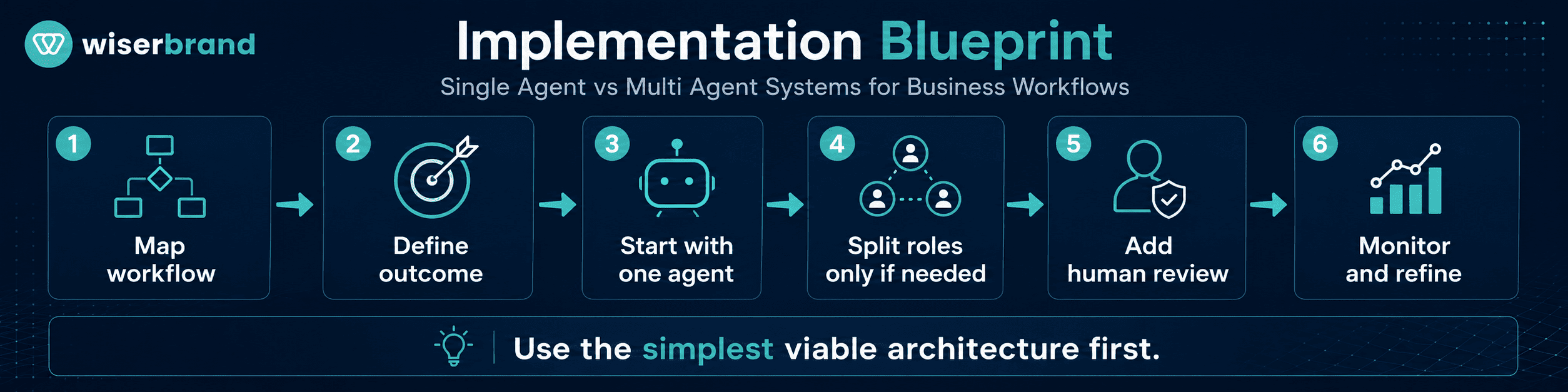
Use this process before choosing the architecture.
- Map the workflow. Document the trigger, systems, users, data, actions, exceptions, and risk.
- Define the outcome. Decide what the agent should improve: speed, quality, cost, backlog, accuracy, or visibility.
- Start with the simplest viable architecture. As part of AI strategy consulting, teams can evaluate workflow complexity, risk, cost, data readiness, and control requirements before choosing between single-agent and multi-agent architecture.
- Identify natural roles. Only split agents when roles are meaningfully different.
- Limit permissions. Each agent should get only the tools and data needed for its job.
- Add human review where risk is high. Keep approvals for financial, legal, HR, customer-facing, or irreversible actions.
- Test real scenarios. Include missing data, conflicting inputs, tool failures, edge cases, and user mistakes.
- Monitor step-level behavior. Track tool calls, handoffs, failures, overrides, latency, and cost.
- Review after launch. Remove unnecessary agents, simplify prompts, refine rules, and update ownership.
This blueprint helps teams avoid the most common problem: building a multi-agent system when a single agent would have solved the workflow more safely.
FAQ
What Is the Difference Between Single Agent and Multi Agent Systems?
A single-agent system uses one agent to manage the workflow. A multi-agent system splits the work across several specialized agents that coordinate, hand off tasks, or review each other’s work.
Is Multi-Agent Always Better Than Single-Agent?
No. Multi-agent systems can help with complex workflows, but they also add cost, coordination overhead, governance needs, and failure modes. A single agent is often better for narrow, sequential tasks.
When Should a Business Use a Single Agent?
Use a single agent when the workflow is narrow, low to moderate risk, sequential, and easy to keep in one context. Examples include summaries, CRM prep, support intake, document review, and internal knowledge search.
When Should a Business Use Multi-Agent Architecture?
Use multi-agent architecture when the workflow has clear sub-tasks, multiple specialist roles, parallel work, separate permissions, or strong review needs. Examples include order exceptions, finance review, onboarding, compliance checks, and revenue operations.
Does a Multi-Agent System Cost More?
Usually, yes. More agents often mean more model calls, tool calls, context passing, logs, tests, and monitoring. The cost can be worth it when the workflow improves enough in quality, speed, risk control, or throughput.
Can a Single Agent Use Many Tools?
Yes. A single agent can use multiple tools and still remain a single-agent system. The question is not how many tools exist. The question is whether one agent owns the reasoning and workflow control.
What Is the Best First Architecture?
Start with a single agent unless the workflow clearly needs specialization, parallel work, or independent review. It is easier to test, govern, and improve one agent before scaling into a multi-agent pattern.
Final Thoughts
The single agent vs multi agent decision should follow the workflow, not the hype. A single agent is often the best choice for clear, narrow, sequential work. A multi-agent system can be valuable when the workflow has distinct roles, parallel tasks, multiple systems, and meaningful review needs.
For business workflows, the best architecture is the one that improves the process with the least unnecessary complexity. Start simple. Split roles only when the task structure demands it. Keep permissions narrow. Monitor behavior, not only final answers. Keep humans in control where risk is high.
If your team is evaluating single-agent or multi-agent systems for business workflows, we can help map the process, choose the right architecture, build the agents, connect tools, add governance, and measure production results.