Back Office Automation: How It Works, Examples, Benefits


Back office automation uses software, rules, and AI agents to handle repetitive internal workflows with less manual effort. It takes work like invoice capture, approval routing, record updates, and internal reporting out of inboxes, spreadsheets, and scattered handoffs. The goal is to reduce labor-heavy admin work, cut delays, and keep people focused on decisions that need judgment.
The biggest gains usually come from workflows that move across teams and systems. Finance, HR, procurement, and operations often follow the same pattern: someone receives a request, checks data in multiple tools, copies information, asks for approval, and follows up when work stalls. Back office automation turns that pattern into a defined process inside a back office system.
What Is Back Office Automation
Back office automation is the use of AI agents or software to manage repeatable internal business tasks with less manual work. That includes functions like finance, procurement, HR, compliance, and internal operations. A back office system supports these teams by giving them a place to manage tasks, records, and approvals. Back office tools add specific capabilities inside that environment, such as document capture, workflow routing, reporting, or integration with ERP, CRM, and HR platforms.
Simple automation follows fixed rules. A form is submitted, a manager gets a request, a status changes, and a record is updated. This works well when the process is stable and inputs are structured.
AI-powered automation handles work that has more variation. It can extract data from invoices, classify requests, summarize internal updates, detect missing fields, or decide which ticket should go to which team. The AI still works inside a defined workflow. It does not replace process design. It helps the process handle messy inputs, language-based tasks, and exceptions with less manual review.
How Back Office Automation Works
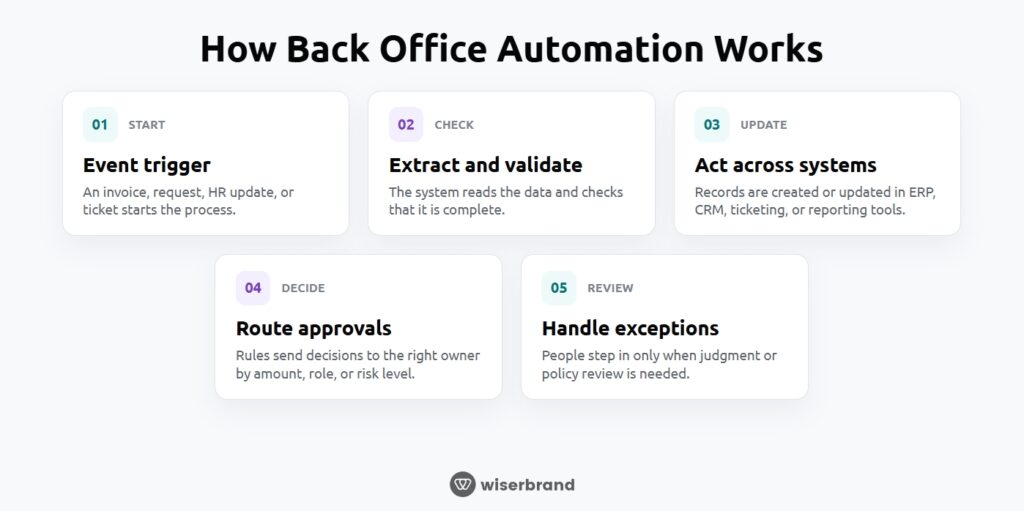
Back office automation follows a defined workflow. A task starts with a trigger, the system gathers or checks the needed data, rules decide what happens next, and exceptions go to a person when the process cannot move forward safely on its own.
Most workflows begin with an event:
- an invoice arrives by email
- a purchase request is submitted through a form
- a new employee is added to the HR system
- a ticket is created in an internal portal
That event tells the automation to start a sequence of actions.
The next step is data extraction and validation. The system reads the incoming information and checks that it is complete and usable.
Once the data is usable, the workflow can take cross-system actions. It might create or update a record in an ERP, write a note into a CRM, create a task in a ticketing system, or log the transaction in a reporting database. The work no longer stops because one person has to move information from one tool to another by hand.
Approval routing comes next when a decision is required. The workflow can send requests based on amount, department, location, role, or risk level. A small purchase may go to a team lead. A larger one may move to finance. The routing logic keeps decisions consistent and reduces the time lost to unclear ownership.
Human review stays in the process where judgment matters. That can include unclear invoice fields, policy exceptions, unusual vendor terms, sensitive HR issues, or records that do not match across systems. Instead of forcing people to handle every case manually, the workflow sends only the exceptions that need attention.
The most effective automations usually share five traits:
- Clear process rules
- Reliable source data
- Connections between the core systems involved
- Defined exception paths
- A measurable business outcome, such as hours saved, cycle time reduced, or error rate lowered
When those pieces are in place, automation moves from a series of isolated shortcuts to a working operational system.
Back-Office Automation Examples
The best back office automation projects focus on workflows that are repetitive, slow, and expensive to handle by hand. These are usually not isolated tasks. They move through multiple people, systems, and approval points.
Invoice Processing And AP Workflows
In many companies, invoices arrive through different channels, in different formats, with inconsistent naming and incomplete fields. Staff then read them, enter the data manually, match them to purchase orders, route them for approval, and follow up when something is missing.
Automation can capture invoice data, validate totals, match line items against purchase orders or vendor records, flag duplicates, and send the invoice to the right approver. If something does not match, the workflow can pause and send the exception to AP or procurement.
Budget Tracking And Finance Reporting
Budget tracking often breaks down because the data lives in several places. Teams pull numbers from ERP reports, spreadsheets, department trackers, and emails, then spend time reconciling them before anyone can use them.
Automation can collect budget inputs on a schedule, standardize the format, update reporting tables, and produce recurring summaries for finance leaders. AI can help summarize variances or flag unusual changes, but the main value comes from removing the manual work required to gather and prepare the data.
Procurement And Purchase Approvals
Procurement workflows often stall because requests come in through email, chat, shared documents, and verbal follow-ups. Then someone has to confirm the category, check policy, identify the correct approver, and track status manually.
A back office workflow can capture the request through a form or inbox, classify it, check spend thresholds, route it based on department or amount, and record each approval step. It can also notify the requester when more information is needed or when the request is approved.
Internal Reporting And Status Summaries
Many internal reports are built by hand every week or month. Managers gather updates from different teams, copy metrics into slides or spreadsheets, and write summaries for leadership. The reporting itself becomes a recurring admin task.
Automation can collect data from source systems, generate a draft report, summarize changes, and send it to the right audience on a schedule. A human can review the final output before distribution if needed.
Employee Onboarding And Offboarding
Onboarding and offboarding often expose how disconnected internal operations really are. A new hire may require steps across HR, IT, payroll, facilities, security, and department leadership. Offboarding has similar complexity, with added risk if access removal is delayed.
Automation can trigger tasks when a status changes in the HR system, assign work to each team, track completion, create accounts, request equipment, collect documents, and revoke access at the right time.
Back Office Tasks That Are Not A Good Fit For Automation
Not every internal process should be automated end to end. Some tasks depend too much on judgment, context, or risk review. In those cases, automation should support the workflow, not replace the decision-maker.
High-Risk Approvals
Large payments, unusual purchases, contract exceptions, and other high-impact approvals should stay human-led. Automation can collect data and route the request, but the final decision should remain with the right person.
Sensitive Employee Matters
Performance issues, complaints, investigations, and termination-related actions need discretion. Software can manage intake and documentation, but people should handle the review and outcome.
Vendor Negotiation And Relationship Decisions
Pricing discussions, renewal terms, and dispute resolution are not rule-based tasks. Automation can organize information, but it should not make relationship or negotiation decisions.
Legal Interpretation And Case-By-Case Review
Contracts, compliance questions, and policy exceptions often require nuance. AI can flag issues or summarize documents, but legal judgment should stay with qualified professionals.
Exception-Heavy Processes With Unclear Rules
If a workflow changes constantly or depends on missing context, it is a weak automation candidate. Fix the process first, then automate the repeatable parts.
Benefits Of Back Office Automation
Back office automation helps teams cut repetitive admin work, move faster, and manage internal processes with more consistency. The biggest gains usually come from workflows that involve manual handoffs, cross-system updates, and recurring approval steps.
- Lower manual workload
- Fewer errors and less rework
- Better visibility across workflows
- Easier scaling during busy periods
- More consistent compliance and audit trails
- Better use of existing systems
- More time for higher-value work
Challenges Of Back Office Automation
Back office automation can deliver strong results, but the outcome depends on process quality, data quality, and system readiness. Most problems come from trying to automate a weak workflow instead of fixing the workflow first.
Poor Process Design Before Automation
If the steps are unclear, inconsistent, or full of unnecessary approvals, automation will carry those problems forward. The fix is to simplify the workflow before building anything. Cut avoidable steps, define ownership, and make the decision points clear.
Siloed Systems
Many back office workflows break because data sits in separate tools that do not communicate well. A team may use one system for finance, another for HR, another for tickets, and another for documents. The fix is to design around the real system landscape, connect the right platforms, and avoid creating one more disconnected layer.
Over-Automation Without Exception Handling
Some teams try to automate every step, including the cases that clearly need human review. That usually creates risk, rework, or user resistance. The fix is to build clear exception paths, define when a person should step in, and keep human approval in place for higher-risk actions.
Weak Change Adoption
Even a well-built workflow can fail if teams do not trust it or do not know how to use it. People fall back to email, spreadsheets, and side conversations. The fix is to keep the process practical, make responsibilities clear, and show users how the new workflow reduces their workload instead of adding friction.
Which Industries Benefit From Back Office Automation?
Back office automation works best in industries where teams handle high volumes of repeatable internal work across multiple systems. The common pattern is the same: too many manual handoffs, too much rekeying, and too much time spent moving routine work from one step to the next.
Retail
Retail operations generate constant back office work across purchasing, inventory updates, invoice handling, returns, vendor coordination, and internal reporting. During peak periods, those workflows can break under volume. Automation helps teams process requests faster, reduce admin load, and keep operations moving without adding the same level of headcount.
Finance And Banking
Finance and banking teams deal with structured processes, approval rules, compliance requirements, and large volumes of documentation. That makes the back office a strong fit for automation in areas like reporting, reconciliations, document intake, internal requests, and routine review workflows. Human oversight still matters, but the repeatable parts can be handled more efficiently.
Logistics
Logistics companies run on time-sensitive workflows. Load updates, rate confirmations, invoice checks, status reporting, and internal coordination often move across TMS, ERP, email, and spreadsheets. Automation helps reduce delay, cut manual entry, and improve speed in processes where every hour affects cost-per-load and service performance.
Real Estate
Real estate firms manage a steady flow of documents, approvals, transaction updates, lease records, vendor requests, and finance-related admin work. Many of these processes are repetitive and involve several people and systems. Automation helps reduce bottlenecks and keeps internal operations moving faster without relying on constant follow-up.
Law Firms
Law firms often carry a heavy back office workload tied to intake, billing support, document handling, conflict checks, matter setup, internal approvals, and status tracking. Some legal work is too nuanced for full automation, but many internal workflows around operations and administration are structured enough to improve with the right process design. The value usually shows up in lower admin overhead and more billable time protected for legal teams.
Final Words
The best back office automation projects do not start with a tool. They start with a workflow that is slow, manual, expensive, and clear enough to fix.
That is usually where the strongest ROI comes from. A team is buried in invoice handling, approval delays, status chasing, record updates, or internal requests that move across too many systems. The process already exists. It just depends on people doing routine work by hand.
FAQ
That depends on the workflow, the systems involved, and the amount of cleanup needed before automation starts. A focused use case with clear rules and a limited number of integrations can often move faster than a cross-functional process with messy data and several approval layers. In most cases, the timeline depends less on the technology and more on how clearly the process is defined.
Tasks that depend heavily on judgment, risk review, negotiation, or legal interpretation should not be fully automated. That includes sensitive employee matters, high-risk approvals, vendor negotiations, and case-by-case compliance decisions. Automation can still support those workflows by handling intake, routing, documentation, and status tracking.
ROI usually comes from lower manual labor costs, faster cycle times, fewer errors, and better throughput without adding headcount. The clearest returns tend to come from workflows with high volume, repeatable steps, and visible bottlenecks. Companies often measure results through hours saved, backlog reduction, turnaround time, error rates, or reduced dependence on manual admin work.
No. In many cases, the better approach is to automate across the systems already in place. That may include ERP, HR, finance, ticketing, document, or communication tools. The goal is to connect existing workflows and reduce manual handoffs, not force a full platform replacement before improvement is possible.
Yes, but it works best inside a defined process. AI can extract data from documents, classify requests, summarize updates, detect anomalies, or route work based on context. It is most useful when paired with clear workflow rules, system integrations, and human review for exceptions or higher-risk actions.