Professional Services Automation in Salesforce: Workflows and Implementation

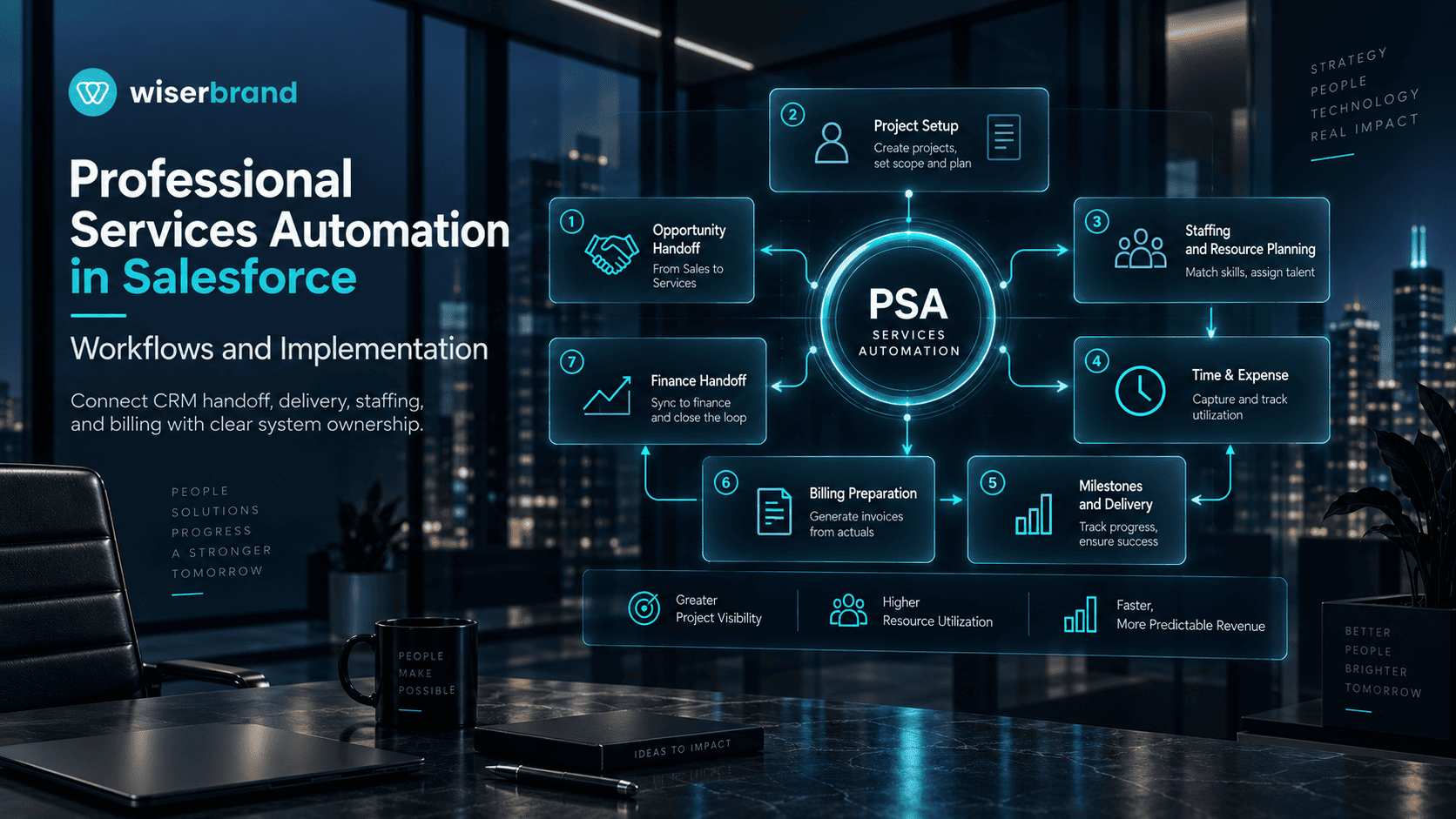
Professional services automation in Salesforce connects sales data with the operational work that starts after a services deal is won. A practical PSA setup can create or prepare projects from opportunities, assign delivery ownership, coordinate resources, capture time, track milestones, prepare billing data, and return delivery status to account teams. The important distinction is that Salesforce CRM by itself is not automatically a complete professional services automation system. Organizations usually combine Salesforce Flow, custom objects, Salesforce-native PSA applications, or external delivery and finance systems.
The implementation should start with the services lifecycle rather than a product list. Define the sales-to-delivery trigger, project source of truth, staffing process, time and expense rules, billing handoff, approval gates, exception paths, and the metrics used to evaluate delivery. That operating model determines which parts belong in Salesforce and which should remain in a dedicated PSA, ERP, accounting, or workforce system.
What Professional Services Automation in Salesforce Covers
Professional services automation (PSA) software supports the operational lifecycle of a services business. Typical domains include project setup, resource planning, staffing, time and expense capture, project financials, delivery status, billing preparation, and utilization reporting. In a Salesforce environment, those functions may use native platform records and automation, a Salesforce-native PSA application, or synchronization with an external system.
Salesforce Flow provides a general automation layer for business processes. Salesforce Trailhead documents Flow Builder for interactive and behind-the-scenes automation, including record-triggered and scheduled flows. That makes Flow useful for Salesforce handoffs, record updates, and approval-oriented processes. Flow does not by itself provide the PSA-specific project, resource, utilization, or billing data model that a services organization may need.
Three Common PSA Architecture Options on Salesforce
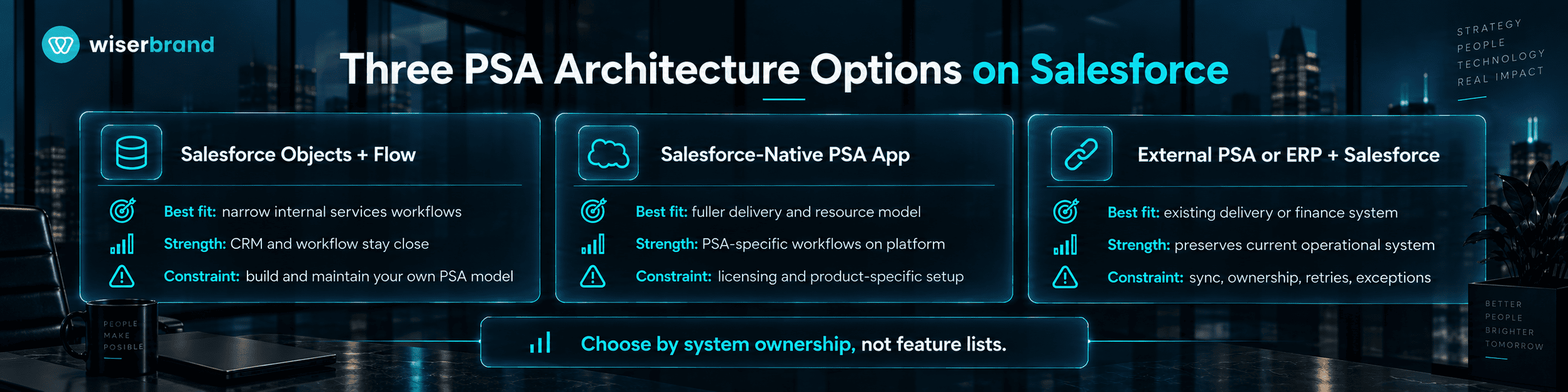
| Architecture | Best Fit | Main Strength | Main Constraint |
|---|---|---|---|
| Salesforce objects plus Flow | Narrow internal services processes with modest PSA requirements | Keeps workflow and CRM records close together | Team must design and maintain the PSA data model and controls |
| Salesforce-native PSA application | Organizations that need a fuller delivery, resource, time, and project model on the platform | Extends Salesforce with PSA-specific objects and workflows | Licensing, configuration, and product-specific operating model |
| External PSA or ERP integrated with Salesforce | Businesses with established delivery or finance systems outside Salesforce | Preserves the operational system already used by services and finance | Requires field ownership, synchronization, retries, and exception handling |
The choice should follow the system-of-record decision. If the services team already manages staffing, time, and project financials in another platform, copying those responsibilities into Salesforce can create competing records. If Salesforce is expected to become the delivery workspace, the organization needs a clear project model, permissions, lifecycle states, and reporting rules before adding automation.
Salesforce-Native PSA Applications
Salesforce AppExchange includes PSA products built for the Salesforce platform. For example, the current Cloud Coach AppExchange listing describes a Salesforce app for professional services automation, project and resource management, customer onboarding, time tracking, project health, availability, and opportunity-to-project creation. These are Cloud Coach product capabilities, not default capabilities of every Salesforce org.
Certinia is another Salesforce-native approach. Its Professional Services Cloud is positioned around resource planning, project delivery, services operations, and financial context on Salesforce. Product-specific claims should stay scoped to the installed PSA application because the object model, approvals, billing behavior, and reporting differ between vendors and configurations.
Core Professional Services Workflows
Opportunity-to-Project Handoff
The handoff starts when a services opportunity reaches the agreed commercial state. The trigger should not rely on a vague “won” interpretation if project creation requires additional conditions. A deterministic check can confirm the opportunity stage, signed scope, service product, billing model, account, delivery owner, start date, and required approvals before a project is created or queued.
The workflow should copy only the fields needed to initialize delivery. Sales notes may provide useful context, but contractual scope, budget, dates, and billing terms need explicit source fields. If required data is missing, the workflow should create an exception for the deal owner or operations team rather than produce a partially defined project.
Project Setup and Template Selection
A services organization often repeats project structures for similar offerings. Automation can select a project template from product, region, delivery model, or contract attributes. Deterministic rules should create the approved tasks, milestones, roles, and default governance steps. A project manager then reviews dates, dependencies, and customer-specific exceptions before delivery starts.
Template selection should not hide scope changes. If a contract contains unusual deliverables or dependencies, route the project for manual setup. Standardization is useful only when the template still represents the sold work.
Resource Requests and Staffing
A staffing workflow can begin when a project or phase needs a role. Inputs may include required skill, location, seniority, allocation percentage, target dates, and budget. A PSA system can present availability and candidate resources, while explicit rules enforce employment, regional, certification, or customer-access constraints.
AI may help summarize skills or rank potential matches, but the final assignment should use reliable availability data and accountable approval. The workflow also needs a response for stale calendars, overlapping assignments, missing skills data, and changed project dates.
Time and Expense Capture
Time entry is operational data, not a marketing-style engagement signal. The system needs a defined project, task or milestone, worker, date, hours, billable status, and approval path. Automation can remind users about missing time, validate obvious field requirements, route exceptions, and lock periods after approval.
Do not let a generative model invent billable hours or resolve financial discrepancies. If time data conflicts with project status, leave the record pending review. The same principle applies to expenses, rate exceptions, and write-offs.
Milestones, Project Health, and Customer Updates
Project status should come from defined delivery signals such as milestone completion, task state, budget consumption, risks, or approved project-manager updates. A workflow can notify stakeholders when a threshold is crossed. AI can summarize current project evidence for a status draft, but a customer-facing commitment or revised date should remain under project-owner review.
Billing Preparation and Finance Handoff
The billing trigger depends on the commercial model. Time-and-materials work may rely on approved time and rates. Fixed-price work may rely on accepted milestones or a billing schedule. Retainers can use period rules. The PSA workflow should prepare validated billing data, but the finance or ERP system should remain responsible for invoice generation if that is the organization’s financial source of truth.
When the finance or ERP system remains the financial source of truth, the Salesforce PSA workflow should use one explicit “ready to bill” state rather than create a second invoice state in CRM. Define the fields transferred to finance, the acknowledgement returned, and the recovery path if the integration fails after partial processing. These controls reduce the chance that a retry or duplicate event produces conflicting billing records.
Workflow Matrix for a Salesforce PSA Implementation
| Project handoff | Opportunity reaches approved delivery state | Salesforce opportunity and contract fields | Create or queue project setup | Missing scope or approvals return to sales operations | Handoff cycle time and incomplete-handoff rate |
|---|---|---|---|---|---|
| Project template | Project created with service attributes | PSA project model | Apply approved tasks, milestones, and roles | Nonstandard scope goes to project manager | Setup time and template override rate |
| Resource request | Role or phase needs staffing | PSA resource and availability data | Create request and candidate list | Conflicts or policy constraints route to resource manager | Time to staff and reassignment rate |
| Time capture | Reporting period or project activity | Timesheet or PSA record | Validate fields and route approval | Conflicts or late entries require review | Time-entry completeness and approval turnaround |
| Project status | Milestone or threshold change | Project delivery record | Update status signals and notify owners | Customer-facing change requires owner review | Milestone variance and escalation rate |
| Billing handoff | Approved billing condition reached | PSA plus finance rules | Prepare and transfer billing data | Failed or mismatched transfer routes to finance | Invoice readiness time and billing exception rate |
Data Model and Source-of-Truth Decisions for Salesforce PSA
In a Salesforce PSA architecture, professional services automation becomes difficult when the same concept exists in multiple systems with no ownership rule. A Salesforce opportunity may contain sold value, a PSA project may contain delivery budget, and an ERP may contain recognized or invoiced financial data. Those values are related, but they are not interchangeable.
Document ownership for account, contract, project, resource, time, rate, billing, invoice, and project-status fields. Derived data should be labeled as derived. Synchronization should not overwrite a source value with a downstream calculation unless the process explicitly requires it.
For organizations connecting Salesforce with a PSA, ERP, accounting platform, or data warehouse, API development services can support controlled field mapping, authentication, retries, logging, and exception handling when standard connectors do not cover the required workflow.
Permissions and Human Approval Boundaries in Salesforce PSA
Least-privilege access matters because PSA records can affect staffing, customer commitments, revenue reporting, and billing. A project coordinator may need to update task status without changing rates. A resource manager may need staffing access without invoice permissions. Finance may approve billing data without editing delivery scope.
- Keep rate changes, write-offs, billing release, and contractual changes behind explicit approval.
- Limit automated writes to the objects and fields required for the workflow.
- Log material changes to project state, resource assignments, financial fields, and approvals.
- Use separate credentials or integration users for external systems so permissions can be reviewed and revoked.
- Route ambiguous scope or financial exceptions to named owners instead of letting automation choose a policy.
Failure Handling and Recovery in Salesforce PSA
A services workflow should define what happens when an integration times out, a project already exists, a resource is assigned twice, a timesheet is rejected, or billing data has already been transferred. Retrying without checking state can create duplicate projects, repeated tasks, or duplicate finance events.
Use workflow identifiers, duplicate checks, bounded retries, and a final exception queue. For reversible record changes, store enough state to restore the prior value. For actions that are hard to reverse, such as financial release or customer commitment, prevention and approval are more important than rollback.
A broader business process automation program can define duplicate handling, retry rules, approval gates, and exception ownership across CRM, PSA, finance, and delivery systems before the organization automates more stages of the services lifecycle.
Salesforce PSA Implementation Blueprint
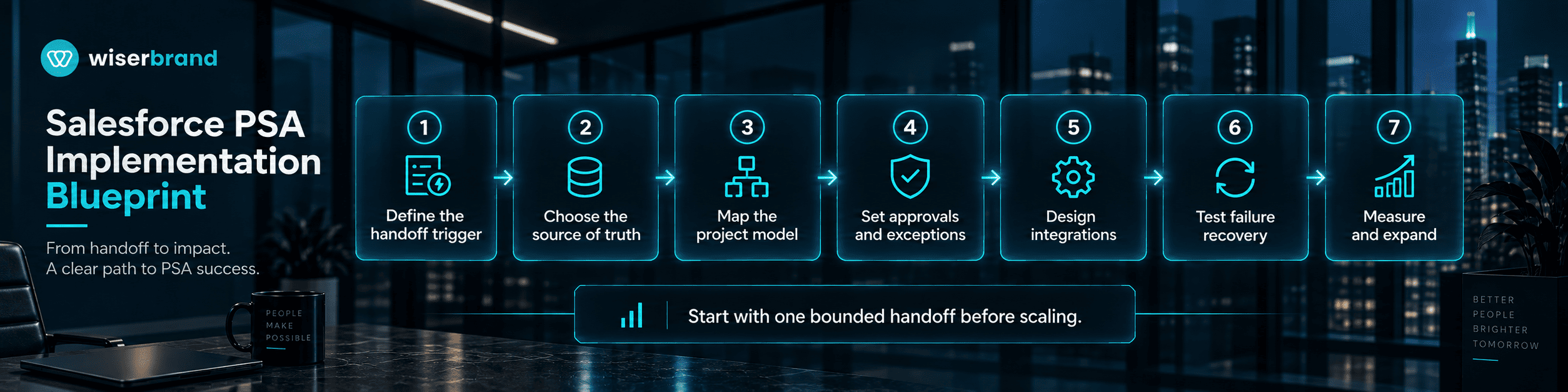
- Map the current services lifecycle from signed opportunity through project close and billing. Record owners, systems, handoffs, delays, and exceptions.
- Choose the PSA source of truth. Decide if Salesforce, a Salesforce-native PSA app, or an external platform owns projects, resources, time, and delivery financials.
- Define the data model. Map opportunity, project, resource, time, milestone, rate, billing, and invoice concepts without treating similar fields as identical.
- Automate one bounded workflow first. Opportunity-to-project handoff is often a good candidate when inputs and approval conditions are already explicit.
- Configure permissions and approval gates. Restrict rate, billing, financial, and customer-commitment actions according to role and risk.
- Test failure cases. Include duplicate triggers, stale availability, missing contract fields, rejected time, integration downtime, and partial billing transfers.
- Run a controlled pilot. Measure completion, manual touches, correction rate, handoff time, and downstream acceptance.
- Expand only after the operating team can investigate failures, restore state where possible, and maintain the automation when process rules change.
When Custom Salesforce PSA Development Fits
When packaged PSA products or platform configuration cannot represent the required delivery model without excessive workarounds, custom software development can support specialized Salesforce objects, interfaces, workflow services, or cross-system extensions. Custom code should solve a specific product or integration gap rather than reproduce a native feature.
Metrics for Professional Services Automation in Salesforce
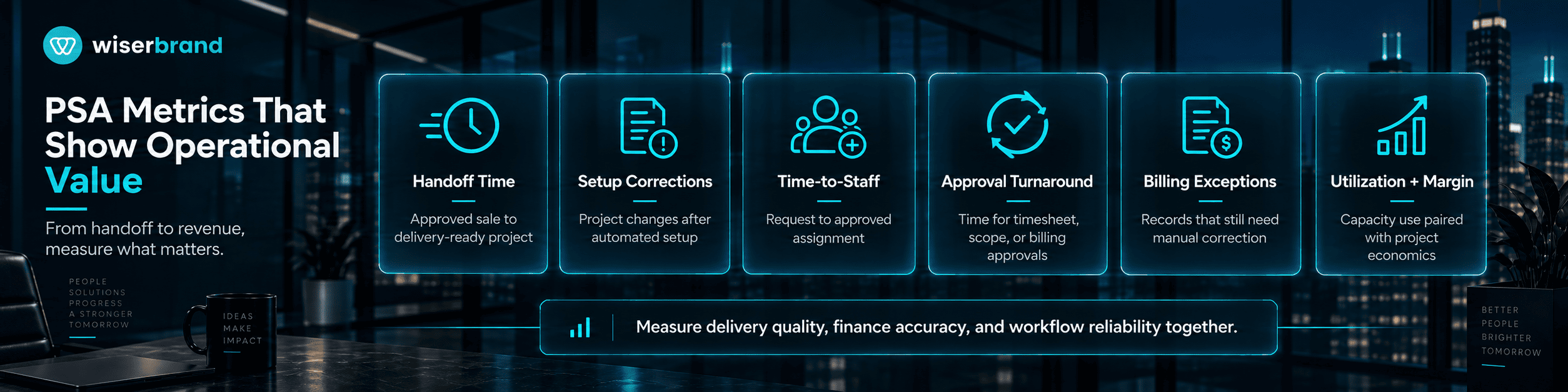
| Metric | What It Shows | Watch For |
|---|---|---|
| Opportunity-to-project handoff time | Time from approved sale to delivery-ready project | Separate waiting for missing commercial data from system processing |
| Project setup correction rate | How often project structures are changed after automated setup | High corrections may mean templates or source fields are weak |
| Time-to-staff | Time from resource request to approved assignment | Balance speed with role fit and schedule conflicts |
| Time-entry completeness | Required time submitted for the reporting period | Do not treat forced completion as proof of accuracy |
| Approval turnaround | Time for timesheet, scope, rate, or billing approvals | Segment by approval type and owner |
| Billing exception rate | Billing-ready records that require manual correction | Investigate data mapping, rate, milestone, and duplicate causes |
| Project margin variance | Difference between planned and actual project economics | Requires consistent cost and revenue definitions |
| Utilization | Share of relevant capacity assigned or billed under the organization’s definition | Use one documented denominator and exclude non-comparable roles |
| Workflow failure rate | Automations that do not reach the intended state | Classify platform, data, permission, and integration failures |
Common Salesforce PSA Implementation Mistakes
Treating CRM opportunity data as a complete delivery specification is a common Salesforce PSA design mistake. Sales data can start a project, but delivery also needs approved scope, responsibilities, dates, resource assumptions, and billing conditions.
Selecting a PSA product before assigning system ownership creates another common failure mode. A feature list does not resolve conflicting project or financial records across Salesforce CRM, delivery systems, and finance platforms.
Automating staffing from incomplete skills or availability data weakens the recommendation before assignment begins. A staffing workflow needs reliable source records plus policy checks for schedule, access, certification, and other constraints that materially affect delivery.
Sending billing events without idempotency or acknowledgement can create duplicate downstream work. If the receiving finance system completes the first request but the response times out, a blind retry may submit the same billing event again.
Measuring utilization alone can hide delivery problems. A higher utilization percentage can coexist with poor margins, late projects, burnout, or weak customer outcomes, so the operating team should pair utilization with delivery, financial, and quality metrics.
Salesforce PSA Frequently Asked Questions
Does Salesforce Have Built-In Professional Services Automation?
Salesforce provides CRM records, reporting, and Flow automation, while Salesforce AppExchange separately lists PSA applications built for the platform. A complete PSA operating model also needs project, resource, time, billing, and utilization structures. Those structures may come from custom objects, a Salesforce-native PSA application, or an external system, so they are not automatically present in every Salesforce org.
What Is the Best First PSA Workflow to Automate?
A strong first PSA workflow has clear inputs, one source of truth, a stable completion condition, and visible manual friction. Opportunity-to-project handoff is often suitable when contract status, service data, project owner, dates, and required approvals are already structured.
Should Resource Assignment Be Fully Automated?
Resource assignment should not be fully automated by default. Automation can prepare candidate resources and validate availability or policy constraints, but staffing often includes skills, customer requirements, schedule conflicts, development goals, and human context. Keep an accountable resource owner in the final assignment when those factors materially affect delivery.
Can PSA Billing Stay in Salesforce?
PSA billing can stay in Salesforce when the selected PSA and finance architecture makes Salesforce the financial source of truth. If an ERP or accounting platform owns invoice state, Salesforce or the PSA should prepare and transfer validated billing data rather than create a second competing financial record.
How Should Salesforce and an External PSA Sync Data?
A Salesforce-to-PSA integration should assign ownership field by field. Use stable identifiers, validated mappings, duplicate protection, retries with state checks, logging, and an exception queue. Avoid two systems continuously rewriting the same status or financial field.
When Is Custom PSA Development Justified?
Custom development is justified when the services business has operating requirements that packaged applications or platform configuration cannot represent without excessive workarounds. Examples include specialized project structures, proprietary staffing logic, unusual billing models, or cross-system workflows that require custom state and controls.
Final Thoughts
Professional services automation in Salesforce should connect the commercial record to a controlled delivery process without turning CRM into a second version of every downstream system. Decide which system owns project, resource, time, billing, and invoice state before adding automation. Then select one bounded handoff, define its trigger, required fields, approvals, exception path, and completion state, and measure the result against the manual baseline.
A practical pilot can start with opportunity-to-project handoff or another workflow whose inputs are already structured. Track incomplete handoffs, correction rate, approval turnaround, workflow failures, and downstream acceptance before expanding scope. If the operating model needs broader data architecture or cross-system automation, Data and AI services can support the integration and data work around that defined source-of-truth model.